Home Appliances / Ovens
Cuisinart PerfecTemp 12-Cup Programmable Coffeemaker DCC-2900 Instruction Manual
Quick guide for the Cuisinart PerfecTemp 12-Cup Programmable Coffeemaker (DCC-2900). Learn how to set the clock, program auto-brew, install the charcoal water filter, and perform decalcification.
Table of contents
Quick guide from the manual
This document provides essential instructions for the Cuisinart PerfecTemp 12-Cup Programmable Coffeemaker (DCC-2900). Before first use, it is recommended to flush the system by running a brew cycle with water only (no coffee grounds). Always ensure the thermal carafe is in place before brewing and never open the filter basket during the cycle to avoid scalding.
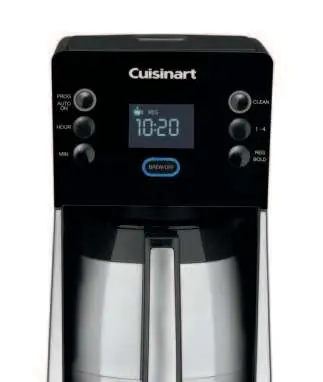
Programming your coffeemaker
To set the clock, hold the Hour or Minute button until the display flashes, then adjust to the desired time. To program the Auto On feature, hold the Prog/Auto On button for 2 seconds, set your preferences (1-4 cup setting, flavor strength), and press the button once to activate. The blue LED indicates that the Auto On mode is set.
Making coffee
- Insert the prepared charcoal water filter into the holder.
- Fill the water reservoir to the desired level.
- Place a #4 paper filter or the permanent gold-tone filter into the basket.
- Add ground coffee (1 level scoop per cup, max 15 tablespoons).
- Ensure the thermal carafe is on the resting plate and the lid is closed.
- Press the Brew/Off button to start.
Charcoal water filter
The filter removes chlorine and odors. Soak the filter in cold water for 15 minutes before first use. Flush it under running water for 10 seconds, then slide the tab to the current month. Replace the filter every 60 days or 60 uses.
Cleaning and maintenance
Always unplug the unit before cleaning. The filter basket and carafe are dishwasher safe (upper rack). Wipe the base unit and heating plate with a damp cloth; never immerse the base in water. If the Clean indicator flashes, decalcify the unit by running a cycle with a mixture of 1/3 white vinegar and 2/3 water, followed by a cycle of fresh water.
Manufacturer information
Cuisinart
Practical help
Common problems
Coffee/water backing up in filter basket
Ensure you are not using too finely ground coffee, multiple paper filters, or a paper filter with the gold-tone filter simultaneously. Clean grounds from the filter properly.
Clean light is flashing
This indicates calcium buildup. Run a cleaning cycle using a mixture of 1/3 white vinegar and 2/3 water.
Filter basket overflowing
Do not exceed 15 tablespoons of ground coffee. Also, do not remove the carafe for more than 20 seconds during the Brew Pause cycle.
Before use
- Flush the system with water only (no coffee) before the first use.
- Soak the charcoal water filter in cold water for 15 minutes.
- Ensure the thermal carafe is correctly positioned on the resting plate.
- Check that the reservoir cover is closed.
- Remove the protective label from the digital display.
Specs in practice
- 1-4 Cup Setting
- Improves extraction and temperature when brewing smaller batches (fewer than 5 cups).
- Power Loss Back-up
- Retains programmed settings for one minute during power failures or if the unit is unplugged.
Images and diagrams
- The control panel features buttons for programming (Prog/Auto On), time adjustment (Hour/Min), cleaning (Clean), batch size (1-4), and flavor strength (Reg/Bold).
- The digital display shows the current time, brewing status, and active settings like Auto On or Clean mode.
Model compatibility
- Use only 120-volt outlets.
- Compatible with #4 paper filters or the included Cuisinart Gold-Tone permanent filter.
- The thermal carafe is designed specifically for this model and must not be used on a range top.

Manual page author
Emily Carter
User documentation editor
Prepares concise manual descriptions and highlights the most useful setup, operation, and maintenance information for readers.