Power / Batteries Chargers
Dayton Audio LBB-3v2 3x 18650 Lithium Battery Charger Board User Guide
Quick start wiring guide for the Dayton Audio LBB-3v2 12V lithium battery charger module. Learn about power inputs, outputs, expansion ports, and LED status indicators.
Table of contents
Quick guide from the manual
The Dayton Audio LBB-3v2 is a charger board designed for 3x 18650 lithium batteries. This document serves as a wiring guide to identify the various input and output ports available on the module for power management and battery monitoring.
Device Overview
The board features multiple connection points for power input, output, and external indicators:
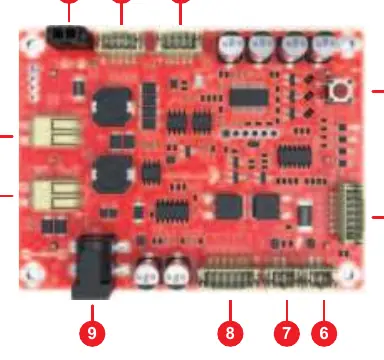
- Power Outputs: Three 12 VDC power output ports (1, 2, 3) for powering external devices.
- Power Inputs: Two 5 to 24 VDC input ports (9, 10) and one dedicated 19V solar input (11).
- Battery Monitoring: A built-in battery status button (4) and a port for an optional external LED battery status indicator and push button (5).
- Charging Indicators: A port for an optional external LED charge done indicator (6) and an optional external LED power input indicator (7).
- Expansion: An expansion voltage in/out port (8) specifically for the optional 325-140 external power/charging board.
Installation and Wiring
Ensure all connections are made according to the voltage requirements of your specific setup. The board supports a wide range of DC inputs (5-24V) and a dedicated solar input (19V). When connecting external LEDs or expansion boards, ensure they are compatible with the specific ports (5, 6, 7, 8) as labeled on the PCB.
Safety and Maintenance
Always verify the polarity of your power sources before connecting to the 5-24V or 19V solar inputs. Do not exceed the specified voltage ranges for the inputs to prevent damage to the charging module or the lithium batteries.
Manufacturer information
Dayton Audio
Practical help
Common problems
Battery not charging via solar
Ensure the solar panel output is 19V and connected to the dedicated 19V solar input port (11).
Device not powering on
Verify that the input voltage (5-24V) is correctly connected to ports 9 or 10 and that the batteries are properly seated.
Before use
- Verify that you are using 3x 18650 lithium batteries.
- Check that your power source is within the 5-24V DC range.
- Ensure all external LED indicators are connected to the correct ports (5, 6, 7).
- Confirm the expansion board (if used) is the compatible 325-140 model.
Specs in practice
- 5 to 24 VDC Input
- Flexible power input range for charging the battery module.
- 19V Solar Input
- Dedicated port for solar panel charging systems.
- 12 VDC Power Output
- Standardized output voltage for powering 12V devices.
Images and diagrams
- Ports 1-3 provide 12V output power.
- Port 4 is the primary battery status button.
- Ports 9-10 are for general DC power input.
- Port 11 is specifically for 19V solar input.
Model compatibility
- Designed specifically for 3x 18650 lithium battery configurations.
- Expansion port 8 is compatible with the Dayton Audio 325-140 external power/charging board.

Manual page author
Emily Carter
User documentation editor
Prepares concise manual descriptions and highlights the most useful setup, operation, and maintenance information for readers.