Mobile / Smartphones
User Manual for Doro PhoneEasy 100w/105wr Cordless Phone
Quick guide and user manual for the Doro PhoneEasy 100w/105wr cordless phone. Includes instructions for installation, phonebook management, speed dial setup, and answering machine operation.
Quick answers from the manual
Quick answer
- This manual provides instructions for setting up, operating, and troubleshooting the Doro PhoneEasy 100w/105wr cordless phone, including features like the phonebook, speed dial, and the answering machine (105wr only). p. 1, 7, 13, 32
Key actions
- Make a call p. 13
- Answer a call p. 13
- Save a phonebook entry p. 17
First start
- Initial installation p. 7
- Set language p. 7
Show 5 more answers Show less
Problems and fixes
Phone does not work
Check adapter/cable connections, ensure tone dialing is selected, check battery charge, test with another phone.
p. 42
Answering machine does not answer
Memory may be full (delete messages), check connections, ensure function is enabled.
p. 43Error codes
| Code | Meaning | Action | Pages |
|---|---|---|---|
| AB VOLL | Answering machine memory is full. | Delete old messages. | p. 37 |
| FF | Answering machine memory is full (on base station). | Delete old messages. | p. 37 |
Maintenance and reset
- Reset to factory settings p. 30
Technical specifications
| Parameter | Value | Meaning | Pages |
|---|---|---|---|
| Range | 50-300 meters | Typical operating range. | p. 9 |
| Battery | 1.2 V Ni-MH AAA | Battery type required. | p. 7 |
| Answering machine capacity | 15 minutes | Total recording capacity. | p. 32 |
| Phonebook capacity | 20 entries | Maximum number of saved contacts. | p. 17 |
Where to find it in the PDF
- Installation p. 7
- Operation p. 13
- Phonebook p. 17
- Answering Machine (105wr) p. 32
- Troubleshooting p. 42
Table of contents
Manual images
Click an image to enlargeQuick guide from the manual
This guide covers the setup and operation of the Doro PhoneEasy 100w and 105wr cordless phones. The 105wr model includes an integrated answering machine. Ensure the phone is charged for 24 hours before the first use to ensure optimal battery performance.
Installation
- Connect the telephone cable to the wall socket and the base station.
- Connect the power adapter to the wall socket and the base station.
- Insert the provided Ni-MH AAA batteries into the handset, observing the correct polarity.
- Place the handset in the base station to charge.
Basic Operation
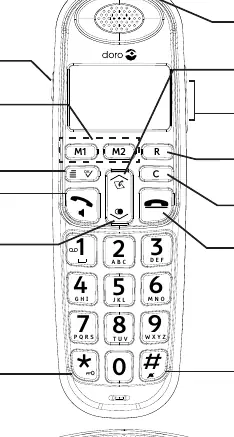
Making and Receiving Calls: Enter the number and press the green phone icon to call. Press the red phone icon to end a call. To answer an incoming call, press the green phone icon.
Volume Control: Use the side buttons on the handset to adjust the volume during a call. The Boost button on the side of the handset can be used to increase volume for users with hearing impairment.
Phonebook: You can store up to 20 names and numbers. To save a number, go to the menu, select TEL.BUCH (Phonebook), then HINZU (Add), enter the name, number, and select a ringtone.
Speed Dial: You can assign numbers to keys 2-9 or use the dedicated M1 and M2 buttons. To call a speed dial number, press and hold the corresponding key.
Answering Machine (105wr only)
The answering machine can be operated from both the base station and the handset. The total recording capacity is 15 minutes.
- Turning On/Off: Use the power button on the base station or the menu settings on the handset.
- Recording a Greeting: Navigate to the answering machine settings in the menu to record a personal greeting.
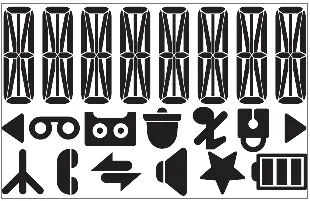
- Listening to Messages: New messages are indicated by a flashing light on the base station or an icon on the handset display.
- Remote Access: You can access your answering machine from another phone by calling your number, pressing the * key during the greeting, and entering your PIN (default is 0000).
Troubleshooting
- Phone not working: Check that the adapter and telephone cable are properly connected. Ensure the phone is set to tone dialing.
- Answering machine not responding: Check if the memory is full. Delete old messages to free up space.
- No Caller ID: Ensure the Caller ID service is activated with your telephone service provider.
Official resources from the manual
Manufacturer information
Doro
Practical help
Common problems
Phone does not work
Check that the power adapter and telephone cable are securely connected. Test the phone on a different wall socket if possible.
Answering machine does not record messages
The memory may be full. Delete old messages to free up space.
Caller ID is not displayed
Ensure that the Caller ID service is activated with your telephone network provider.
Handset cannot connect to base
Ensure the handset is within range of the base station and that the batteries are charged.
Before use
- Connect the telephone cable to the wall socket.
- Connect the power adapter to the base station.
- Insert the Ni-MH AAA batteries into the handset.
- Charge the handset for 24 hours before the first use.
Show more Show less
Specs in practice
- GAP-compatible
- The phone can be used with most other GAP-compatible devices from other manufacturers.
Images and diagrams
- Handset keys 1-13: Includes volume, menu, call, and speed dial buttons.
- Base station (105wr) keys 14-16: Includes answering machine controls like play, stop, and volume.
Model compatibility
- Answering machine features are exclusive to the PhoneEasy 105wr model.

Manual page author
Michael Turner
Technical manual editor