Tools / Power Tools
Dremel 8250 Cordless Rotary Tool User Guide
Quick guide for the Dremel 8250 Cordless Rotary Tool, covering safety, assembly, operation, battery maintenance, and troubleshooting.
Table of contents
Manual images
Jump to the sectionQuick guide from the manual
The Dremel 8250 is a cordless rotary tool designed for carving, engraving, routing, grinding, sharpening, cutting, cleaning, polishing, sanding, and drilling. This guide provides essential safety and operational information. Always disconnect the battery pack before performing any adjustments or changing accessories to prevent accidental starting.
Device Description
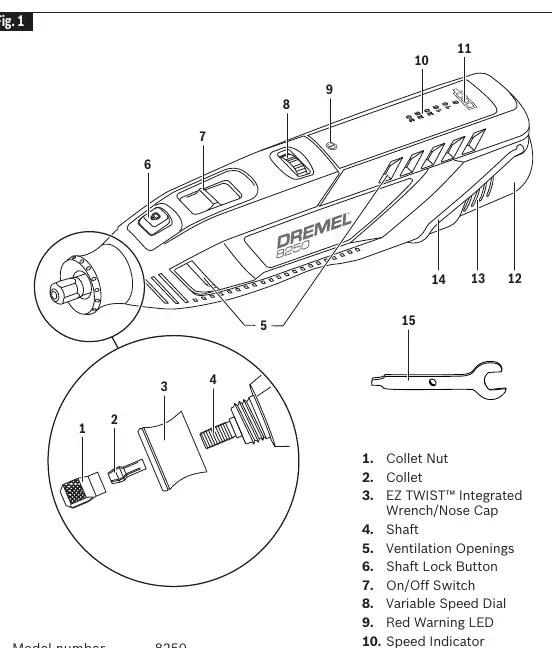
The tool features a collet nut, collet, EZ TWIST integrated wrench/nose cap, shaft, ventilation openings, shaft lock button, on/off switch, variable speed dial, red warning LED, speed indicator, fuel gauge, battery pack, battery release tabs, and a hanger.
Assembly
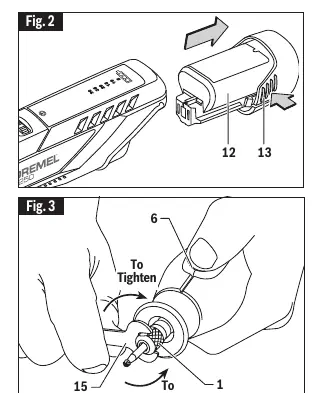
- Battery Pack: Press the release tabs on both sides to remove. Align and slide the battery into the tool until it locks.
- Collet Nut: Press the shaft lock button and rotate the shaft until it engages. Use the collet wrench to loosen or tighten the collet nut. Do not engage the lock while the tool is running.
- EZ TWIST Wrench: The nose cap has an integrated wrench. Unscrew the cap, align the steel insert with the collet nut, and twist to tighten or loosen.
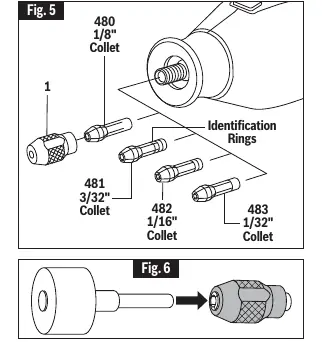
- Collets: Four sizes are available (1/32", 1/16", 3/32", 1/8"). Always use the collet that matches the accessory shank size.
Operation
Slide the on/off switch forward to turn the tool on and backward to turn it off. Use the variable speed dial to adjust speed during operation. The speed indicator shows the current setting. If the tool is turned off and back on within 5 minutes, it resumes at the last speed setting; otherwise, it defaults to 15,000 RPM.
Battery and Charging
The tool includes a fuel gauge. When the last light flashes, the battery is nearly empty. Charge using the Dremel GAL12V-20 charger. The green indicator light blinks during fast charging and becomes steady when complete. Charge only in temperatures between 32°F (0°C) and 113°F (45°C).
Maintenance
Keep ventilation openings clean. Do not disassemble the tool. If performance drops significantly, the battery may need replacement. For service, contact a Dremel Service Center.
Safety
Always wear eye protection. Keep the work area clean and well-lit. Do not operate in explosive atmospheres. Hold the tool by insulated gripping surfaces. Avoid contact with the bit or collet after use as they may be hot. Do not use accessories that require liquid coolants.
Manufacturer information
Dremel
Practical help
Common problems
Tool stalls or overload warning (Red LED)
Reduce pressure applied to the tool and let the speed do the work.
Battery not charging properly
Check outlet voltage, ensure outlet is not controlled by a light switch, clean battery terminals with alcohol, or contact a Dremel Service Center.
Collet stuck in collet nut
Push the shank of an accessory into the hole in the collet nut to pop the collet out.
Before use
- Ensure the switch is in the off position before inserting the battery.
- Check that the collet matches the accessory shank size.
- Inspect accessories for damage (cracks, chips, loose wires) before use.
- Ensure the collet nut is securely tightened.
- Wear appropriate personal protective equipment (eye, respiratory, hearing protection).
Specs in practice
- Collet capacities
- 1/32", 1/16", 3/32", 1/8".
Images and diagrams
- Fig 1: Overview of tool components (1-15).
- Fig 2: Battery insertion and release.
- Fig 3: Using the collet wrench to tighten/loosen the collet nut.
- Fig 4: Using the EZ TWIST integrated wrench.
- Fig 5: Collet identification chart based on rings.
Model compatibility
- Use only Dremel branded accessories.
- Charge only Dremel rechargeable batteries.
- Use only the specified GAL12V-20 charger.

Manual page author
David Miller
Documentation analyst
Organizes user manual content into clear summaries, with attention to model details, product context, and everyday usability.