Tools / Power Tools
Dremel 3000/4000/4250/4300 Rotary Tool User Guide
A comprehensive user guide for Dremel 3000, 4000, 4250, and 4300 rotary tools, covering safety, operation, accessory changes, maintenance, and troubleshooting.
Table of contents
Manual images
Jump to the sectionQuick guide from the manual
This manual provides essential instructions for the Dremel 3000, 4000, 4250, and 4300 rotary tools. Always unplug the tool before changing accessories. For optimal performance, especially when using a new flexible shaft, run the tool at high speed in a vertical position for two minutes before first use.
Device description
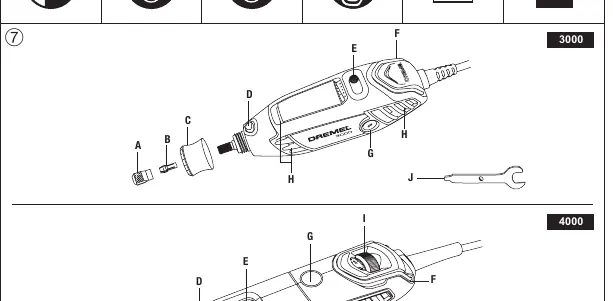
The tools feature a collet nut, collet, nose cap (with integrated EZ Twist wrench on some models), shaft lock button, and variable speed control (slide switch for 3000, dial for 4000/4250/4300). The 4300 model also includes a light module.
Operation
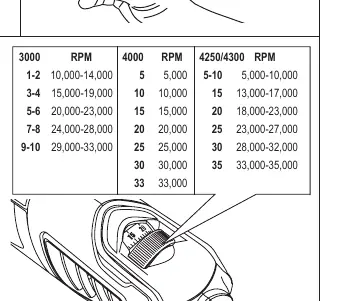
To start, hold the tool like a pen for precision work or use the "golf" grip for heavier tasks. Slide the switch forward to turn the tool ON and backward to turn it OFF. Use the variable speed control to adjust the RPM based on the material and accessory. Refer to the speed chart on pages 17-18 for guidance.
Changing accessories
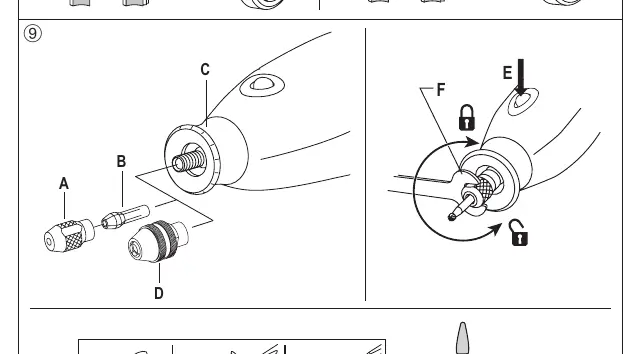
Press the shaft lock button and rotate the shaft by hand until it engages. Loosen the collet nut, insert the accessory shank fully, and tighten the nut. The EZ Twist nose cap allows for tool-free tightening. For the 4300 model, the Dremel chuck (4486) allows for quick accessory changes without collets.
Maintenance and cleaning
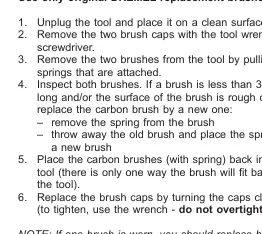
The only user-serviceable parts are the carbon brushes (3000/4250/4300). Inspect them every 40-50 hours of use. If a brush is less than 3mm long or pitted, replace both brushes with original Dremel parts. Keep ventilation openings clean and free of foreign matter.
Safety
Always wear eye protection, a dust mask, and hearing protection. Do not work with asbestos-containing materials. If dust is generated, use dust extraction. Keep the work area clean and well-lit.
Manufacturer information
Dremel
Practical help
Common problems
Accessory slipping in the chuck
Use the EZ Twist nose cap or wrench to tighten the chuck around the bit. If slippage persists, switch to using the collet and collet nut.
Accessory not running true/concentric (run-out)
Reset the chuck jaws: remove accessory, clean chuck, extend jaws 3mm, press against a hard surface to seat axially, and tighten.
Tool running erratically or losing power
Inspect carbon brushes for wear (less than 3mm) and replace if necessary.
Before use
- Ensure the tool is unplugged before changing accessories.
- Check that the supply voltage matches the tool's nameplate.
- Inspect accessories for cracks or damage before use.
- Ensure the collet nut or chuck is securely tightened.
- Wear appropriate personal protective equipment (eye protection, dust mask).
Specs in practice
- Collet Capacity
- The size of the shank the tool can accept (3.2mm standard; 0.8-3.4mm for 4300).
Images and diagrams
- Page 4: Overview of tool components for models 3000, 4000, 4250, and 4300.
- Page 5: Light module installation and accessory changing procedure.
- Page 6: Speed settings chart and carbon brush replacement.
- Page 8: Flexible shaft setup and safety warnings.
Model compatibility
- Light module (4300) only works with the new style nose cap (R) included with the tool.
- Dremel chuck (4486) accepts accessories with 0.8-3.2mm shanks.

Manual page author
Michael Turner
Technical manual editor
Reviews PDF manuals for structure, safety notes, and practical product details so readers can find the right information quickly.