Automotive / Car Audio
User Manual for DS18 DSP2.6DBT Digital Sound Processor
Quick guide for the DS18 DSP2.6DBT Digital Sound Processor. Learn how to install, configure audio settings, use the app, and manage presets.
Table of contents
Manual images
Click an image to enlargeQuick Guide from the Manual
The DS18 DSP2.6DBT is a digital sound processor designed to enhance audio system performance. It features 2-channel RCA input, 6-channel RCA output, parametric EQ, crossover filters, time delay, and a limiter. Configuration can be done directly via the front panel rotary encoder or through the dedicated smartphone app available for Android and iOS.
Device Description
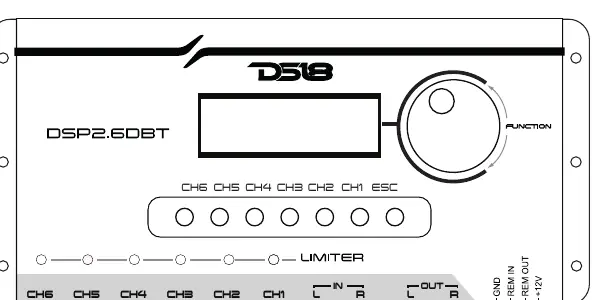
The front panel features a rotary encoder for menu navigation and parameter adjustment. It includes buttons to select specific channels (CH1-CH6) for configuration and an ESC button to return to previous menus. LED indicators show when the limiter is active.
Installation
Proper installation is critical for optimal performance. Use wire gauge 1mm2 (18AWG) or larger for power connections.
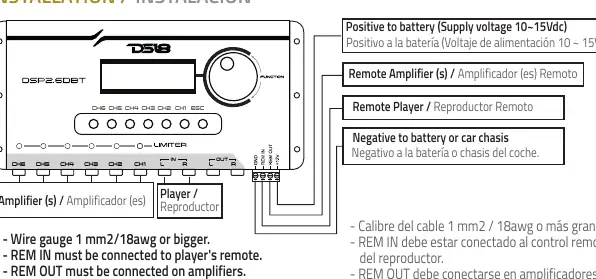
- Power Supply: Connect to 12Vdc (operating range 10-15Vdc).
- REM IN: Must be connected to the player's remote output.
- REM OUT: Connect to amplifiers to trigger them.
- Inputs/Outputs: Connect RCA cables to the respective input and output channels.
- Ground: Connect to the battery negative or car chassis.
Menu & Configurations
Access the menu by pressing the rotary encoder. Use the encoder to scroll through options and press to select.
- Main Gain: Adjust the overall gain of the processor.
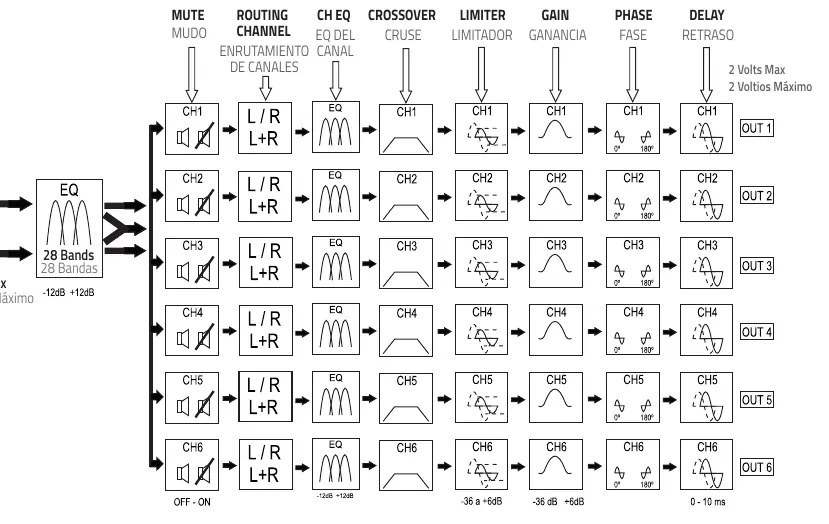
- Routing Channel Output: Configure input-to-output routing (L, R, or L+R).
- Gain: Independent gain adjustment for each channel.
- Crossover: Set filters (Butterworth, Linkwitz-Riley, Bessel) with attenuations from 6dB/OCT to 48dB/OCT.
- Polarity/Phase: Adjust phase (0 or 180 degrees) for each output.
- Delay: Adjust time delay to align speakers.
- Channel EQ: 3-band parametric equalizer per channel (20Hz-20kHz).
- Input EQ: 28-band equalizer for the input signal.
- Limiter: Set threshold, attack, and decay for signal protection.
- Custom Preset: Save and load device configurations.
- Pink Noise: Generator for system alignment.
- Password: Protect configurations with a password.
- Mute: Mute individual output channels.
- Reset: Restore factory settings (requires holding ESC button).
Bluetooth Interface
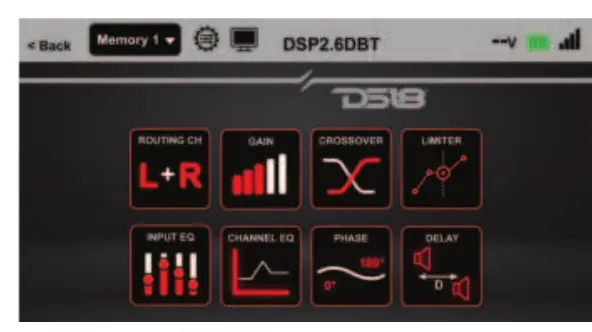
The processor includes a Bluetooth interface for app-based control. Download the app from the Google Play Store or Apple Store. Ensure Bluetooth and location services are enabled on your smartphone. The default factory password is 0000.
Technical Specifications
- Voltage: 10-15Vdc
- Resolution: 24 Bits
- Sample Frequency: 48kHz
- THD+N: 0.01% max
- Signal to Noise Ratio: 100dB
- Dimensions: 120 x 250 x 30mm
Manufacturer information
DS18
Practical help
Common problems
Forgot password
You must use the reset function to restore factory settings.
Device needs reset
Return to the initial display, then press and hold the ESC button for a few seconds.
App not connecting
Ensure Bluetooth and device location are turned on, and the app has necessary permissions.
Before use
- Ensure power supply is between 10-15Vdc.
- Use 18AWG (1mm2) or larger wire for power.
- Connect REM IN to the player's remote output.
- Connect REM OUT to your amplifiers.
- Ensure all outputs are disconnected before performing a factory reset.
Specs in practice
- Sample Frequency
- 48kHz, the standard for high-fidelity digital audio.
- Signal to Noise Ratio
- 100dB, ensuring clear sound with minimal background noise.
Images and diagrams
- The front panel diagram identifies the rotary encoder, channel selection buttons, and the ESC button.
- The installation diagram shows the correct wiring for power, remote, and RCA connections.
Model compatibility
- Compatible with Android and iOS.
- App requires Android 4.3 or later.

Manual page author
David Miller
Documentation analyst
Organizes user manual content into clear summaries, with attention to model details, product context, and everyday usability.