Power / Energy Storage Systems
User Manual for EG4 Chargeverter 5kW AC Charger
Quick guide for the EG4 Chargeverter 5kW AC Charger. Includes installation steps, wiring instructions, LCD settings, and safety guidelines for efficient 48VDC battery charging.
Table of contents
Manual images
Click an image to enlargeQuick Guide
The EG4 Chargeverter is a 5kW AC charger designed for 48VDC battery systems. Before installation, ensure the unit is inspected for damage. The charger is primarily designed for LiFePO4 batteries; verify compatibility with other battery chemistries with the manufacturer before use. Always ensure battery breakers are in the OFF position and the charger is unplugged during installation.
Product Overview
The front panel of the unit features the following components:
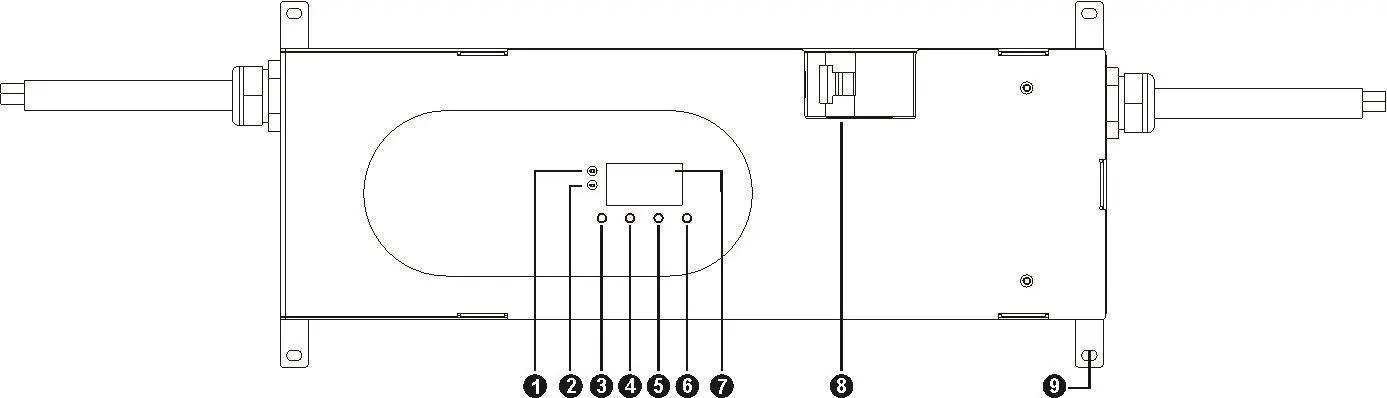
- Power and Charging indicators
- LCD display for monitoring status
- Function buttons: ESC, UP, DOWN, ENTER
- Built-in battery breaker
- AC line input with a prewired 250V, 30A twist-lock plug
Installation
Consider the following requirements before mounting the unit:
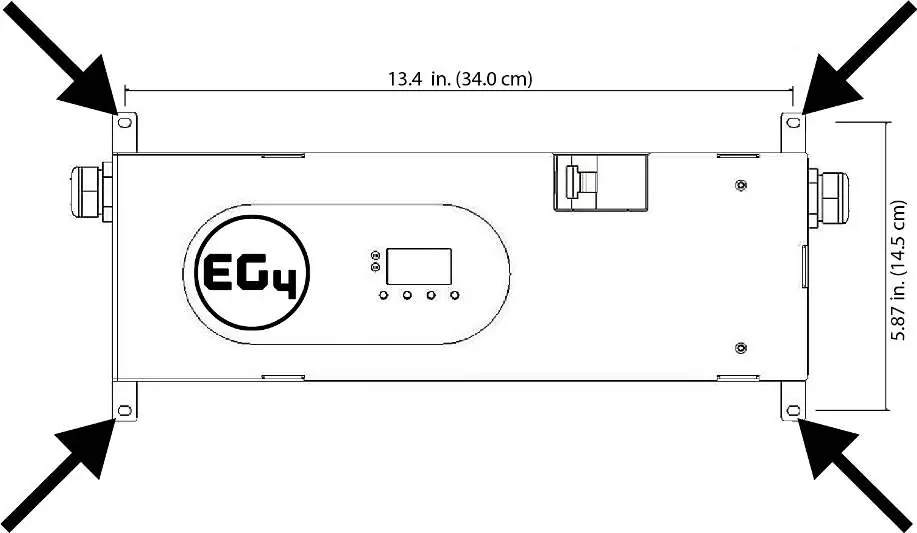
- Do not mount on flammable materials; use non-combustible surfaces like cement board.
- Install at eye level for easy LCD viewing.
- Ensure ambient temperature is between 0°C and 55°C.
- Provide sufficient clearance around the unit for heat dissipation, as it can exceed 131°F (55°C).
- Secure the unit using four M4 screws.
AC and DC Connections
Follow these steps for proper connection:
- Connect battery cables to terminals or bus bars using appropriate bolts, ensuring proper polarity and torque.
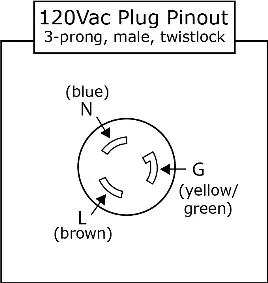
- For 240V usage, plug into a 250V 30A twist-lock receptacle with a dedicated 30A breaker.
- For 120V usage, plug into a 125V 30A receptacle with a dedicated 30A breaker (requires an additional adapter cable, sold separately).
Operation
To power on the unit:
- Ensure battery cables are securely connected.
- Plug the charger into an outlet of the proper voltage and amperage.
- Turn on battery breakers and/or battery on/off switches.
- Turn on the built-in battery breaker on the front of the unit.
The LED indicators provide status updates: Power (Green, Solid On) indicates the unit is powered. Charging (Green, Solid On) indicates the battery is fully charged, while Flashing indicates the battery is charging.
LCD Settings
Press the ENTER button to enter settings mode. Use UP or DOWN to select programs and ENTER to confirm.
- Program 1: Charging voltage (Range: 43V to 57V).
- Program 2: Charging current (Range: 0A to 100A).
Note: A recommended 30A charging rate per battery is suggested to maintain lifespan, and an 85A total charging rate is recommended to reduce heat output.
Specifications
The unit operates with a 48Vdc nominal battery voltage. It supports 90-264Vac input voltage at 50-60Hz. The maximum output is 5120W at 240Vac or 3050W at 120Vac. The unit is rated IP21 and is suitable for indoor use only.
Manufacturer information
EG4 Electronics LLC
Practical help
Common problems
Unit not charging
Check battery cable connections, ensure battery breaker is ON, and verify AC input voltage.
Overheating
Ensure sufficient clearance around the unit for airflow; do not block air vents.
Incorrect charging parameters
Verify battery chemistry (LiFePO4 recommended) and check LCD settings for voltage and current.
Before use
- Inspect unit for damage upon unpacking.
- Ensure mounting surface is non-combustible (e.g., cement board).
- Verify ambient temperature is between 0°C and 55°C.
- Ensure battery breakers are OFF before connecting cables.
- Verify correct polarity of battery cable ring terminals.
Specs in practice
- Charging Voltage
- Adjustable range from 43V to 57V.
- Charging Current
- Adjustable range from 0A to 100A.
- Operating Temperature
- 0°C to 55°C.
Images and diagrams
- Front panel includes Power and Charging indicators, LCD display, and function buttons (ESC, UP, DOWN, ENTER).
- Battery breaker is located on the front panel.
- AC input is a prewired 250V, 30A twist-lock plug.
Model compatibility
- Designed primarily for LiFePO4 batteries.
- Requires dedicated 30A breaker for AC input.
- Requires additional adapter cable for 120V usage (sold separately).

Manual page author
David Miller
Documentation analyst
Organizes user manual content into clear summaries, with attention to model details, product context, and everyday usability.