Home Appliances / Refrigerators
User Manual for ETA 139090010DN / 139090015DN Refrigerator
Quick guide for the ETA 139090010DN / 139090015DN refrigerator. Includes installation, control panel settings, food storage tips, and troubleshooting.
Table of contents
Manual images
Click an image to enlargeQuick guide from the manual
This guide provides essential information for the ETA 139090010DN / 139090015DN refrigerator. Before first use, ensure the appliance is unpacked, checked for damage, and allowed to stand for at least 4 hours before connecting to power to allow the oil to settle in the compressor. Ensure proper ventilation by leaving at least 50mm of space on the sides and 100mm at the top.
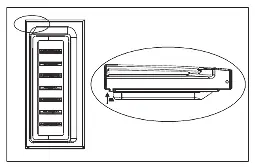
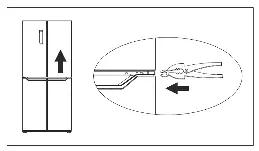
Overview
The refrigerator features an LED light, adjustable shelves, a crisper drawer with humidity control, a convertible zone, and freezer drawers. The control panel allows for temperature adjustments and mode selection.
Control Panel and Modes
The control panel includes touch buttons for fridge and freezer temperature control, and mode selection. The system locks automatically after 25 seconds of inactivity. Available modes include:
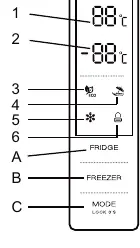
- ECO Mode: Optimizes energy consumption (5°C fridge, -18°C freezer).
- Holiday Mode: Sets the fridge to 17°C for energy saving during long absences.
- Super Freezing Mode: Rapid freezing for fresh food; automatically exits after 26 hours or can be manually disabled.
Daily Use and Food Storage
For optimal performance, keep the fridge at 4°C and the freezer at -18°C. Do not store warm food or uncovered liquids. Store raw meat and fish in suitable containers on the glass shelf above the vegetable drawer. Do not block air circulation by packing food too tightly.
Cleaning and Maintenance
Regularly clean the interior with lukewarm water and neutral soap. Do not use abrasive cleaners, steam cleaners, or metal objects. The appliance features NO FROST technology, so manual defrosting is not required. If the drain becomes blocked, clean it to prevent water accumulation.
Troubleshooting
If the appliance does not work, check the power connection and fuses. If food is too warm, check temperature settings and ensure doors are not left open. Unusual noises can often be resolved by leveling the appliance or moving it slightly away from walls.
Practical help
Common problems
Appliance does not work
Check if the mains plug is connected, check the fuse or circuit breaker, or consult an electrician if the socket is faulty.
Food is too warm
Check temperature settings, ensure doors are not left open for long periods, or check if the appliance is near a heat source.
Unusual noises
Ensure the appliance is level, move it slightly away from walls or objects, or adjust components on the back that may be touching the wall.
Before use
- Unpack the appliance and check for damage.
- Wait at least 4 hours before connecting to power.
- Ensure adequate air circulation (50mm sides, 100mm top).
- Clean the interior with lukewarm water and neutral soap.
- Level the appliance using the front feet.
Specs in practice
- Super Freezing
- Rapid freezing mode for fresh food; exits after 26 hours.
- Holiday Mode
- Sets fridge to 17°C for energy saving during long absences.
Images and diagrams
- Control panel layout and button functions.
- Door alignment process using C-type washers.
- Rubber block placement on doors.
Model compatibility
- Not intended for built-in use.
- Not for use at altitudes above 2000m.

Manual page author
Emily Carter
User documentation editor
Prepares concise manual descriptions and highlights the most useful setup, operation, and maintenance information for readers.