Health / Personal Care
Etekcity Lasergrip 1025D Voltage Detecting Infrared Thermometer User Guide
Comprehensive user guide for the Etekcity Lasergrip 1025D, covering safety, operation, non-contact voltage testing, emissivity settings, and maintenance.
Table of contents
Manual images
Jump to the sectionProduct Overview
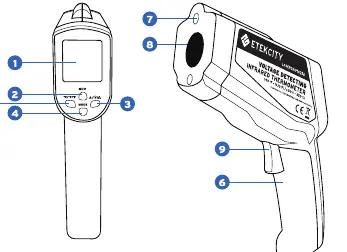
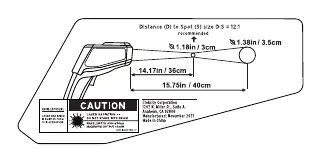
The Etekcity Lasergrip 1025D is a versatile tool combining non-contact infrared temperature measurement with non-contact voltage (NCV) detection. It is designed for surface temperature monitoring and electrical safety checks. The device features an adjustable emissivity setting, allowing for accurate readings across various materials, and a 12:1 distance-to-spot ratio for precise targeting.
Safety Information
Warning: This device emits a Class 2 laser. Never stare directly into the laser beam or point it at people, animals, or aircraft. Do not use optical instruments to view the beam. Keep the device away from children and do not disassemble it. Ensure the 9V battery is installed with correct polarity and remove it during prolonged storage. The device is not intended for measuring human body temperature.
Operation
To measure surface temperature, point the Lasergrip at the target and hold the trigger. The scan symbol will flash, and the reading will hold on the display for 15 seconds after release. For continuous measurements, keep the trigger held down. The device will display OH if the temperature exceeds the range and OL if it is below. To test for live AC voltage, press the NCV button and move the device near the surface; the screen will indicate voltage levels with rising lines and an audible beep.
Emissivity and Accuracy
Emissivity represents a material's efficiency in emitting thermal energy. Most organic materials have an emissivity of 0.95. For reflective surfaces like polished metal, glass, or granite, accuracy can be improved by adjusting the emissivity setting on the device or by covering the surface with non-reflective masking tape or flat black paint. Use the mode button to adjust these settings as needed.
Maintenance
Keep the lens clean by using compressed air to remove dust, followed by a soft, clean cloth. Do not use soap, detergents, or water to clean the lens. If the low battery icon appears on the LCD, replace the 9V battery immediately. Ensure the battery compartment is sealed properly and that internal wiring is not pinched during reassembly.
Manufacturer information
Etekcity
Practical help
Common problems
Inaccurate temperature readings
Adjust the emissivity setting for the specific material or cover the surface with non-reflective tape/paint.
Low battery icon on display
Replace the 9V battery immediately to ensure device accuracy.
OH or OL displayed
The measured temperature is outside the device's operating range (OH for too high, OL for too low).
Before use
- Remove the battery notice strip from the compartment.
- Ensure the 9V battery is installed with correct polarity.
- Check that the lens is clean and free of dust.
- Verify the target surface is not behind glass.
- Ensure the device is within the operating temperature range (32°F–122°F).
Specs in practice
- Measurement Range
- -58°F to 1022°F (-50°C to 550°C).
- Distance-to-Spot Ratio
- 12:1 ratio; the measured area diameter is roughly 1/12 of the distance from the target.
- Response Time
- The time taken to register a temperature change, which is 500ms or less.
Images and diagrams
- The 12:1 ratio diagram illustrates that at 12 feet away, the device measures a 1-foot diameter spot.
- The LCD display diagram identifies the scan, hold, laser, and battery icons.
- The NCV display diagram shows the voltage indication lines and NCV mode indicator.
Model compatibility
- The device is not suitable for measuring internal body temperatures.
- Non-contact voltage testing is compatible with live AC voltages ranging from 90V to 600V.

Manual page author
Emily Carter
User documentation editor
Prepares concise manual descriptions and highlights the most useful setup, operation, and maintenance information for readers.