Health / Personal Care
ETEKCITY Lasergrip 1030D Dual Laser Infrared Thermometer User Guide
Comprehensive user guide for the Etekcity Lasergrip 1030D Dual Laser Infrared Thermometer, covering setup, operation, safety, and maintenance.
Table of contents
Product Overview
The Etekcity Lasergrip 1030D is a high-precision dual laser infrared thermometer designed for measuring surface temperatures safely and accurately. It is an essential tool for various household and professional applications, providing quick readings without the need for physical contact. Please note that this device is intended for surface temperature measurement only and should not be used as a reliable source for measuring human body temperatures.
Safety Information
This device utilizes a Class 2 laser. Users must exercise extreme caution during operation. Never look directly into the laser beam or point it at other people, animals, or aircraft. Do not use optical instruments to view the laser beam. Keep the device out of the reach of children and ensure that bystanders are aware of the potential dangers of laser radiation. Always remove the battery when the device is not in use for a prolonged period to prevent leakage.
Getting Started
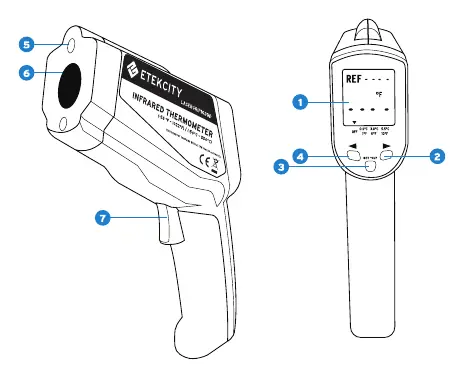
To begin using your Lasergrip 1030D, open the battery compartment and remove the battery notice strip. Ensure the 9V battery is installed with the correct polarity and that the wiring is not pinched when closing the compartment lid. The device features an intuitive interface with an LCD display, measurement trigger, and buttons for setting temperature ranges and selecting units.
Operation
To measure surface temperature, point the Lasergrip towards the desired surface and press the measurement trigger. The scan symbol will appear on the display. Release the trigger to lock in the temperature reading. For continuous scanning, keep the trigger pressed. The device includes a temperature filtering function that allows you to set a reference value and monitor temperature differences. The screen will light up blue if the temperature is lower than the set range and red if it is higher. The device automatically powers off after one minute of inactivity to conserve battery life.
Maintenance and Accuracy
To ensure accurate readings, keep the lens clean using compressed air or a soft brush followed by a clean, dry cloth. Avoid using soap or detergents on the lens. Be aware of the distance-to-spot ratio of 12:1, which means the measured area increases with distance. For best results, ensure the target surface is larger than the spot size. The device may provide inaccurate results when measuring reflective surfaces like glass or polished metal due to emissivity factors.
Manufacturer information
Etekcity
Practical help
Common problems
Device displays 'OH' or 'OL'
The measured temperature is outside the device's operating range (too high or too low).
Inaccurate readings on reflective surfaces
Reflective surfaces like glass or polished metal have low emissivity. Cover the surface with non-reflective masking tape or flat black paint for better accuracy.
Low battery icon appears
Replace the 9V battery immediately to ensure continued accurate operation.
Before use
- Remove the battery notice strip from the compartment.
- Ensure the 9V battery is installed with correct polarity.
- Check that the lens is clean and free of dust.
- Ensure the target surface is larger than the spot size at the chosen distance.
- Verify that the environment is free of steam, dust, or other contaminants.
Specs in practice
- Measurement Range
- The total temperature span the device can detect (-58°F to 1022°F).
- Distance-to-Spot Ratio
- The ratio of the distance to the object versus the diameter of the area being measured (12:1).
- Response Time
- The speed at which the device updates the temperature reading (≤ 500ms).
Images and diagrams
- The laser aperture is located at the top front of the device.
- The LCD screen displays the current temperature, scan status, and reference values.
- The measurement trigger is located on the handle for easy operation.
- The battery compartment is accessed via the handle grip.
Model compatibility
- Not suitable for measuring internal body temperatures.
- Cannot measure temperatures of objects behind glass.
- Keep away from strong electromagnetic fields like arc welders.

Manual page author
David Miller
Documentation analyst
Organizes user manual content into clear summaries, with attention to model details, product context, and everyday usability.