Industrial / Electrical
User Manual for Ezcoo HDMI V2.1 Switch 4x1 EZ-SW41H21
Quick guide for the Ezcoo HDMI V2.1 Switch 4x1 (EZ-SW41H21). Learn how to install, connect devices, troubleshoot, and understand technical specifications.
Table of contents
Quick guide from the manual
This HDMI switch allows you to connect 4 HDMI sources to a single display. For optimal performance, ensure you use high-quality HDMI cables under 3 meters in length. If you experience picture issues like flashing or black screens, perform a reset by holding the select button for 5 seconds until the input LED blinks 3 times.
Overview
The 4-Port HDMI switch allows 4 HDMI ports to be switched to a single display terminal via remote control or buttons on the unit. It supports various video formats including 720p, 1080i, 1080p, 4K/120Hz, and 8K/60Hz.
Features
- Supports HDMI 2.1
- Supports video resolutions up to 4K/120Hz and 8K/60Hz
- Supports HDR, Dolby Vision, and Dolby Atmos
- Supports 3D and 24/30/36 bit deep color
- Supports CEC/ARC pass through
- Compatible with DVD players, PS5, HD players, and Set Top Boxes
- Requires 5V/2A power adapter
Product Diagram
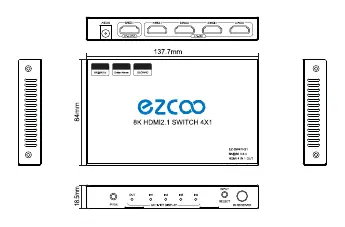
The device features an input selection button and IR receiver on the front panel, along with activity display LEDs. The rear panel houses the four HDMI inputs, one HDMI output, and the DC 5V power input port.
Installation
- Connect your HD signal sources into the HDMI switch inputs using 4 HDMI 2.1 cables.
- Connect your HDMI display source into the HDMI switch output using 1 HDMI 2.1 cable.
- Connect the switcher to a power outlet using the 5V/2A power adapter.
Specifications
- HDMI Version: 2.1
- HDCP Version: 2.3
- Max Resolution: Up to 8K/60Hz YUV 4:4:4 8bit
- Audio Format: DTS-HD, Dolby-Atmos, DTS, Dolby-trueHD, DSD
- Power Adapter: AC 100V-240V input; DC 5V/2A output
- Operating Temperature: -10 to +55 degrees Celsius
- Dimensions: 137.7 x 84 x 18.5 mm
- Weight: 90g
Using Tips
- If you encounter connection issues, try re-powering the device and unplugging/replugging the HDMI cable.
- Use qualified or brand-new HDMI 2.0 standard cables less than 3 meters long.
- To solve picture flash or black screen issues, hold the select button for 5 seconds until the input LED blinks 3 times to reset the device.
Safety Notes
- Place the machine in an environment away from dampness, high temperatures, dust, erosive, and oxidant environments.
- Avoid strong shaking, hitting, or dropping the device.
- Do not touch the device with wet hands.
- Turn off the power when the machine is not in use for a long time.
- Do not open the cover or touch internal parts.
- Use only the original factory power adapter.
- Check connection cables carefully before powering on.
Contacts
For technical assistance, please send an e-mail to [email protected] or visit https://www.easycoolav.com
Official resources from the manual
Practical help
Common problems
Picture flashing or black screen
Hold the select button for 5 seconds until the input LED blinks 3 times to perform a reset.
General connection issues
Re-power the device and unplug/replug the HDMI cable.
Before use
- Ensure you have a 5V/2A power adapter.
- Use qualified or brand-new HDMI 2.0 (or higher) cables.
- Keep HDMI cables under 3 meters for best performance.
- Check that all interfaces are securely connected before powering on.
Specs in practice
- HDMI Version
- 2.1 (Supports 8K/60Hz and 4K/120Hz)
- Power Requirement
- 5V/2A DC
- Operating Temperature
- -10 to +55 degrees Celsius
Images and diagrams
- Front panel: IR receiver, input selection button, and activity display LEDs.
- Rear panel: HDMI inputs (1-4), HDMI output, and DC 5V power port.
Model compatibility
- Supports HDR, Dolby Vision, Dolby Atmos, and 3D.
- Compatible with PS5, Xbox One X, Nintendo Switch, Laptops, and Blu-Ray players.

Manual page author
Emily Carter
User documentation editor
Prepares concise manual descriptions and highlights the most useful setup, operation, and maintenance information for readers.