Electronics / Speakers & Soundbars
User Manual for FBT X-LITE 110A, 112A, 115A Active Speakers
Comprehensive user guide for FBT X-LITE series active speakers (110A, 112A, 115A). Includes installation instructions, connection diagrams, DSP settings, Bluetooth pairing, and technical specifications.
Table of contents
Manual images
Click an image to enlargeQuick Guide from the Manual
The FBT X-LITE series consists of active speakers (110A, 112A, 115A) featuring a 3-channel mixer, Bluetooth 5.0 streaming, and DSP processing. This manual covers safety, installation, connectivity, and operation. Always ensure the device is connected to a grounded power outlet and that ventilation slots are not obstructed.
Safety Precautions
- Maintain a minimum clearance of 30 cm on all sides for proper ventilation.
- Do not block ventilation slots with papers, curtains, or other objects.
- Do not place naked flame sources (e.g., candles) on the device.
- Keep the device away from water and do not place liquid containers on it.
- The device must be connected to a power outlet with a protective earth connection.
Controls and Functions
The rear panel features the following controls:
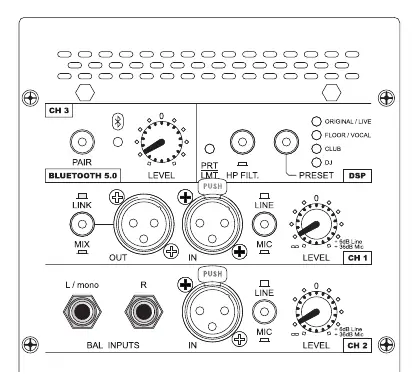
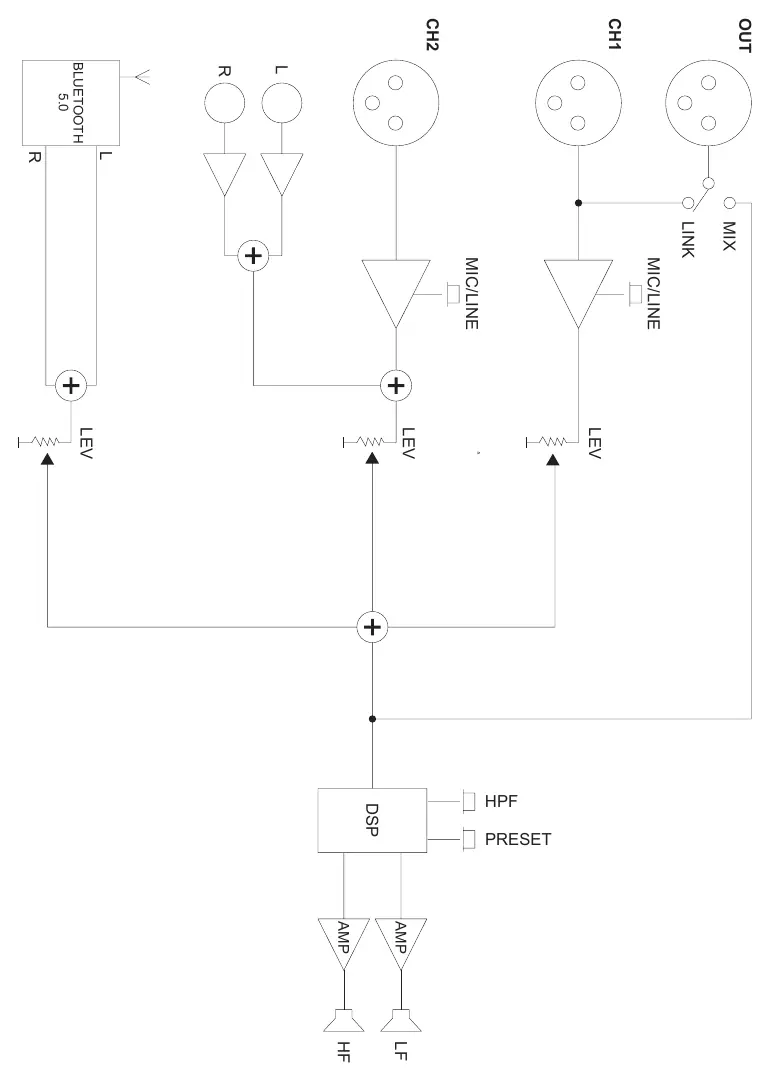
- DSP: Includes a PRT/LMT LED (indicates limiter/protection status) and an HP FILTER button (100Hz high-pass filter for subwoofer use). The PRESET function offers four modes: ORIGINAL/LIVE, FLOOR/VOCAL, CLUB, and DJ.
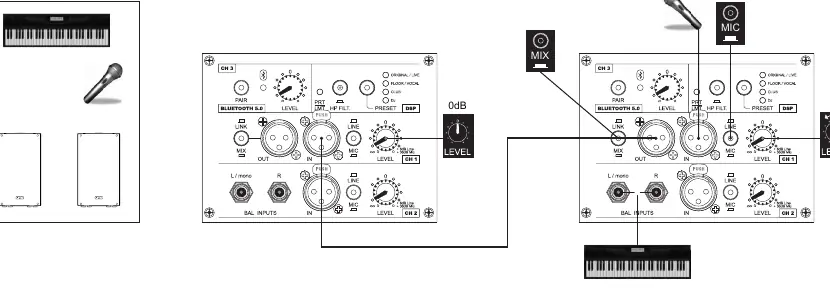
- CH1: XLR input for microphone or mixer. Use the LINE/MIC button to select the appropriate input level.
- CH2: XLR and 6.3mm jack inputs for keyboard, CD/MP3 player, or microphone.
- CH3 (Bluetooth 5.0): Press the PAIR button to initiate Bluetooth pairing. The LED flashes during pairing and remains steady when connected.
- OUT: XLR output. The MIX button mixes signals from channels 1, 2, and 3. The LINK button provides a physical link to the CH1 input.
Installation Modes
The X-LITE speakers support several installation methods:
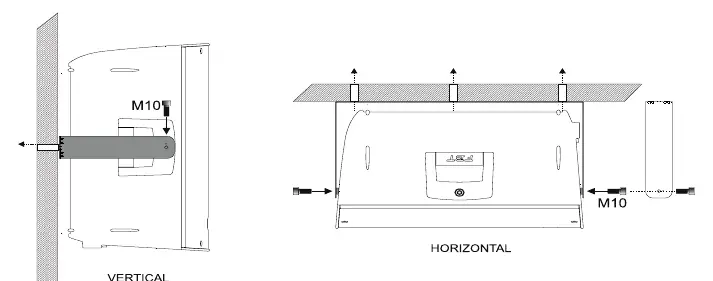
- Wall Bracket: Use original FBT flying accessories. Remove rubber feet, secure the bracket to the wall, and mount the speaker using M10 threaded inserts.
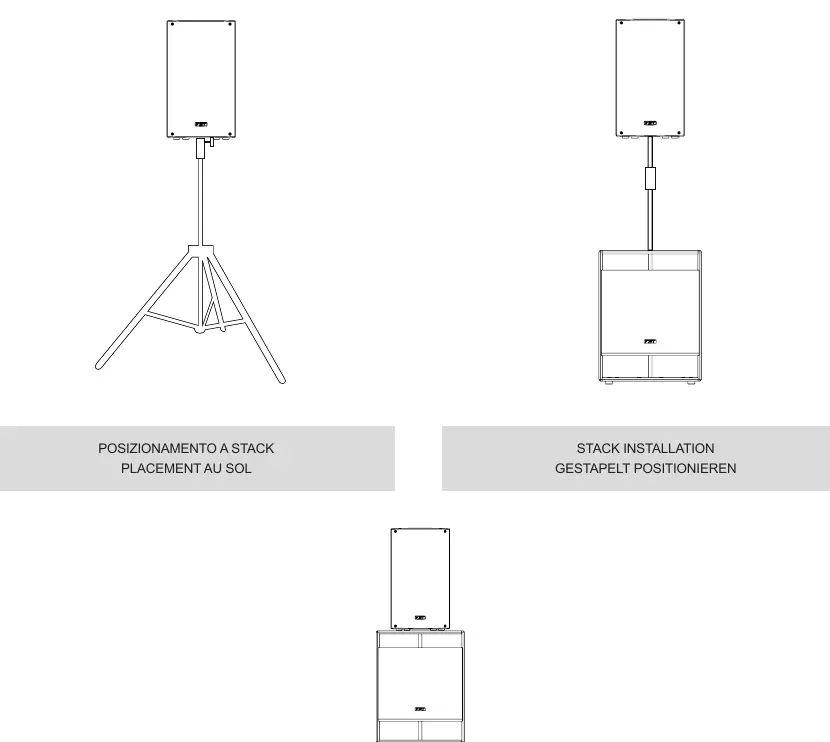
- Tripod Stand: Ensure the stand is on a flat, non-slip surface and can support the speaker's weight. Widen the base for stability.
- Stack Installation: Place the speaker on top of a corresponding subwoofer on the ground.
Connectivity
The speakers utilize standard professional connectors:
- XLR: 3-pole connectors for balanced mono signals (Pin 1: Ground, Pin 2: Positive, Pin 3: Negative).
- SPEAKON: Used for power terminal connections; locks to prevent accidental disconnection.
- JACK: 6.3mm connectors for mono (TS) or stereo (TRS) signals.
Technical Specifications
The series features a universal switching power supply (100-240Vac). Each model includes a 1200W LF and 300W HF Class D amplifier. Refer to the technical specifications section for detailed dimensions, weights, and frequency response data for the 110A, 112A, and 115A models.
Manufacturer information
FBT Elettronica SpA
Practical help
Common problems
Speaker does not turn on
Check the power cable connection and the fuse located in the power socket. Replace faulty fuses only with ones of the same electrical value.
Distorted sound or PRT/LMT LED flashing
The limiter is active because maximum power has been reached. Reduce the volume to prevent sound degradation and transducer damage.
Bluetooth pairing failed
Ensure your device is Bluetooth 5.0 compatible. Repeat the pairing process by pressing the PAIR button.
PRT/LMT LED stays on (fixed light)
Indicates thermal overload or internal malfunction. Turn off the speaker, wait at least 5 seconds, and turn it back on. If the LED remains on, contact technical support.
Before use
- Verify mains voltage is within 100-240Vac range.
- Ensure at least 30cm of clearance around the speaker for ventilation.
- Check that the mounting structure (wall/stand) can support the speaker's weight.
- Use only original FBT flying accessories for suspended installations.
- Set the LINE/MIC button correctly based on your input source (MIC for microphones, LINE for mixers).
Specs in practice
- Bluetooth 5.0
- Allows wireless audio streaming from smartphones and tablets.
Images and diagrams
- Wiring Diagrams: Illustrate how to connect microphones, instruments, mixers, and subwoofers to the speaker inputs.
- Block Diagram: Shows the internal signal flow from inputs through the mixer, DSP, and amplifiers to the drivers.
Model compatibility
- Simultaneous pairing of two speakers via Bluetooth requires a Bluetooth 5.0 compatible device.
- The X-LITE flying accessories are designed exclusively for X-LITE systems.

Manual page author
Emily Carter
User documentation editor
Prepares concise manual descriptions and highlights the most useful setup, operation, and maintenance information for readers.