Electronics / PA Systems
User Manual for FBT Horizon VHA 118SND / 118SN / 118.2SA / 118S Active Subwoofer
Quick guide for the FBT Horizon VHA 118SND, 118SN, 118.2SA, and 118S active subwoofers. Includes setup, networking, DSP settings, installation, and technical specifications.
Table of contents
Manual images
Click an image to enlargeQuick guide from the manual
This manual provides essential instructions for the FBT Horizon VHA 118SND, 118SN, 118.2SA, and 118S active subwoofers. Always ensure the system is placed on a flat, non-slippery surface. For ground stacking, use dedicated accessories and secure the installation with straps if there is any inclination. The system features advanced DSP control via an OLED display and encoder, and remote management via the INFINITO System Management Suite.
Description
The VHA 118 series are processed active subwoofers equipped with a 460mm (18") high-excursion woofer and a 2500W Class D amplifier. They are designed for professional sound reinforcement, offering high SPL and versatile configuration options. The VHA 118SND and 118.2SA models include network interfaces (TCP/IP, AES70), while the 118SN model lacks Dante functionality.
Controls and Functions
The rear panel features an OLED display and a push-encoder for parameter adjustment. Key functions include:
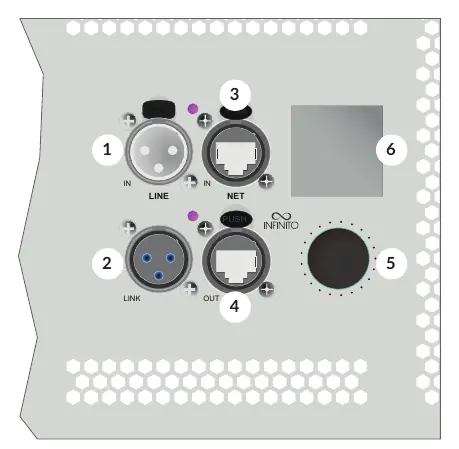
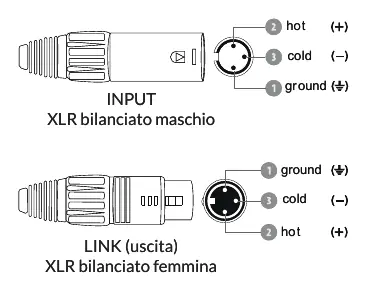
- DSP Menu: Access presets, delay, phase, and routing settings.
- Presets: Select from Original, Deep, Punch, Infra, and Cardioid configurations to match your acoustic environment.
- Networking: Connect via Ethernet for remote control. Supports Star, Daisy Chain, and Mixed topologies.
- Status LEDs: Monitor system health (Green: ON, Yellow: Standby, Red: Fan Error/Protection).
Installation and Networking
Ground Stacking: You can stack up to 3 modules above the subwoofer using dedicated accessories like the VHA-B 406 or MS-F 210. Always ensure the stack is secure.
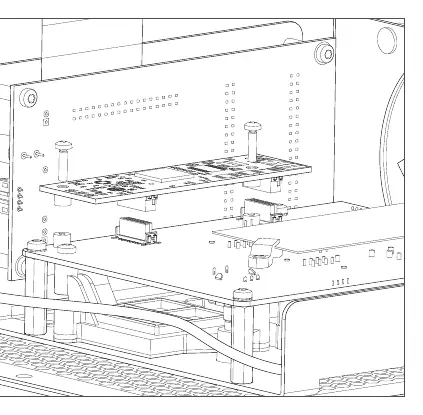
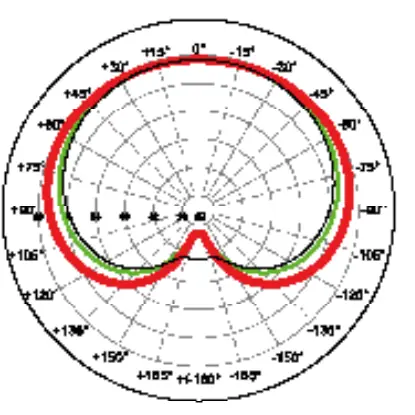
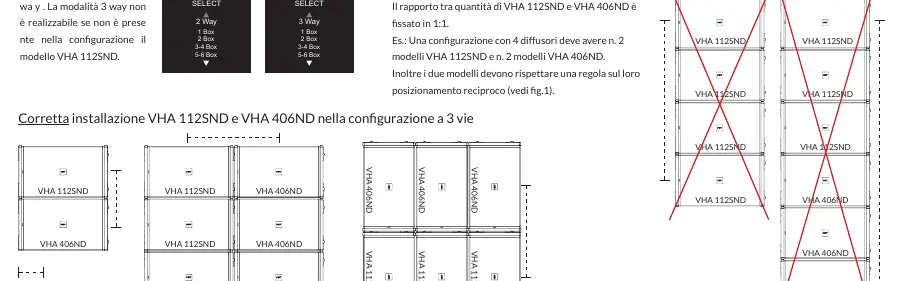
Cardioid Configurations: Useful for reducing low-frequency energy on stage. Requires specific positioning of rear-facing and front-facing subwoofers. Refer to the manual's diagrams for correct placement.
Networking: Use CAT5e or higher cables. The system supports daisy-chaining up to 8 devices per group. In case of a network failure, the hardware bypass ensures downstream devices remain controllable.
Maintenance and Safety
- Cleaning: Use only a dry cloth.
- Ventilation: Do not block ventilation openings.
- Fan Error: If the red LED indicates a fan error, check if the fan is free to spin; it may require replacement.
- Safety: Never use handles or brackets to suspend the system. Always anchor the system for outdoor use.
Technical Specifications
- Amplifier: 2500W RMS Class D.
- Frequency Response: 30Hz (preset dependent).
- Connections: Neutrik PowerCon (Power), XLR (Audio), EtherCon RJ45 (Network).
- Dimensions: 1140 x 740 x 555 mm (Net).
Manufacturer information
FBT Elettronica SpA
Practical help
Common problems
Fan Error (Red LED)
Check if the fan is free to spin. It may need to be replaced if it cannot cool the amplifier.
System in Standby (Yellow LED)
No input signal detected for 30 minutes. The system will automatically wake up when a signal exceeds the threshold.
Distortion or Protection Mode
Check DSP settings, ensure the amplifier is not overloaded, and verify thermal conditions.
Before use
- Verify power voltage (100-240V)
- Ensure proper ventilation around the unit
- Check all cable connections (XLR, Ethernet, Speakon)
- Verify DSP preset selection for your configuration
- Confirm ground stability for stacking
Specs in practice
- 18 inch (460mm)
- The diameter of the high-excursion woofer.
Images and diagrams
- Wiring diagrams for XLR and Speakon connections
- Networking topologies (Star, Daisy Chain, Mixed)
- Ground stacking configurations
- Cardioid setup diagrams
Model compatibility
- VHA 118SN does not include Dante functionality.
- VHA 118S requires an external digital processor.
- Compatible with VHA 406ND and VHA 112SND for array configurations.

Manual page author
David Miller
Documentation analyst
Organizes user manual content into clear summaries, with attention to model details, product context, and everyday usability.