Tools / Power Tools
User Manual for FERM 12V Battery CDA1188/CDA1189
Quick guide for FERM 12V battery models CDA1188 and CDA1189. Learn how to charge, install, remove, and maintain your battery safely.
Table of contents
Manual images
Click an image to enlargeQuick guide from the manual
This document provides essential instructions for the FERM 12V battery platform, specifically models CDA1188 and CDA1189. Always remove the battery before performing any work on the power tool. The battery must be charged before its first use. Use only the specified USB charging method (5V 1-2A) to avoid damage or fire risks.
Product Description
The FERM 12V battery platform is designed for use with all FERM 12V battery platform tools. The batteries are interchangeable across this platform.
Technical Specifications
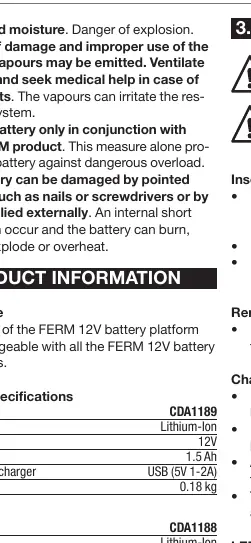
- Model CDA1189: 12V, 1.5 Ah, Weight 0.18 kg
- Model CDA1188: 12V, 2.0 Ah, Weight 0.18 kg
- Recommended Charger: USB (5V 1-2A)
Operation
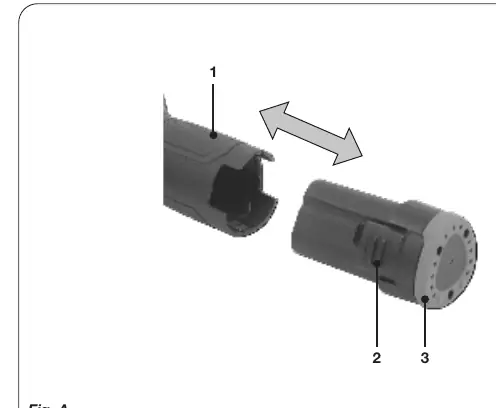
Inserting and Removing the Battery
- Inserting: Ensure the exterior of the battery is clean and dry. Insert the battery into the base of the machine and push forward until it clicks into place.
- Removing: Press the battery release buttons and pull the battery out of the machine.
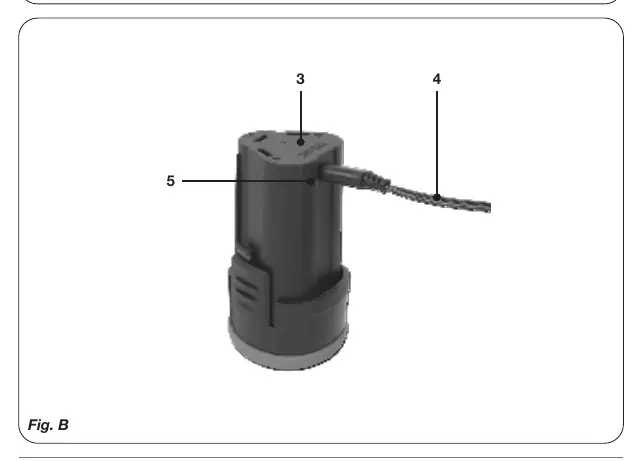
Charging the Battery
The battery is charged via a USB-C connection.
- Plug the USB-C connector of the charging cable into the battery.
- Plug the USB-A connector into a USB power adapter (not included), powerbank, or laptop.
- The charging indicator light will show the status.
LED Indicator Status
- Red: Battery charging in progress.
- Green: Battery charging finished, battery fully charged.
After charging, remove the charger plug from the outlet and unplug the cable from the battery.
Maintenance
Clean the battery casing regularly with a soft cloth, preferably after each use. Ensure ventilation openings are free of dust and dirt. Remove persistent dirt with a soft cloth moistened with soapsuds. Do not use solvents like gasoline, alcohol, or ammonia, as these damage synthetic components.
Environment and Warranty
Do not dispose of batteries in normal household waste. Dispose of them at an approved waste or recycling facility in accordance with local regulations and Directive (EU) 2023/1542. FERM products are guaranteed against defects in materials and workmanship for the period stipulated by law. Warranty is void if the product has been misused, altered by unauthorized centers, or if non-original spare parts have been used.
Practical help
Common problems
Battery not charging
Ensure the USB power adapter provides 5V 1-2A. Check that the USB-C cable is securely connected to the battery.
Battery does not fit into the tool
Ensure the battery and the tool base are clean and free of debris. Push the battery forward until it clicks.
Before use
- Charge the battery fully before the first use.
- Ensure the battery exterior is clean and dry.
- Check the battery casing for any signs of damage or modification.
- Verify that the charger used is a 5V 1-2A USB adapter.
Specs in practice
- 1.5 Ah / 2.0 Ah
- Battery capacity; higher values generally indicate longer runtime.
Images and diagrams
- Fig A: Illustrates the battery insertion and removal process using the release buttons.
- Fig B: Illustrates the USB charging connection and the location of the LED indicator.
Model compatibility
- Compatible with all tools in the FERM 12V battery platform.

Manual page author
Michael Turner
Technical manual editor
Reviews PDF manuals for structure, safety notes, and practical product details so readers can find the right information quickly.