Tools / Impact Wrenches
FLEX IW 1/2" 400 18-EC Cordless Impact Wrench User Manual
Quick guide for the FLEX IW 1/2" 400 18-EC cordless impact wrench. Includes operating instructions, mode selection, maintenance, and safety guidelines.
Quick answers from the manual
Quick answer
- The FLEX IW 1/2" 400 18-EC is a cordless impact wrench designed for commercial use in industry and trade for fastening and loosening bolts, nuts, and threaded fasteners. p. 13
Key actions
- Insert/replace battery p. 15
- Install/remove impact socket p. 15
- Select direction p. 15
- Select mode p. 15
First start
- Unpack and inspect p. 14
- Charge battery p. 14
Maintenance and reset
- Cleaning p. 18
- Motor maintenance p. 18
Technical specifications
| Parameter | Value | Meaning | Pages |
|---|---|---|---|
| Rated voltage | 18 Vdc | Operating voltage | p. 14 |
| No-load speed | 2700 /min | Rotational speed without load | p. 14 |
| Max. impact rate | 3750 bpm | Maximum impacts per minute | p. 14 |
| Max. torque | 406 Nm | Maximum tightening torque | p. 14 |
| Weight (without battery) | 1.17 kg | Tool weight according to EPTA Procedure 01/2003 | p. 14 |
| Working temperature | -10-40°C | Operating temperature range | p. 14 |
Where to find it in the PDF
- Safety symbols and instructions p. 13
- Technical data and overview p. 14
- Operating instructions p. 15, 16, 17
- Maintenance and disposal p. 18
Table of contents
Manual images
Click an image to enlargeQuick guide from the manual
This cordless impact wrench is designed for commercial use in industry and trade for fastening and loosening bolts, nuts, and various threaded fasteners. Before using the tool, ensure the battery is fully charged and the direction preselector switch is in the correct position.
Device Overview
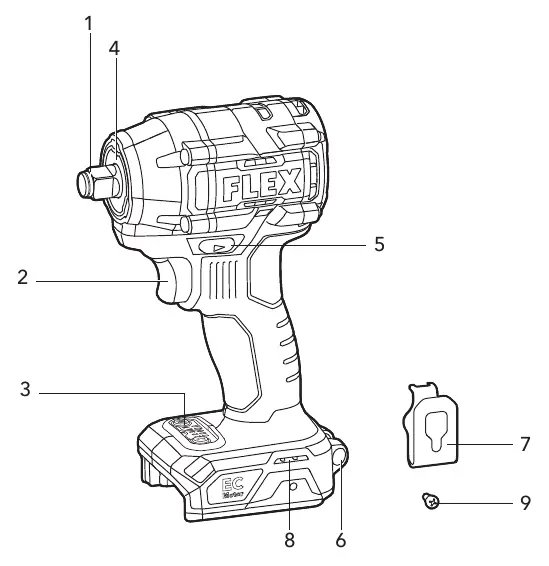
The tool features a 1/2" square drive, a variable-speed trigger switch, a speed control panel, an LED light, and a direction preselector switch. It also includes a removable belt clip and a strap fixing point.
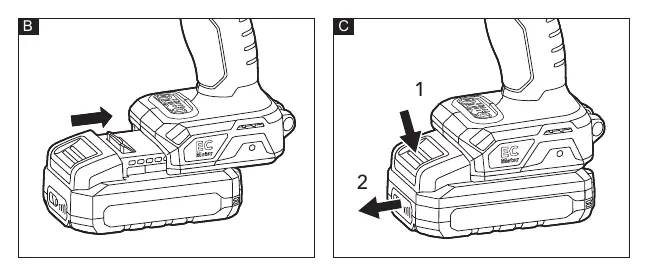
Battery and Belt Clip
To insert the battery, press it into the tool until it clicks. To remove, press the release button and pull it out. The belt clip can be attached to either side of the tool for convenient transport using the provided fastening screw.
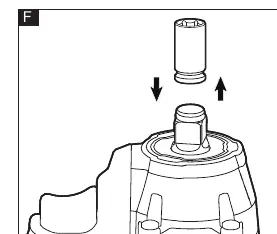
Socket Installation
Before installing or removing a socket, set the direction preselector switch to the middle (locked) position. Align the square of the socket with the square drive and push it on until it stops.
Direction and Mode Selection
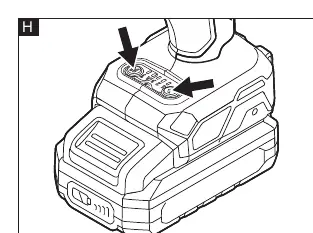
Use the direction preselector switch to choose forward (tightening) or reverse (loosening) rotation. The speed control panel allows you to select between three modes (1, 2, 3) for torque, rotation speed, and impact speed. Mode 'A' is a special mode for automatic stop during tightening or loosening. The 'screw' mode is intended for driving screws into wood.
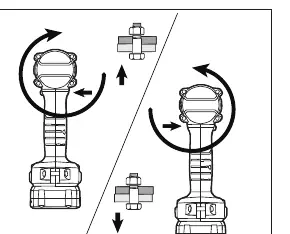
Operation
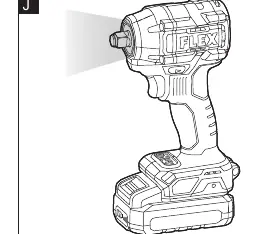
Hold the tool firmly and ensure the socket is fully engaged on the bolt or nut. Start the tool slowly using the variable-speed trigger, increasing speed as the fastener runs down. Always check the final torque with a torque wrench after fastening.
Maintenance and Cleaning
Regularly clean the tool and the grille in front of the vent slots. Blow out the housing interior and motor with dry compressed air. For spare parts and accessories, visit www.flex-tools.com.
Official resources from the manual
Manufacturer information
FLEX
Practical help
Common problems
Tool does not run
Ensure the direction preselector switch is fully engaged to the left or right.
Fasteners are too tight
Reduce the impacting time.
Tool twists in hand
Hold the tool firmly and ensure the socket is fully engaged on the bolt/nut.
Before use
- Charge the battery fully
- Check for missing or damaged parts
- Ensure the socket is compatible
- Set the direction switch to the desired position
Specs in practice
- No-load speed
- 2700 /min
- Max impact rate
- 3750 bpm
Images and diagrams
- Figure A: Overview of components
- Figure B/C: Battery insertion/removal
- Figure F: Socket installation
- Figure H: Mode selection panel
- Figure K: Tightening/loosening operation
Model compatibility
- Compatible with AP 18.0/2.5, AP 18.0/5.0, AP 18.0/8.0 batteries

Manual page author
Michael Turner
Technical manual editor
Reviews PDF manuals for structure, safety notes, and practical product details so readers can find the right information quickly.