Tools / Power Tools
User Manual for FLEX IW 1/2" 950 18.0-EC Cordless Impact Wrench
Quick guide for the FLEX IW 1/2" 950 18.0-EC cordless impact wrench. Learn about torque settings, speed control, technical specifications, and key features of this 18V power tool.
Table of contents
Quick guide from the manual
This document provides technical specifications and feature highlights for the FLEX IW 1/2" 950 18.0-EC cordless impact wrench. Please note that the battery and charger are not included in the package. Ensure you use compatible FLEX 18V battery packs for operation.
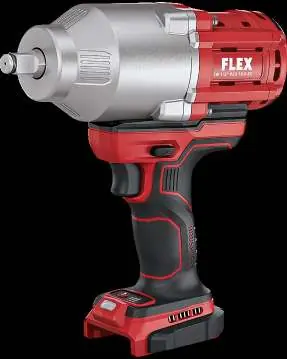
Product Features
- Brushless Motor: Designed for higher efficiency and longer service life.
- Electronic Management System (EMS): Protects the machine, extends service life, and increases efficiency.
- Speed Command: Allows for three different speed ranges for controlled tightening and loosening.
- Electronic Quick Brake: Stops the tool quickly for safety and precision.
- Ergonomic Design: Features a non-slip soft grip and a rotatable handle that decouples the auxiliary handle from the motor to reduce vibration.
- Integrated LED Light: Includes a post-glow function for better visibility in dark areas.
- Battery Capacity Indicator: LED display to monitor battery status.
Technical Specifications
The tool features three levels of performance settings:
- Torque Levels: Level 1: 280 Nm, Level 2: 700 Nm, Level 3: 950 Nm.
- No-load Speed: Level 1: 0-500 rpm, Level 2: 0-1000 rpm, Level 3: 0-2100 rpm.
- No-load Impact Rate: Level 1: 0-1000 ipm, Level 2: 0-2000 ipm, Level 3: 0-2450 ipm.
- Tool Holder: 1/2 inch external square.
- Weight: 3.1 kg (without battery).
- Dimensions: 222 x 77 x 240 mm.
Operation and Maintenance
The tool is equipped with a speed control switch with a lock-off function. The reinforced aluminum die-cast gear housing provides durability. Always ensure the battery is removed before performing any maintenance or when the tool is not in use. The battery protection element prevents damage to the battery packs when the tool is set down.
Manufacturer information
FLEX
Practical help
Common problems
Tool does not start
Check if the battery is charged and properly inserted. Ensure the speed control switch is not locked.
Battery capacity indicator not showing
Ensure the battery is fully clicked into the tool and has sufficient charge.
Before use
- Ensure you have a compatible FLEX 18V battery pack.
- Check that the tool is switched off before inserting the battery.
- Verify the 1/2 inch socket is securely attached to the tool holder.
- Check the battery charge level using the integrated LED indicator.
- Ensure the work area is clear and safe.
Specs in practice
- Torque Levels
- 3 settings (280/700/950 Nm) to match the force required for different bolt sizes and applications.
- Speed Levels
- 3 settings (0-500/1000/2100 rpm) to control the rotation speed for precise tightening or loosening.
Model compatibility
- Compatible with all FLEX 18V battery packs.
- Battery and charger are not included in the delivery.

Manual page author
David Miller
Documentation analyst
Organizes user manual content into clear summaries, with attention to model details, product context, and everyday usability.