Tools / Measuring Tools
Troubleshooting Guide for Fluke 190C Series ScopeMeter
A practical guide for using the Fluke 190C Series ScopeMeter to troubleshoot FOUNDATION Fieldbus H-1 segments. Includes setup instructions, waveform analysis, and device isolation techniques.
Table of contents
Manual images
Click an image to enlargeQuick Guide for Fieldbus Troubleshooting
This document provides instructions for using the Fluke 190C Series ScopeMeter to diagnose and troubleshoot FOUNDATION Fieldbus H-1 segments. The ScopeMeter is ideal for this task due to its portability, battery operation (which provides isolation from earth ground), and ability to read Manchester encoding.
Setup and Connection
To begin troubleshooting an H-1 segment, follow these steps:
- Isolation: Ensure the ScopeMeter is battery-operated to maintain isolation from earth ground during analysis.
- Connection: Place the probe and its grounding lug across both wires of the H-1 segment.
- Capture Settings: Set the scope to capture a 32-microsecond bit pattern.
- Voltage Settings: Set the volt capability on the scope to capture .75 volts DC peak to peak.
Waveform Analysis
Once connected and 24-volt DC power is present, a waveform should appear if the Link Active Scheduler (LAS) is actively communicating on the segment bus.
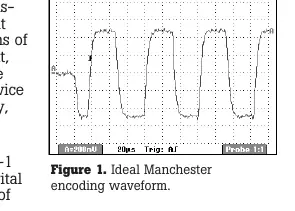
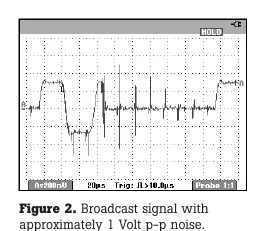
- Healthy Signal: Waveforms should match the specified trapezoidal image characteristic of Manchester encoding.
- Faulty LAS: If no waveforms appear, the Link Active Scheduler itself is likely faulty.
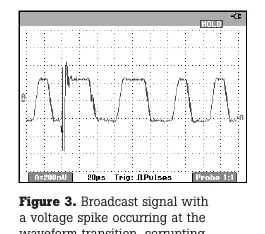
- Misbehaving Device: If the waveform is degraded or contains inadvertent spikes, a field or host device on the segment is likely misbehaving.
Isolating Faulty Devices
If you suspect a device is causing communication issues, use the following isolation method:
- Remove one device at a time from the segment.
- Observe the waveform to see if the suspect signal (noise or spikes) disappears.
- If the signal clears, the removed device or its communication card is likely the culprit.
Spikes present in the waveform typically indicate a faulty communication card in the field device or at the host LAS.
Manufacturer information
Fluke Corporation
Practical help
Common problems
No waveform appears on the scope
This indicates the Link Active Scheduler (LAS) is faulty and not communicating on the segment bus.
Degraded waveform or inadvertent spikes
This indicates a field or host device on the H-1 segment is misbehaving or has a faulty communication card.
Garbled messages or system shutdown
Often caused by background noise or improper setup of the fieldbus segment.
Before use
- Ensure the ScopeMeter is running on battery power to isolate from earth ground.
- Connect the probe and grounding lug across both wires of the H-1 segment.
- Configure the scope to capture a 32-microsecond bit pattern.
- Set the voltage capability to .75 volts DC peak to peak.
Specs in practice
- Manchester encoding
- The standard digital signal format used in FOUNDATION fieldbus communications.
- Link Active Scheduler (LAS)
- The device responsible for regulating communication parameters on the fieldbus segment.
Images and diagrams
- Figure 1: Displays the ideal Manchester encoding waveform for a properly functioning segment.
- Figure 2: Illustrates a broadcast signal corrupted by approximately 1 Volt p-p noise.
- Figure 3: Illustrates a broadcast signal with a voltage spike at the waveform transition.
Model compatibility
- The ScopeMeter must be battery-operated to ensure isolation from earth ground during H-1 segment analysis.

Manual page author
Emily Carter
User documentation editor
Prepares concise manual descriptions and highlights the most useful setup, operation, and maintenance information for readers.