Mobile / Smartphone Accessories
Forever Transparent 1-Step Transfer Paper Instructions
A comprehensive guide for using Forever Transparent 1-Step transfer paper, including printer settings, heat press application steps, and a reference table for various fabric types.
Table of contents
Manual images
Click an image to enlargeQuick Guide
The Forever Transparent 1-Step transfer process involves preparing the printer, loading the garment, pressing, and finishing. Ensure your heat press is preheated to the correct temperature before starting. Always use heat-resistant tape to secure the transfer to the garment.
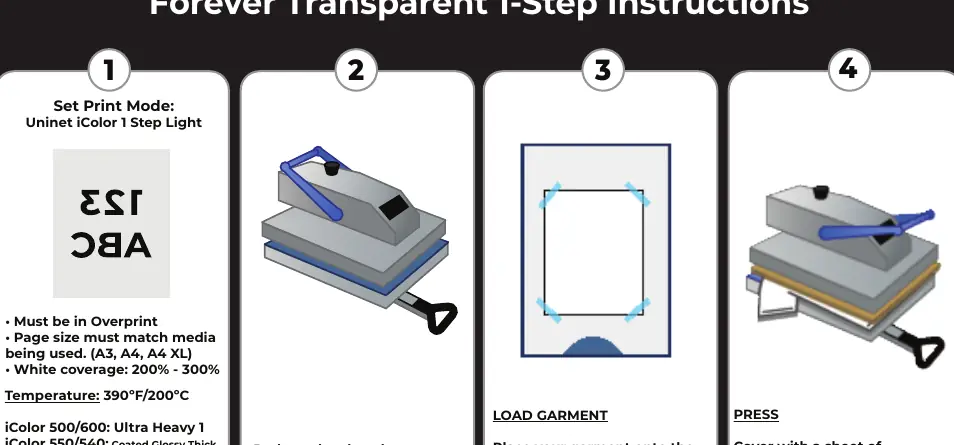
Print Settings
Before printing, configure your printer with the following settings:
- Print Mode: Uninet iColor 1 Step Light
- Overprint: Must be enabled
- Page Size: Must match the media used (A3, A4, A4 XL)
- White Coverage: 200% - 300%
- Design: Must be mirrored
- Print Side: Use the plain side
Specific printer model adjustments:
- iColor 500/600: Ultra Heavy 1
- iColor 550/540: Coated Glossy Thick
- iColor 560: Thick to 105g
- iColor 650: Ultra Heavy 3
- iColor 800: Thick to 163g
Application Procedure
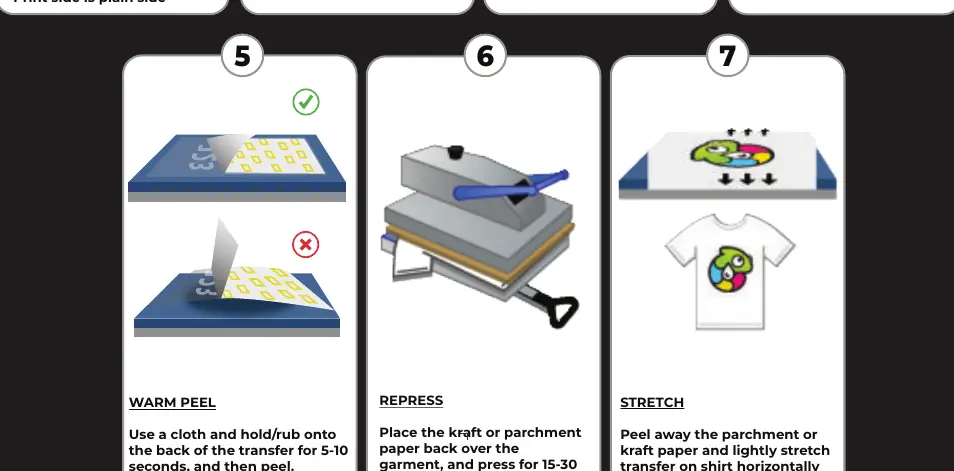
- Preheat: Preheat the closed press to the required temperature (390°F/200°C or 305°F/150°C depending on fabric). Wait for the press to reach the temperature.
- Load Garment: Place the garment onto the press. Align the image on top of the garment with the print side facing DOWN. Fix in place with heat-resistant tape.
- Press: Cover with a sheet of parchment or kraft paper and press for 15 seconds.
- Warm Peel: Use a cloth to rub the back of the transfer for 5-10 seconds, then peel.
- Repress: Place the kraft or parchment paper back over the garment and press for 15-30 seconds at the application temperature to increase durability.
- Stretch: Peel away the paper and lightly stretch the transfer on the shirt horizontally for a few seconds to improve the feel.
Reference Table
Use the following settings based on the fabric type:
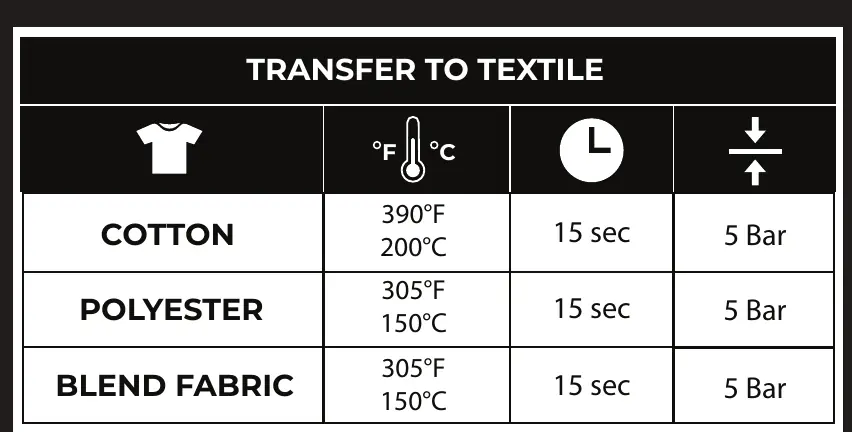
- Cotton: 390°F (200°C), 15 seconds, 5 Bar pressure.
- Polyester: 305°F (150°C), 15 seconds, 5 Bar pressure.
- Blend Fabric: 305°F (150°C), 15 seconds, 5 Bar pressure.
Note: All values are for reference. Toner types vary, and optimal temperature and time should be determined through experimentation.
Manufacturer information
Forever
Practical help
Common problems
Transfer not adhering properly
Ensure the heat press has reached the full target temperature before pressing and verify the pressure is set to 5 Bar.
Image alignment issues
Use heat-resistant tape to secure the transfer paper to the garment before closing the press.
Poor durability after washing
Ensure the 'Repress' step is performed for the full 15-30 seconds using parchment or kraft paper.
Before use
- Set printer to 'Uninet iColor 1 Step Light' mode.
- Ensure the design is mirrored.
- Verify page size matches the media (A3, A4, A4 XL).
- Preheat the heat press to the target temperature.
- Have parchment or kraft paper ready for pressing.
Images and diagrams
- The process is divided into 7 steps: Print Mode setup, Preheat, Load Garment, Press, Warm Peel, Repress, and Stretch.
- The Reference Table provides specific temperature and time settings for Cotton, Polyester, and Blend fabrics.
Model compatibility
- Compatible with iColor 500/600, 550/540, 560, 650, and 800 printer models with specific media settings.

Manual page author
David Miller
Documentation analyst
Organizes user manual content into clear summaries, with attention to model details, product context, and everyday usability.