Computers / Printer Consumables
User Manual for Forever Ultra Fast Automatic Car Holder 15W Wireless Charger
Quick guide for the Forever 15W Ultra Fast Automatic Car Holder. Learn how to install, use the automatic arms, and understand LED charging indicators.
Table of contents
Manual images
Click an image to enlargeQuick guide from the manual
This device is an automatic car holder with built-in 15W wireless charging. It features an infrared sensor for automatic arm operation and a supercapacitor that allows you to open the arms even after the power supply is disconnected. For optimal performance, use a fast car charger (e.g., Qualcomm 3.0).
Product description
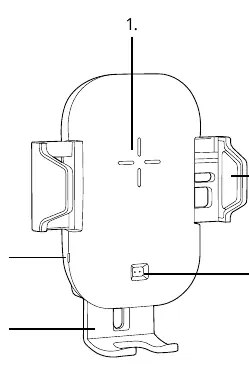
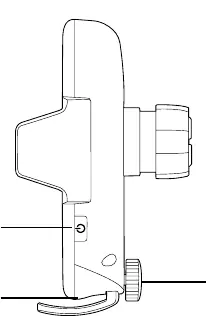
- Wireless charging area: The center surface where the phone is placed.
- Wireless charging indicator: LED light showing the device status.
- Adjustable bottom stand: Can be adjusted to fit the size of your smartphone.
- Extendable arm: Part of the mounting mechanism.
- Infrared sensor: Detects the phone to automatically open/close the arms.
- Unlocking button: Used to manually open the arms.
- Rotary knob: Used for adjusting the mount.
- Type-C input: Power input port.
Installation
- Choose between the air vent holder or the window holder with a telescopic arm.
- Fix the chosen mount securely in your vehicle.
- Connect the holder to a car charger using the provided Type-C cable.
- Adjust the bottom stand to ensure your phone aligns correctly with the charging area.
Usage
- Once powered, bring your phone close to the holder. The infrared sensor will trigger the arms to open automatically.
- Place your phone in the holder; the arms will close automatically, and wireless charging will start.
- To remove the phone, press the unlocking button.
- If the power is disconnected, the built-in supercapacitor allows you to press the unlocking button to open the arms and retrieve your phone.
LED charging indicators
- Standby: Stable red light.
- Wireless charging: Stable blue light.
- Fully charged: No LED light.
- FOD (Foreign Object Damage) / Temperature protection: Red and blue blinking light.
Troubleshooting and safety
If the LED blinks red and blue, the device has detected a foreign object or is overheating. Ensure no metal objects are between the phone and the charger. If the device is overheating, allow it to cool down before resuming use.
Manufacturer information
Forever
Practical help
Common problems
Arms do not open
Press the unlocking button. If the power is disconnected, the built-in supercapacitor allows for several manual openings.
LED blinks red and blue
Foreign object detected (FOD) or temperature protection is active. Remove any metal objects from the charging area or let the device cool down.
Before use
- Ensure you have both the air vent and window mounts available.
- Use a fast car charger (e.g., Qualcomm 3.0) to enable fast wireless charging.
- Connect the holder using the provided Type-C cable.
- Adjust the bottom stand to fit your specific smartphone size before placing the phone.
Specs in practice
- 15W Wireless Charging
- Supports fast wireless charging when paired with a compatible QC 3.0 car charger.
- Supercapacitor
- Allows the automatic arms to open even after the car engine is turned off or power is disconnected.
Images and diagrams
- 1. Wireless charging area
- 2. Wireless charging indicator
- 3. Adjustable bottom stand
- 4. Extendable arm
- 5. Infrared sensor
Model compatibility
- Compatible with smartphones supporting wireless charging.
- Requires a fast car charger (e.g., Qualcomm 3.0) for 15W fast charging.

Manual page author
David Miller
Documentation analyst
Organizes user manual content into clear summaries, with attention to model details, product context, and everyday usability.