Power / Power Banks
User Manual for Gadnic CBAT-150 Battery Charger
Quick guide for the Gadnic CBAT-150 smart battery charger. Learn about charging modes, LCD display indicators, technical specifications, and troubleshooting steps for this multi-stage automatic charger.
Table of contents
Manual images
Click an image to enlargeQuick Guide
The Gadnic CBAT-150 is a multi-stage, microprocessor-controlled automatic battery charger designed for 12V and 24V batteries. It supports various battery types, including AGM, Gel, SLA, and Wet batteries. The device features automatic voltage detection, pulse repair mode, and comprehensive safety protections.
Product Overview
The charger is designed for ease of use with a clear LCD display and a single mode selection button. It provides efficient charging while preventing overcharging, even if left connected. Key features include:
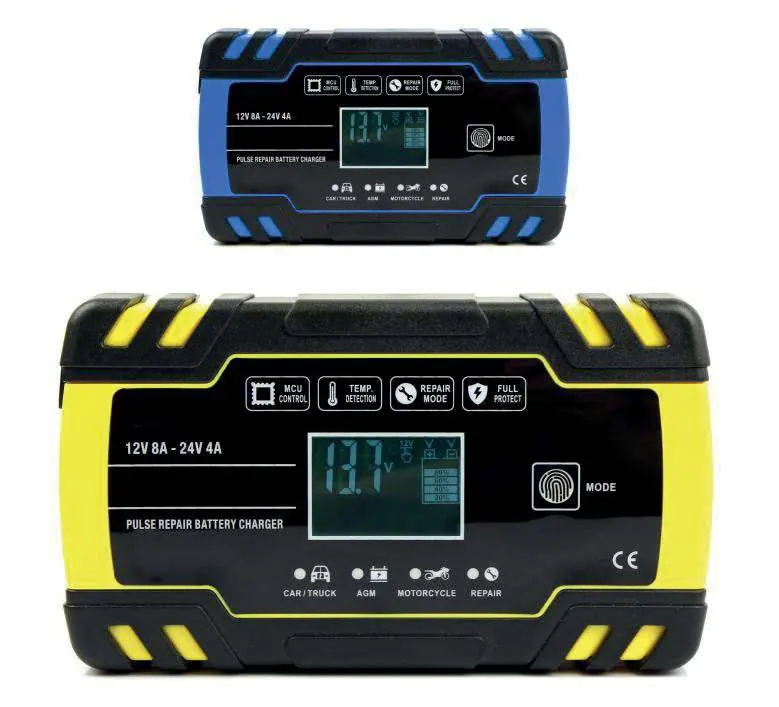
- Microprocessor Control: Automatically adjusts charging parameters.
- Pulse Repair Mode: An advanced 24-hour recovery mode for old, idle, damaged, or sulfated batteries.
- Safety Protections: Includes reverse polarity protection, short circuit protection, and spark-free contact.
- Temperature Adaptation: Adjusts charging voltage based on ambient temperature to optimize battery health.
Technical Specifications
- AC Input: 240V 50Hz
- Output Voltage: 12V / 24V (Auto-detect)
- Output Current: 12V 8A / 24V 4A
- Minimum Start Voltage: >2.0V
- Input Power (with load): Max 130W
- Cooling: Integrated fan
- Dimensions: 170 x 98 x 58 mm
- Weight: 560g
LCD Display Indicators
The LCD screen provides real-time feedback on the charging process:
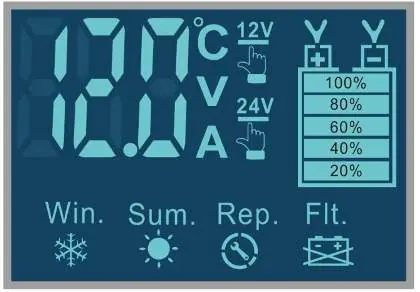
- Temperature: Displays internal charger temperature.
- Voltage/Current: Shows current charging voltage and amperage.
- Repair Mode (Rep.): Indicates the pulse repair function is active.
- Battery Full (FUL): Indicates the battery is fully charged.
- Winter Mode (Win.): Activates when ambient temperature is below +10°C to raise charging voltage.
- Summer Mode (Sum.): Activates when ambient temperature is above +28°C to reduce charging voltage.
- Fault (Flt.): Indicates an issue such as wrong polarity, defective battery, or bad connection.
Charging Modes
Use the Mode button to cycle through the following profiles:
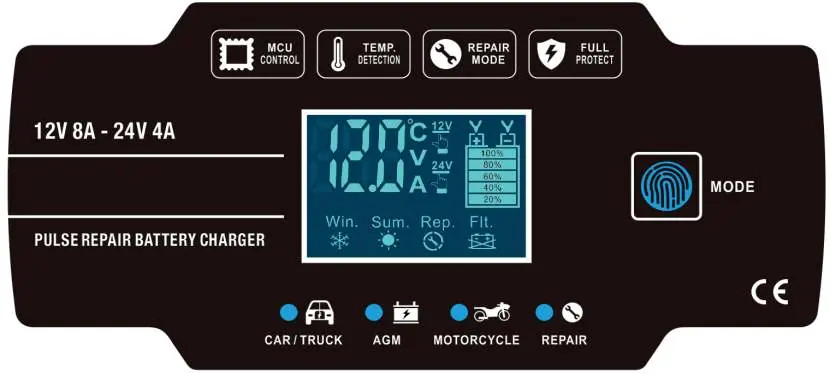
- Car/Truck: Fast charge mode for large batteries (12V max 8A / 24V max 4A).
- AGM: Optimized for AGM and Calcium batteries.
- Motorcycle: Slow charge mode for small batteries (max 1.5A).
- Repair: 24-hour advanced recovery mode for damaged or sulfated batteries. Note: Not all batteries can be recovered.
Troubleshooting
If the LCD displays a fault (Flt.) icon, check the following:
- Wrong Polarity: Ensure the clamps are connected to the correct battery terminals (positive to positive, negative to negative).
- Defective Battery: If the fault persists, have the battery tested by a professional mechanic; it may need replacement.
- Bad Connection: Verify that the clamps are securely attached to the battery terminals and free of corrosion.
Manufacturer information
Gadnic
Practical help
Common problems
Fault (Flt.) icon displayed
Check for wrong polarity, bad connection, or a defective battery.
Battery not charging
Ensure the battery voltage is above 2.0V; the charger cannot start if the battery is completely dead.
Repair mode not working
Repair mode is an advanced recovery process; not all damaged or sulfated batteries can be recovered.
Before use
- Ensure the battery is a 12V or 24V type.
- Verify the AC power source is 240V 50Hz.
- Check that the battery type is compatible (AGM, Gel, SLA, Wet).
- Ensure clamps are clean and securely attached to terminals.
- Check ambient temperature to understand if Winter or Summer mode will activate.
Specs in practice
- 12V 8A / 24V 4A
- Maximum output current depending on the detected battery voltage.
Images and diagrams
- The LCD screen displays charging status, including voltage, current, and temperature.
- The Mode button allows switching between Car/Truck, AGM, Motorcycle, and Repair profiles.
- Fault icons indicate specific connection or battery health issues.
Model compatibility
- Compatible with AGM, Gel, SLA, and Wet batteries.
- Automatically detects 12V or 24V systems.
- Repair mode is intended for old, idle, damaged, or sulfated batteries.

Manual page author
Michael Turner
Technical manual editor
Reviews PDF manuals for structure, safety notes, and practical product details so readers can find the right information quickly.