Power / Batteries & Chargers
User Manual for Gadnic 15000mAh Power Bank
Quick guide for the Gadnic 15000mAh Power Bank. Learn how to charge your devices, interpret LED indicators, and troubleshoot common issues with this portable charger.
Table of contents
Manual images
Click an image to enlargeQuick Guide
This document provides essential instructions for operating your Gadnic 15000mAh Power Bank. Before first use, ensure the device is fully charged. The power bank features intelligent switching, allowing it to turn off automatically when not in use.
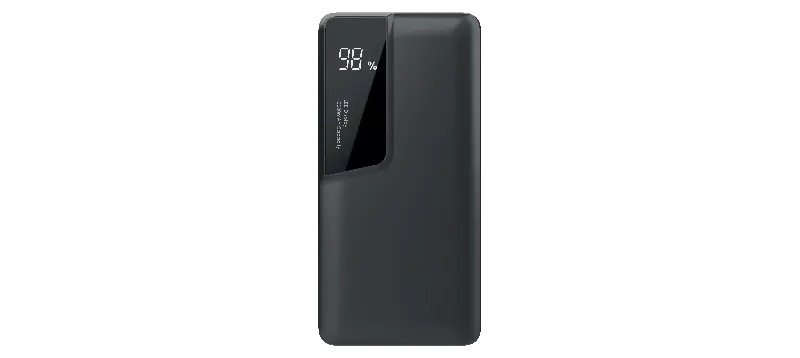
Safety Warnings
- Do not disassemble or alter the product.
- Avoid physical impact or dropping the device.
- Do not expose the device to high temperatures, humidity, dust, or direct sunlight.
- Operating environment: 0 to 35°C, humidity 5-95%, altitude below 3000m.
- Keep away from liquids and do not expose to water splashes.
- Use only an official charger that meets the technical specifications to avoid danger.
- If storing for a long time, keep in a dry environment between 5 and 35°C.
- If not used for more than three weeks, charge and discharge the power bank at least once a month to maintain battery health.
Parts and Functions
- Button: Press to display the current charge percentage.
- Micro USB (IN): Input port for charging the power bank.
- USB (OUT): Output port for charging mobile devices.
- LED Lights: Indicate battery status. Double-click or press and hold for three seconds to turn the LED lights on or off (feature availability varies by model).
LED Indicators
The power bank uses four LED lights to indicate status:
- Charging the Power Bank: Flashing lights indicate the charging process. Once fully charged, the lights will stop flashing.
- Discharging (Charging other devices):
- 0-5%: Lights off (last LED flashes if at 5%).
- 5-25%: One light on.
- 25-50%: Two lights on.
- 50-75%: Three lights on.
- 75-100%: Four lights on.
Charging the Power Bank
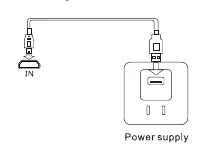
- Connect the USB-Micro USB cable to a power source (charger or PC).
- Connect the other end to the Micro USB (IN) port on the power bank.
- Ensure the power source is active. The power bank will begin charging automatically.
Charging Other Devices
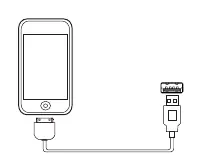
- Connect your device's charging cable to the USB (OUT) port of the power bank.
- Connect the other end to your mobile device.
- Charging will start automatically.
- After disconnecting the device, the power bank will automatically turn off after 30 seconds.
Troubleshooting
- Indicator not on: You may be using an incorrect charger or a faulty cable. Use a charger that meets specifications and replace the cable.
- Overheating: Stop using the device immediately and contact technical support.
- Device not charging: The cable may be faulty or there is a connection error. Replace the cable or verify the connection.
- Power bank does not turn on: The battery may be empty. Reconnect to a power source.
Specifications
- Input (DC): 5V, 1.0A - 2.1A.
- Output (DC): 5V, 1.0A - 2.1A.
- Compatibility: Phones, tablets, MP3/MP4 players, PSP/NDS consoles.
Manufacturer information
Gadnic
Practical help
Common problems
Indicator light does not turn on
Ensure you are using a compatible charger and a functional USB cable.
Device overheating
Stop using the power bank immediately and contact technical support.
Cannot charge mobile device
Check the USB cable for damage and ensure the connection to the USB port is secure.
Power bank does not turn on
The battery level is likely at zero. Reconnect the power bank to a charger.
Before use
- Charge the power bank fully before the first use.
- Use an official charger that meets the 5V/1A-2.1A specification.
- Verify that the USB cable is in good condition.
- Ensure the operating environment is between 0 and 35°C.
Images and diagrams
- The 'IN' port is specifically for charging the power bank.
- The 'USB' port is for connecting and charging your mobile devices.
Model compatibility
- Compatible with most mobile devices including phones, tablets, MP3/MP4 players, and portable consoles like PSP/NDS.

Manual page author
Emily Carter
User documentation editor
Prepares concise manual descriptions and highlights the most useful setup, operation, and maintenance information for readers.