Garden / Outdoor
User Manual for GARDENA 3000 Silent 18V P4A Garden Pump
Quick guide and user manual for the GARDENA 3000 Silent 18V P4A Garden Pump. Includes installation, operation, maintenance, and troubleshooting steps.
Table of contents
Manual images
Click an image to enlargeQuick guide from the manual
This manual provides essential information for the safe and efficient operation of the GARDENA 3000 Silent 18V P4A Garden Pump. Always read the safety instructions before use.
Product Description
The GARDENA Garden Pump is designed for watering, water supply, and cleaning tasks in private gardens and allotments. It is powered by the POWER FOR ALL 18V battery system.
Installation
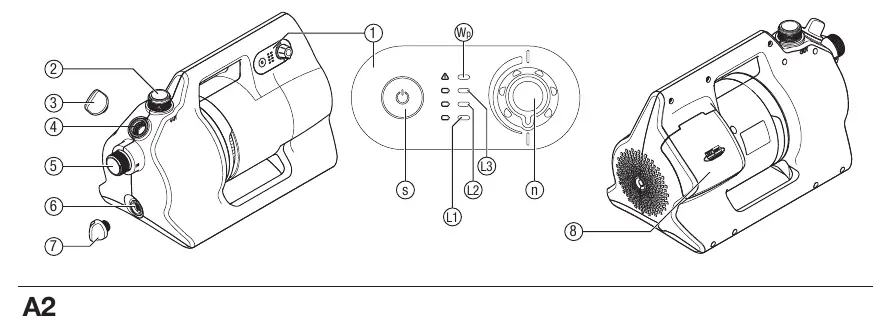
- Setup: Place the pump on a level, firm, and dry surface at least 2m away from the water. Ensure ventilation slots are not covered.
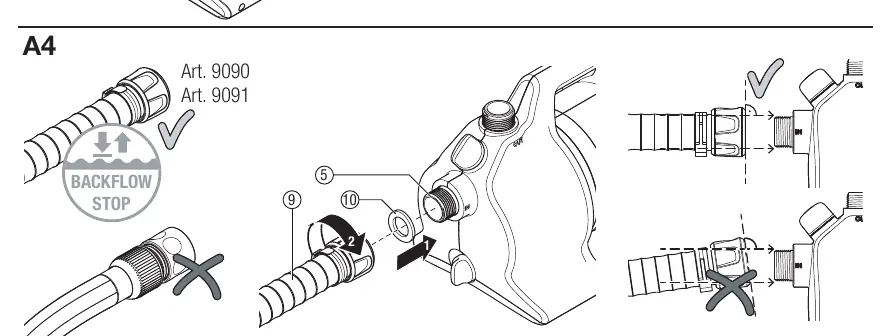
- Suction Hose: Use a vacuum-resistant suction hose. Connect it to the (In) connection on the pump. Ensure an airtight seal.
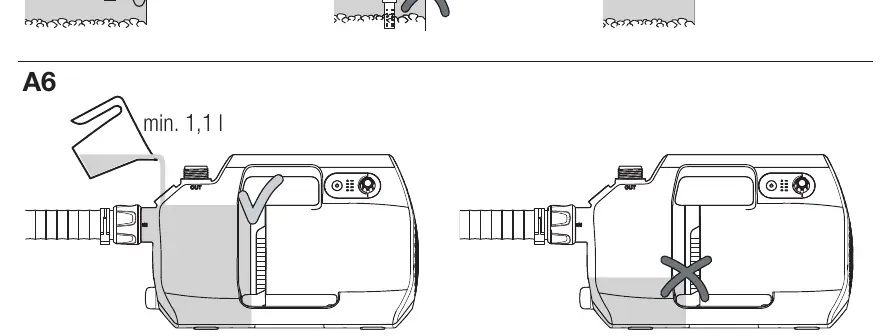
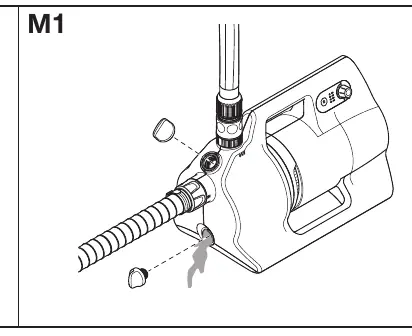
- Filling: Before each startup, fill the pump with at least 1.1 liters of water through the filling opening until it reaches the opening on the suction side.
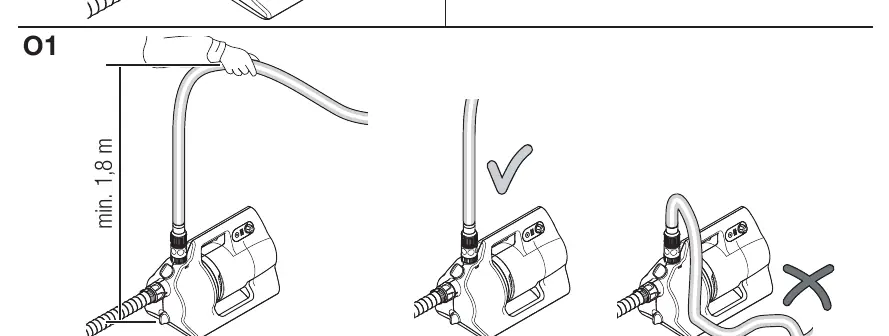
- Pressure Hose: Connect the pressure hose to the (Out) connection. Ensure the hose is fully extended and slopes upwards from the pump to allow air to escape during priming.
Operation
- Starting: Open all shut-off valves and consumers. Press the On/Off button on the control panel.
- Priming Mode: To speed up the priming process, press and hold the On/Off button for 3 seconds. The pump will run at increased power.
- Adjusting Power: Use the rotary knob to adjust the pump power continuously.
- Stopping: Press the On/Off button on the control panel.
Maintenance
- Cleaning: Do not use a water jet or chemicals to clean the pump. Clean the housing with a damp cloth and air vents with a soft brush.
- Flushing: Flush the pump after pumping chlorinated water by pumping lukewarm water until clear.
- Battery/Charger: Keep contacts clean and dry. Use a soft, dry cloth for cleaning.
Storage
Store the pump in a frost-proof location. Before storage, remove the battery, drain the pump by tilting it approx. 80° towards the drain opening, and clean all components.
Troubleshooting
If the pump does not start or stops, check the LED indicators on the control panel. A flashing green LED indicates an empty battery. A red LED indicates errors such as dry-run protection, battery temperature issues, or a blocked motor. Refer to the troubleshooting table in the manual for specific remedies.
Manufacturer information
GARDENA
Practical help
Common problems
Pump runs but does not suction
Check suction line for leaks, ensure end of hose is in water, fill pump with water, check suction filter/backflow preventer.
Pump does not start or stops (LED flashes green)
Battery is empty, charge the battery.
Pump does not start or stops (Error LED lights up red)
Battery temperature out of range, dry-run protection tripped, control panel too hot, motor blocked.
Before use
- Ensure battery is charged
- Check suction hose for airtight connection
- Fill pump with water up to overflow (min 1.1L)
- Connect pressure hose
- Ensure pump is on a level, firm surface
Specs in practice
- Max. delivery capacity
- 3000 l/h
- Max. pressure/delivery head
- 3.0 bar / 30 m
- Max. self-priming level
- 8 m
- Max. media temperature
- 35 °C
Images and diagrams
- A1: Overview of pump components
- A2: Battery and charger details
- A4: Suction hose connection
- A6: Filling the pump
- O1: Priming height
Model compatibility
- Compatible with POWER FOR ALL 18V batteries
- Use vacuum-resistant suction hoses

Manual page author
David Miller
Documentation analyst
Organizes user manual content into clear summaries, with attention to model details, product context, and everyday usability.