Garden / Outdoor
User Manual for GARDENA EasyWeed 1800/18V P4A Cordless Groove Brush
A comprehensive user guide for the GARDENA EasyWeed 1800/18V P4A Cordless Groove Brush. This manual covers assembly, battery charging, operation, maintenance, troubleshooting, and technical specifications.
Table of contents
Quick guide from the manual
The GARDENA EasyWeed 1800/18V P4A is a cordless tool designed for removing weeds from joints between paving slabs and panels in private gardens. It is not suitable for professional, continuous operation.
Assembly
The weed brush is supplied pre-assembled. If you need to replace the brush, follow these steps:
- Loosen the Allen screw using a 4 mm Allen key by turning it clockwise (left-hand thread).
- Remove the screw and washer from the brush holder.
- Pull the old brush sideways from the holder and downwards out of the safety guard.
- Slide the new brush into the safety guard from underneath and place it onto the holder.
- Replace the washer and screw, then tighten firmly by turning the Allen key anticlockwise.
Operation
Charging the battery
The smart charging process automatically detects the battery's state of charge and charges it with the optimal current. Note: Charging is only possible if the battery temperature is within the permissible range (0 °C to +35 °C).
- Press the release button and remove the battery from the holder.
- Connect the charger to a power outlet and slide it onto the battery.
- A flashing green light indicates charging; a solid green light indicates the battery is fully charged.
Working position and adjustments
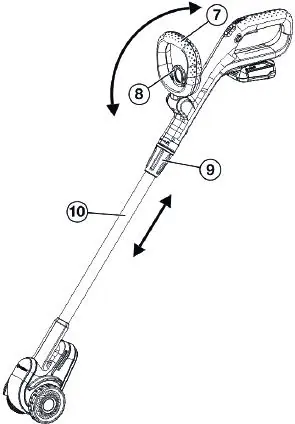
Hold the tool in an upright position with one hand on the handle and the other on the auxiliary handle. The auxiliary handle position and shaft length can be adjusted to suit your height by pulling the respective levers or sleeves.
Starting and stopping
To start, press the safety lock with one finger, hold the tool with both hands, and pull the start lever towards the handle. Release the start lever to stop the tool.
Maintenance
The ventilation slots must always be kept clean. Clean the tool with a damp cloth and the ventilation slots with a soft brush. Do not use water or chemical cleaners. If the housing touches the ground during use due to wear, the brush must be replaced.
Troubleshooting
If the tool does not start or stops unexpectedly, check the battery charge, ensure the battery is fully inserted, and check for obstructions blocking the motor or brush. If the error LED (Wp) is illuminated or flashing, refer to the troubleshooting table in the full manual.
Technical Data
- Brush speed: 700–1800 RPM
- Weight (without battery): 2.2 kg
- Sound pressure level: 67 dB(A)
Manufacturer information
GARDENA
Practical help
Common problems
Brush is blocked
Remove the obstruction.
Brush does not clean properly or vibrates
The brush is worn; replace it.
Tool does not start or stops
Check if the battery is flat, not fully inserted, or if the battery temperature is outside the permissible range.
Before use
- Check the work area for hidden cables.
- Ensure the safety guard is correctly fitted.
- Check for small stones in the brush and remove them.
- Ensure the battery is fully charged.
- Perform a short test run to check for effects on the surface.
Specs in practice
- Sound pressure level
- 67 dB(A) at the operator's position.
Images and diagrams
- O1/O2/O3: Battery charging process.
- O4: Battery state of charge indicator.
- O5: Correct working position.
- O6: Adjusting auxiliary handle and shaft length.
- O7: Adjusting rotation speed.
Model compatibility
- Compatible with POWER FOR ALL system batteries (PBA 18V).
- Use only original GARDENA brushes (Steel wire art. 14821 or Nylon art. 14822).

Manual page author
Emily Carter
User documentation editor
Prepares concise manual descriptions and highlights the most useful setup, operation, and maintenance information for readers.