Lighting / Decorative Lighting
Owner's Manual for GE Profile Side-by-Side Refrigerator
Quick guide for your GE Profile Side-by-Side Refrigerator. Learn about temperature controls, CustomCool, TurboCool, water filter replacement, installation, and troubleshooting.
Quick answers from the manual
Quick answer
- This manual provides comprehensive instructions for operating, installing, and maintaining your GE Profile Side-by-Side refrigerator, including temperature settings, water filter replacement, and troubleshooting. p. 1
Key actions
- Adjust temperature p. 5
- Replace water filter p. 9
- Use CustomCool p. 7
First start
- Allow 24 hours for temperature to stabilize after plugging in. p. 5
Problems and fixes
Refrigerator does not operate
Check power, controls, and defrost cycle.
p. 32Maintenance and reset
- Reset water filter light p. 9
Technical specifications
| Parameter | Value | Meaning | Pages |
|---|---|---|---|
| Refrigerator Temp Range | 34°F to 44°F | Adjustable range | p. 5 |
| Freezer Temp Range | -6°F to +6°F | Adjustable range | p. 5 |
Where to find it in the PDF
- Operating Instructions p. 5, 6, 7, 8
- Installation Instructions p. 19, 20, 21, 22
Table of contents
Manual images
Click an image to enlargeQuick Guide
This manual provides essential information for operating and maintaining your GE Profile Side-by-Side refrigerator. Key features include precise temperature controls, the CustomCool drawer, TurboCool for rapid cooling, and an automatic icemaker with water filtration.
Temperature Controls
The refrigerator is factory-preset to 37°F (refrigerator) and 0°F (freezer). Allow 24 hours for temperatures to stabilize after initial startup.
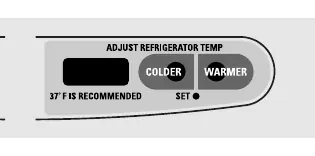
- Adjusting Temperature: Press the WARMER or COLDER pads. The display shows the set temperature. Refrigerator range: 34°F to 44°F. Freezer range: -6°F to +6°F.
- TurboCool: Rapidly cools the refrigerator compartment. Press the TurboCool pad; the display will show TC. It runs for 8 hours or until pressed again.
- CustomCool: A specialized drawer for chilling, thawing, or holding specific temperatures. Select ExpressThaw, ExpressChill, or SelectTemp.
Water and Ice
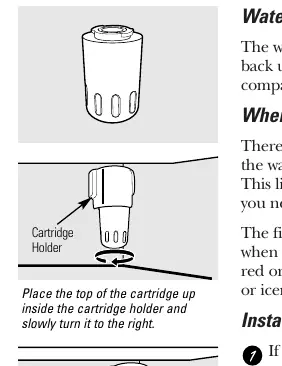
- Water Filter: Located in the upper right corner of the refrigerator. Replace when the indicator light turns red or water flow decreases. After installation, run water for 3 minutes to clear the system.
- Dispenser: Select Cubed Ice, Crushed Ice, or Water. Press the glass against the cradle.
- Locking: Hold the LOCK CONTROL pad for 3 seconds to lock the dispenser and control panel.
Storage and Organization
- Shelves and Bins: Many shelves are adjustable. Slide-out spillproof shelves can be removed by pressing the tab and sliding out.
- Crispers: Humidity controls allow you to set drawers to HI (vegetables) or LO (fruits).
Installation
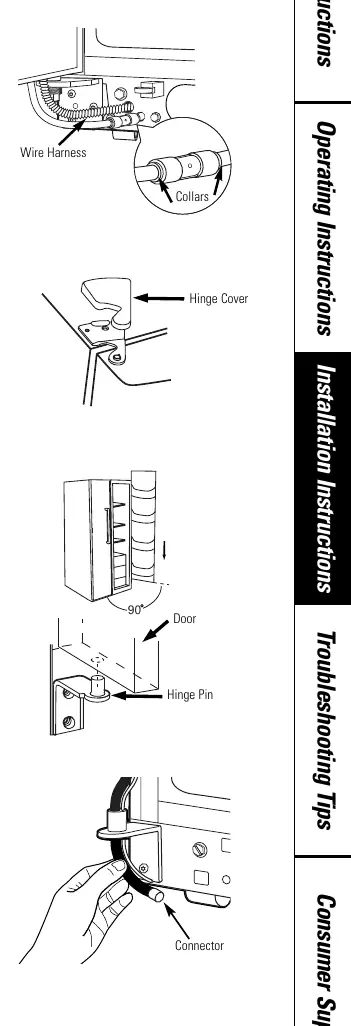
Proper installation is critical for performance. Ensure the refrigerator is level using the front rollers. If installing a water line, use only approved tubing (GE SmartConnect or copper) and ensure the shutoff valve is accessible.

Maintenance and Cleaning
- Cleaning: Use a solution of 1 tablespoon baking soda to 1 quart of water for interior cleaning. Do not use harsh chemicals or abrasive cleaners.
- Light Bulbs: Unplug the refrigerator before replacing bulbs. Use appliance bulbs of the same or lower wattage.
Troubleshooting
If the refrigerator does not operate, check if it is in a defrost cycle (wait 30 minutes), unplugged, or if the controls are set to OFF. For ice dispenser issues, ensure the dispenser is not locked and the icemaker is turned on.
Practical help
Common problems
Refrigerator does not operate
Check if it is in a defrost cycle (wait 30 minutes), if the controls are set to OFF, or if the unit is unplugged.
Water filter indicator light is red
Replace the water filter cartridge.
Ice dispenser not working
Check if the dispenser is locked (hold LOCK CONTROL for 3 seconds) or if the icemaker power switch is in the OFF position.
Refrigerator or freezer too warm
Adjust temperature controls to a colder setting and allow 24 hours for the temperature to stabilize.
Before use
- Remove protective film from temperature controls
- Allow 24 hours for temperature to stabilize
- Flush water system for 3 minutes after filter installation
- Ensure refrigerator is level using rollers
- Verify water supply is connected and turned on
Specs in practice
- Performance Air-Flow System
- Air tower and tunnel system for uniform cooling.
Images and diagrams
- Temperature control panel layout
- Water filter installation steps
- CustomCool tray disassembly
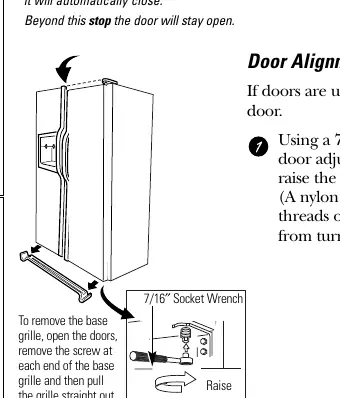
- Door alignment procedure
Model compatibility
- Water filter GWF
- CustomStyle models require specific panel dimensions

Manual page author
Emily Carter
User documentation editor
Prepares concise manual descriptions and highlights the most useful setup, operation, and maintenance information for readers.