Health / Medical Imaging
DICOM Conformance Statement for Senographe Pristina 10.x
Technical DICOM conformance statement for the Senographe Pristina 10.x mammography imaging system, detailing supported services, network communication, and interoperability specifications.
Table of contents
Manual images
Click an image to enlargeQuick guide from the manual
This document provides the DICOM Conformance Statement for the Senographe Pristina 10.x mammography imaging system. It is intended for system integrators, field service engineers, and hospital IT staff to assess interoperability and configure the system for network communication with other DICOM-compliant devices.
Overview of Implemented Services
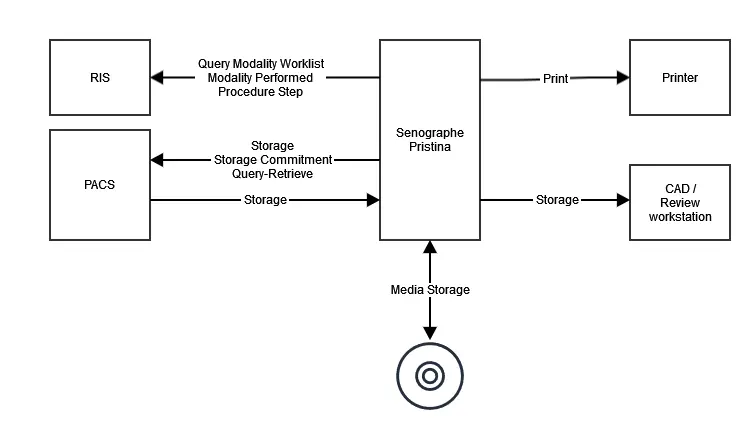
The Senographe Pristina provides DICOM 3.0 support to receive scheduled procedures from a Radiology Information System (RIS), update procedure status, transfer and archive images to a PACS or Review Workstation, print images, and export data on media. The system supports various Storage SOP Classes, including Breast Tomosynthesis Image Storage, Digital Mammography X-Ray Image Storage, and X-Ray Radiation Dose SR Storage.
Implementation Model
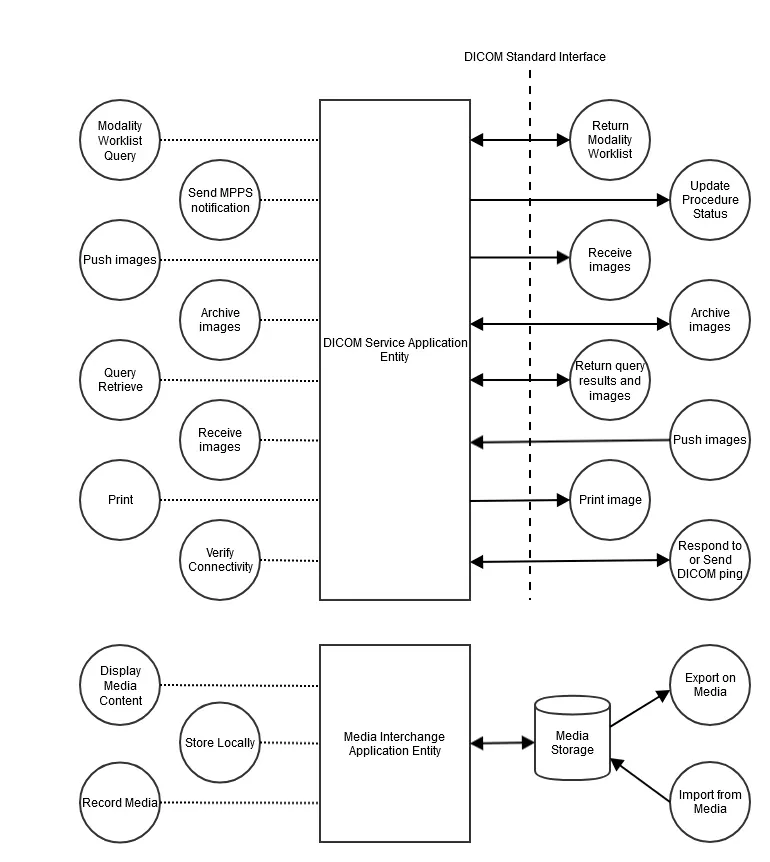
The system utilizes a DICOM Service Application Entity (AE) and a Media Interchange Application Entity. The DICOM Service AE handles network-based activities such as Modality Worklist queries, image storage, and printing. The Media Interchange AE manages reading and writing DICOM file sets on removable media.
Service and Interoperability Description
The system supports several key DICOM services:
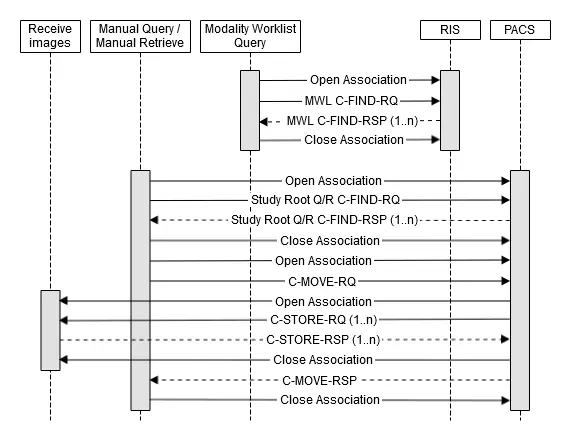
- Basic Worklist Management: Allows the system to query a remote SCP for scheduled procedure steps.
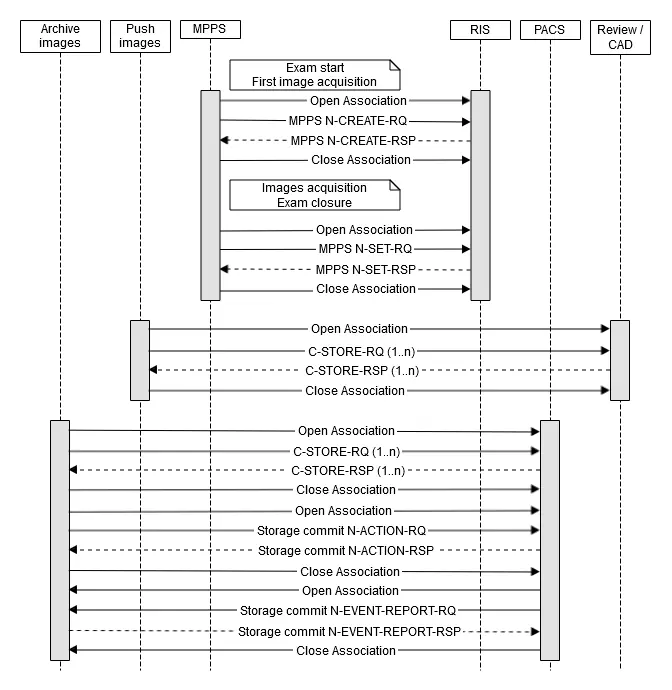
- Storage Service: Enables the system to push images to remote DICOM AEs, either manually or automatically.
- Storage Commitment: Requests storage commitment from a remote SCP to ensure images are archived.
- Query/Retrieve: Allows the system to query remote databases and retrieve studies, series, or images.
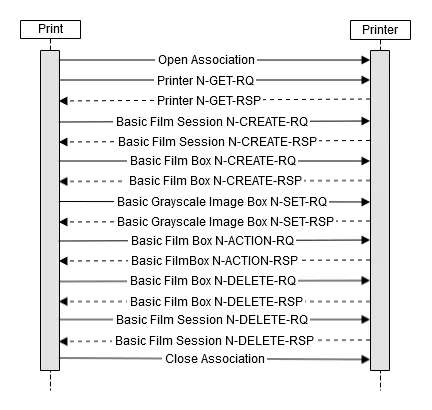
- Print Management: Supports printing to DICOM-compliant printers using the Basic Grayscale Print Management Meta SOP Class.
Configuration
Configuration parameters are accessible through the Service User Interface in the Service Desktop. Parameters are categorized as User-configurable, Service-configurable, or Fixed. Key configuration areas include:
- General Parameters: Timeouts for association requests and TCP/IP settings.
- DIMSE Services: Configuration for Worklist, MPPS, Storage, Query/Retrieve, and Print Management services, including AE titles, ports, and host information.
- Audit Trail: Configuration for Syslog-based audit trail reporting.
Network and Media Communication
The system implements a single network AE. Association parameters, such as maximum PDU length and association limits, are defined to ensure stable network communication. The system supports various transfer syntaxes, including Explicit and Implicit VR Little Endian, and JPEG Lossless for specific image types.
Security
The system includes security features such as:
- External Network Requirements: Support for NTP for time synchronization, DHCP for network address management, and LDAP for application configuration.
- DICOM Security Profiles: Support for secure transport connection profiles (TLS) and audit trail message transmission.
Information Object Definitions (IODs)
The document provides detailed definitions of the Information Objects created by the system, including Breast Tomosynthesis Image IOD, CT Image IOD, Digital Mammography X-Ray Image IOD, and X-Ray Radiation Dose SR IOD. These sections detail the modules and attributes used in these objects.
Practical help
Common problems
Association failure
Check network configuration, verify AE titles on both the system and the remote device, and ensure the remote device is reachable.
Storage failure
Verify that the receiving PACS has sufficient disk space and that the system is configured with the correct storage AE title and port.
Worklist query failure
Verify RIS connectivity, check that the correct AE title is configured for the worklist SCP, and ensure the system is not experiencing network timeouts.
Before use
- Verify network connectivity between the system and the PACS/RIS.
- Ensure correct AE titles are configured for all remote devices.
- Check that the required DICOM SOP classes are supported by the receiving system.
- Verify TCP/IP settings and port configurations.
- Ensure the system time is synchronized via NTP if required.
Specs in practice
- Transfer Syntax
- The encoding method used for exchanging DICOM data.
Images and diagrams
- Figure 1-1: Overview of Implemented Services showing the system's interaction with RIS, PACS, and other devices.
- Figure 4-1: Application Data Flow Diagram illustrating the DICOM Service AE and Media Interchange AE.
- Figure 7-1: Sequencing of activities before starting an exam, including worklist queries.
- Figure 7-2: Sequencing of activities during and after an exam, including image storage and commitment.
- Figure 7-3: Sequencing of activities for printing.
Model compatibility
- Supports DICOM 3.0 standards.
- Supports various transfer syntaxes including JPEG Lossless and Uncompressed.
- Compatible with standard RIS and PACS systems supporting the listed SOP classes.

Manual page author
Emily Carter
User documentation editor
Prepares concise manual descriptions and highlights the most useful setup, operation, and maintenance information for readers.