Mobile / Smartphones
Operator's Manual for Genie GS™-1432m, GS™-1932m, GS™-1932m XH
Quick guide for Genie GS™-1432m, GS™-1932m, and GS™-1932m XH scissor lifts, covering safety, pre-operation inspections, controls, operation, and maintenance.
Table of contents
Manual images
Jump to the sectionQuick guide from the manual
This manual provides essential operating and maintenance instructions for the Genie GS™-1432m, GS™-1932m, and GS™-1932m XH scissor lifts. Operators must be trained and qualified to operate Mobile Elevating Work Platforms (MEWP). Always keep this manual in the storage container on the platform.
Safety
Failure to follow instructions can result in death or serious injury. Key safety requirements include:
- Perform pre-operation inspections and functional tests before every shift.
- Inspect the workplace for hazards such as slopes, holes, debris, and overhead obstructions.
- Do not operate the machine during lightning or storms.
- Maintain safe distances from power lines.
- Ensure the machine is on a firm, level surface before elevating the platform.
- Do not exceed the platform load capacity.
Controls
The machine features both ground and platform control panels. The ground control panel is used for testing and emergency rescue. The platform control panel includes proportional joystick controls for drive, steer, and lift functions, as well as emergency stop buttons and mode selection buttons (indoor/outdoor).
Operation
To operate the machine:
- Ensure batteries are connected.
- Turn the key switch to the desired control mode (Ground or Platform).
- Pull out the red Emergency Stop button.
- Select the operating mode (Indoor/Outdoor).
- Use the function enable switch and joystick to perform movements.
After use, park the machine on a level surface, lower the platform, turn the key to off, remove the key, and charge the batteries.
Maintenance
Operators are responsible for daily pre-operation inspections and routine maintenance. Scheduled maintenance must be performed by qualified service technicians. Always check hydraulic oil levels and battery condition regularly. Use only Genie-approved replacement parts.
Troubleshooting
The machine uses LED/LCD diagnostic displays to indicate status and faults. Common indicators include 'LL' (Machine Tilted), 'OL' (Platform Overloaded), and 'PHS' (Pothole Guard Stuck). Refer to the manual for specific recovery procedures for these codes.
Manufacturer information
Genie
Practical help
Common problems
Machine Tilted (LL) indicator
Lower the platform and move the machine to a firm, level surface.
Platform Overloaded (OL) indicator
Remove excess weight from the platform, then cycle the Emergency Stop button.
Pothole Guard Stuck (PHS)
Ensure the area under the pothole guards is clear of debris and that the machine is on level ground.
Before use
- Check for hydraulic oil leaks and proper oil level.
- Inspect battery fluid levels and connections.
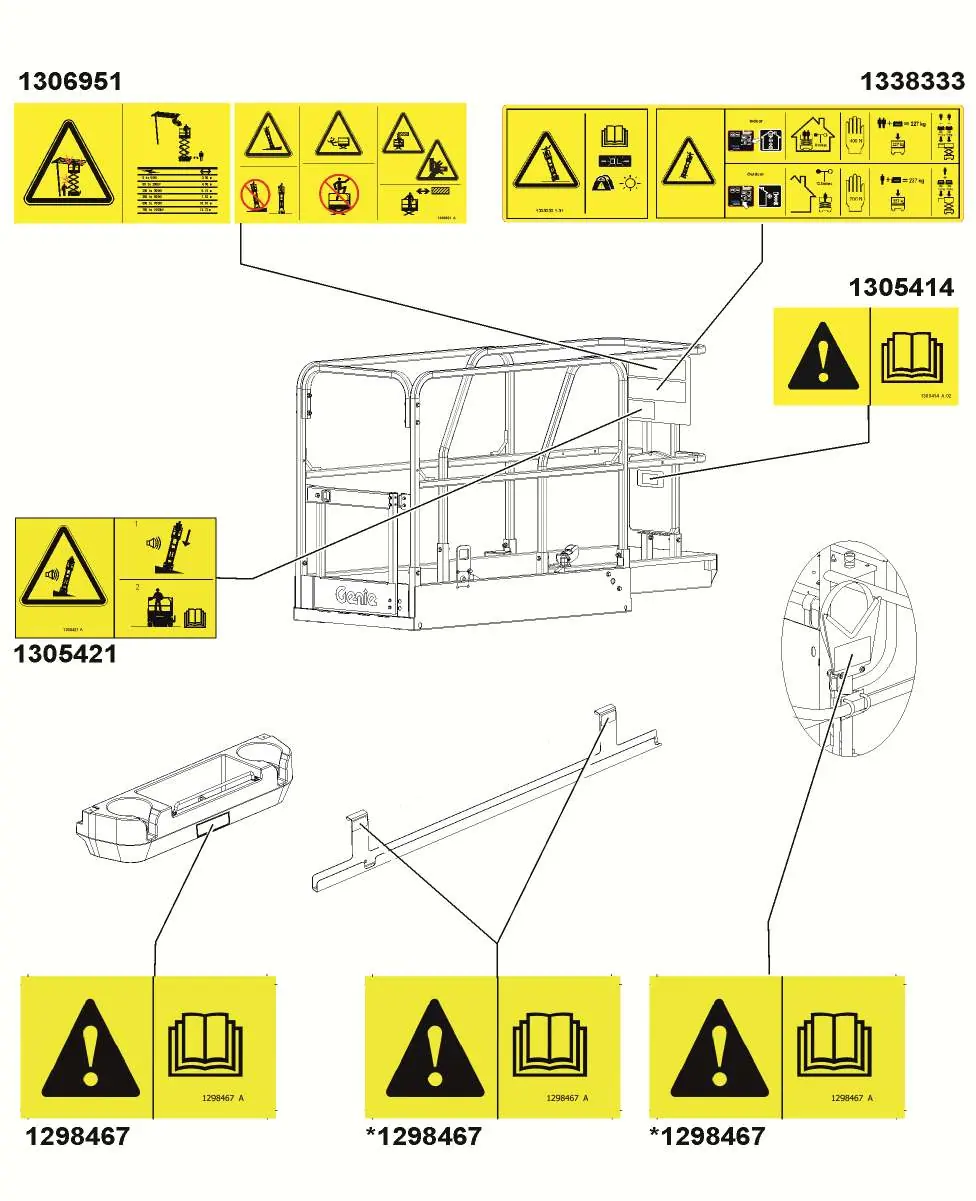
- Verify all safety labels are in place and legible.
- Check tires and wheels for damage.
- Ensure the platform gate is closed and secure.
- Test all emergency stop buttons.
- Inspect structural components for cracks or damage.
Specs in practice
- Max Platform Capacity
- Maximum weight allowed on the platform, including personnel, tools, and materials.
- Gradeability
- The maximum slope the machine can safely traverse in stowed position.
- Max Wind Speed
- Maximum wind speed for safe operation; do not operate if exceeded.
Images and diagrams
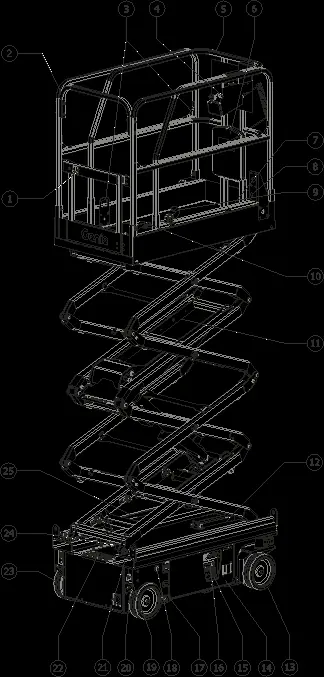
- The manual includes a detailed legend (page 22) identifying all major components like the platform gate, joystick, tilt alarm, and battery charger.
- Safety label diagrams (pages 10-12) show the exact placement of all warning and instruction decals on the machine.
Model compatibility
- The machine is not electrically insulated; maintain safe distances from power lines.
- Use only Genie-approved batteries and chargers.
- Certain options (like pipe cradles or panel cradles) reduce the total platform capacity.

Manual page author
David Miller
Documentation analyst
Organizes user manual content into clear summaries, with attention to model details, product context, and everyday usability.