Home Appliances / Vacuum Cleaners
User Manual for Grundig VCH 9832 2-in-1 Cordless Stick Vacuum Cleaner
Quick guide for the Grundig VCH 9832 2-in-1 cordless stick vacuum cleaner. Includes setup, operation, cleaning, maintenance, and technical specifications.
Quick answers from the manual
Quick answer
- The Grundig VCH 9832 is a 2-in-1 cordless stick vacuum. To operate, ensure it is charged, then use the on/off button on the handle. Detach the handheld unit by pressing the release button. p. 4, 16
Key actions
- Charging the vacuum p. 4
- Cleaning the filter p. 5
First start
- Assemble the vacuum, charge it for 5 hours, and use the on/off button on the handle. p. 4
Problems and fixes
Appliance blocked
Check the air duct and ventilation slots for obstructions and clean them.
p. 15Technical specifications
| Parameter | Value | Meaning | Pages |
|---|---|---|---|
| Input Voltage | 100-240V~ | Standard mains voltage range | p. 18 |
Where to find it in the PDF
- Parts Diagram p. 3
- Operation Steps p. 4
- Cleaning and Maintenance p. 5
Table of contents
Manual images
Click an image to enlargeQuick guide from the manual
The Grundig VCH 9832 is a 2-in-1 cordless stick vacuum cleaner designed for domestic use. Before first use, ensure the device is fully charged. The vacuum is intended for dirt and dust particles; do not use it to vacuum large objects, cigarette stubs, ash, or matches, as these can block or damage the appliance.
Product Overview
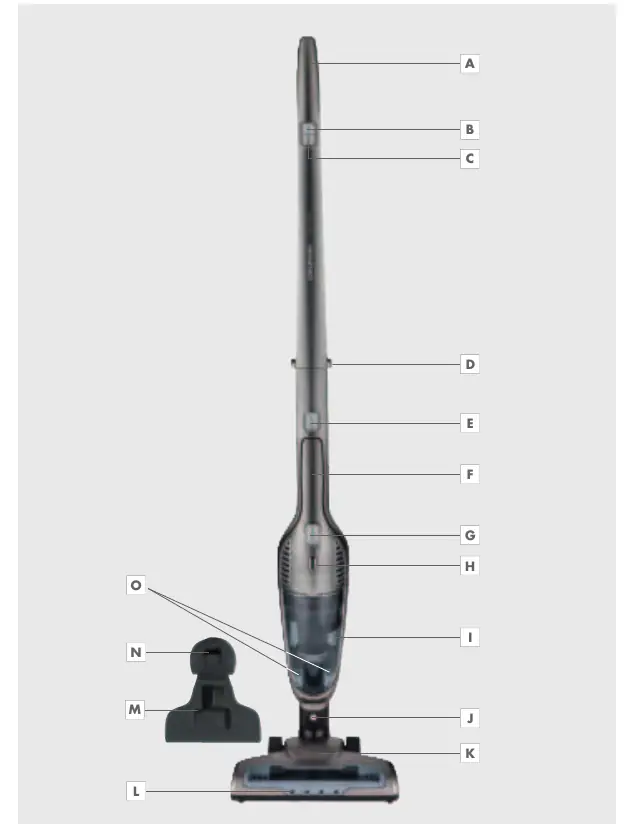
The vacuum consists of a stick handle, a cordless handheld unit, a dust container, and a turbo brush. Accessories include a dust brush for sensitive objects and an upholstery tool for floors, stairs, and cars.
Operation
Charging: Connect the charging station to a power outlet. Place the vacuum in the station to charge. The LED indicator shows the charging status.
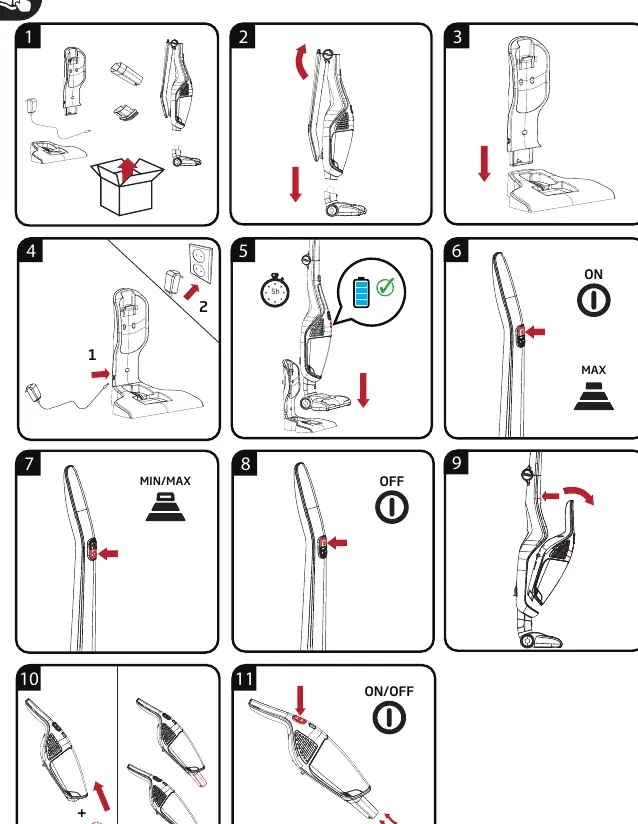
Usage: Use the on/off button on the handle to start the vacuum. You can adjust the speed using the speed adjustment button. To use as a handheld vacuum, press the release button to detach the handheld unit from the stick.
Cleaning and Maintenance
Dust Container and Filter: Regularly empty the dust container. The EPA E10 filter should be cleaned when necessary. Switch off and unplug the appliance before cleaning. Never use gasoline, solvents, abrasive cleaning agents, or hard brushes to clean the device.
Blockages: If the air duct or ventilation slots are blocked, the vacuum will not function correctly. Keep these areas free of dust, hair, and other obstructions.
Safety Information
- Do not use on wet surfaces or in wet environments.
- Do not operate with wet hands.
- Keep the appliance away from children.
- Do not dismantle the appliance.
- Only use the provided power cord.
- If the appliance or power cord is damaged, have it repaired by an authorized service center.
Practical help
Common problems
Appliance not working
Ensure the battery is charged and the power cord is connected properly.
Weak suction
Clean the filter and check the air duct and suction intake for blockages.
Appliance blocked
Remove any hair, dust, or large objects from the air duct and ventilation slots.
Before use
- Ensure the filter is correctly installed.
- Check that the suction intake is free of obstructions.
- Charge the battery fully before the first use.
- Verify that the local mains voltage matches the rating label.
Specs in practice
- Input Voltage
- 100-240V~ (Compatible with standard household outlets)
- Output Power
- 13.5W (Power output of the external power supply)
Images and diagrams
- Page 3: Parts diagram identifying components A through O.
- Page 4: Visual guide for assembly, charging, and operation steps.
- Page 5: Visual guide for cleaning the dust container, filter, and brush.
Model compatibility
- Use only original GRUNDIG accessories for replacements.
- Designed for domestic use only; industrial or commercial use voids the warranty.

Manual page author
Emily Carter
User documentation editor
Prepares concise manual descriptions and highlights the most useful setup, operation, and maintenance information for readers.