Electronics / Monitors
Hama 180x180 cm Screen with Tripod
Professional 180x180 cm projection screen with a stable tripod stand, designed for high-quality presentations and home cinema setups.
Table of contents
Product Overview
The Hama 180x180 cm projection screen is a versatile solution for professional presentations and home entertainment. It features a robust, height-adjustable tripod stand that ensures stability on various surfaces. The screen surface is designed to provide clear, high-contrast images, making it suitable for both business and personal use.
Setup and Installation
Setting up the screen is straightforward and requires no specialized tools. Follow these steps to ensure proper operation:
- Place the tripod on a flat, stable surface to prevent tipping.
- Extend the tripod legs fully and lock them into position.
- Raise the central pole to the desired height and secure it using the integrated locking mechanism.
- Attach the screen housing to the top of the tripod mount.
- Pull the screen handle upwards to the desired height and hook it onto the top support bar.
Screen Detachment
The screen can be removed from the tripod for wall mounting or storage purposes. To detach the screen:
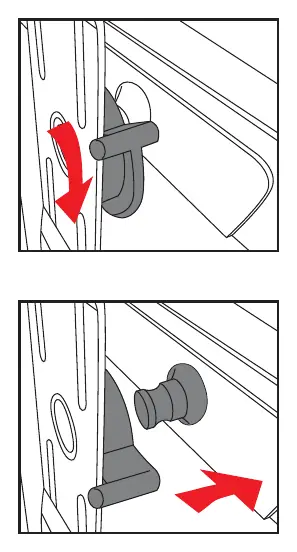
- Ensure the screen is fully retracted into its housing.
- Locate the locking lever on the rear of the screen housing.
- Rotate the lever to the unlocked position as indicated by the visual guides.
- Carefully slide the screen housing off the tripod mounting bracket.
Safety and Maintenance
To ensure the longevity of your Hama projection screen, please adhere to the following guidelines:
- Always retract the screen fully into its protective housing when not in use to prevent dust accumulation and accidental damage.
- Clean the screen surface only with a soft, dry, or slightly damp cloth. Avoid using harsh chemicals or abrasive cleaning agents that could damage the projection surface.
- Do not attempt to force the mechanism if you encounter resistance during setup or retraction. Check for obstructions or misalignments.
- Keep the tripod legs clear of debris to ensure smooth operation of the height adjustment mechanism.
- Store the unit in a cool, dry place away from direct sunlight when not in use for extended periods.
Troubleshooting
If the screen does not retract smoothly, ensure that it is being pulled straight up and down. If the tripod feels unstable, verify that all legs are fully extended and that the floor surface is level. For any mechanical issues, do not attempt to disassemble the internal spring mechanism, as this can be dangerous and will void the warranty.
Related manuals
Related manuals from the same brand or category.
Computers / Laptops
Hama 16000mAh Power Pack
HAMAPower / Batteries Chargers
Hama Safety 150W Car Power Inverter
HAMA
Manual page author
Michael Turner
Technical manual editor
Reviews PDF manuals for structure, safety notes, and practical product details so readers can find the right information quickly.