Home Appliances / Coffee Equipment
User Manual for Hamilton Beach The Scoop™ 2-Way Brewer
Quick guide for the Hamilton Beach The Scoop™ 2-Way Brewer. Learn how to brew single-serve or carafe coffee, program the timer, clean the unit, and troubleshoot common issues.
Quick answers from the manual
Quick answer
- The Hamilton Beach The Scoop™ 2-Way Brewer allows you to brew coffee either into a single-serve mug or a full carafe. Use the selector lever to choose the side, fill the reservoir, add grounds, and press the I/O button to start. p. 3, 4, 7
Key actions
- Brewing Single-Serve: Select side, fill reservoir (max 14 oz), add grounds, press I/O. p. 4, 5
- Brewing Carafe: Select side, fill reservoir (max 12 cups), add grounds, press I/O. p. 7, 8
First start
- Set the clock using the HOUR and MINUTE buttons. p. 9
Problems and fixes
Weak coffee
Use more ground coffee.
p. 12, 13
Coffee overflows
Use less grounds, especially for decaf/flavored coffee.
p. 12, 13Maintenance and reset
- Clean the unit monthly using a vinegar and water solution. p. 10, 11
Technical specifications
| Parameter | Value | Meaning | Pages |
|---|---|---|---|
| Single-Serve Capacity | 14 oz (410 ml) | Maximum water capacity for single-serve side. | p. 4 |
| Carafe Capacity | 12 cups (1.8 L) | Maximum water capacity for carafe side. | p. 7 |
Where to find it in the PDF
- Single-Serve Usage p. 4, 5, 6
- Carafe Usage p. 7, 8
- Cleaning p. 10, 11
Table of contents
Manual images
Click an image to enlargeQuick guide from the manual
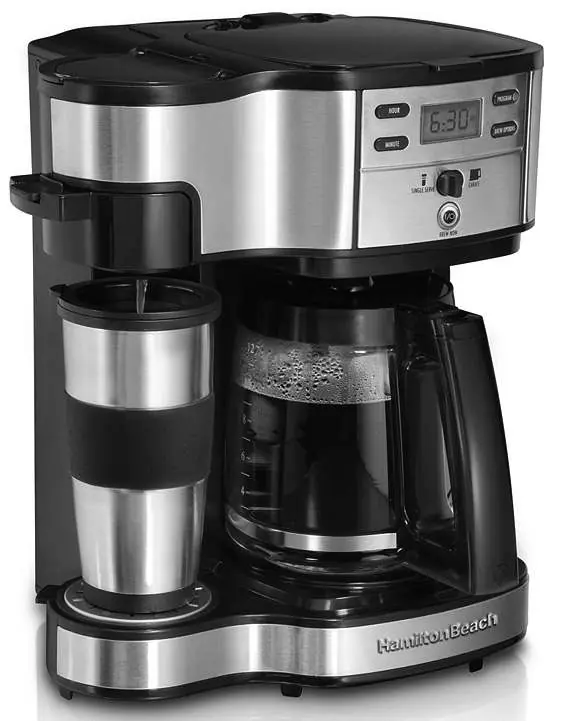
The Hamilton Beach The Scoop™ 2-Way Brewer is a versatile coffee maker that allows you to brew either a single cup or a full carafe. The unit features a selector lever to choose between the Single-Serve side and the Carafe side. It includes a programmable timer and an automatic shutoff feature (40 minutes for single-serve, 2 hours for carafe). Always ensure the unit is on a flat surface and never overfill the reservoirs.
Product overview
The coffee maker consists of two main brewing sides:
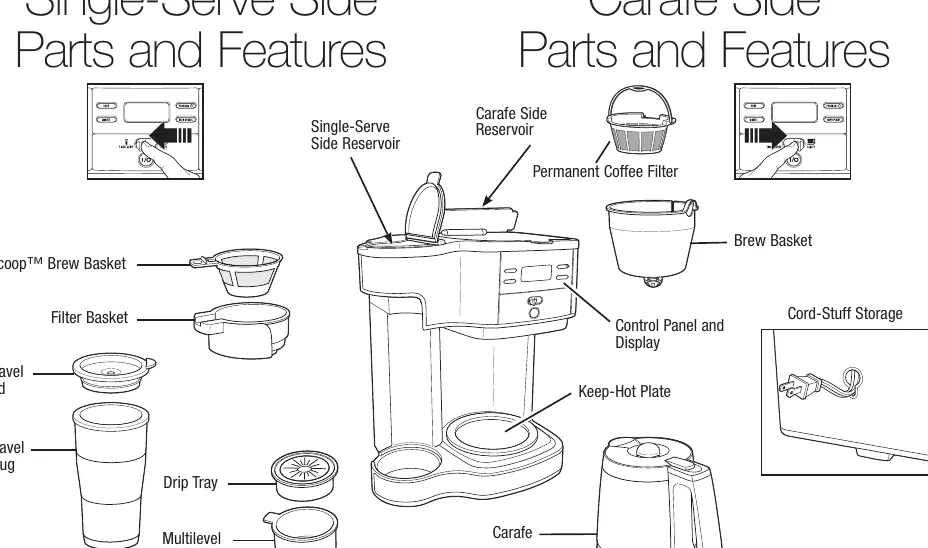
- Single-Serve Side: Includes a reservoir, Scoop™ brew basket, filter basket, and cup rest. Designed for brewing directly into a mug or travel mug.
- Carafe Side: Includes a reservoir, brew basket, permanent coffee filter, and glass carafe. Designed for brewing into the carafe.
- Control Panel: Features buttons for HOUR, MINUTE, PROGRAM, and BREW OPTIONS, along with a display and the main I/O (ON/OFF) button.
Using the Single-Serve side
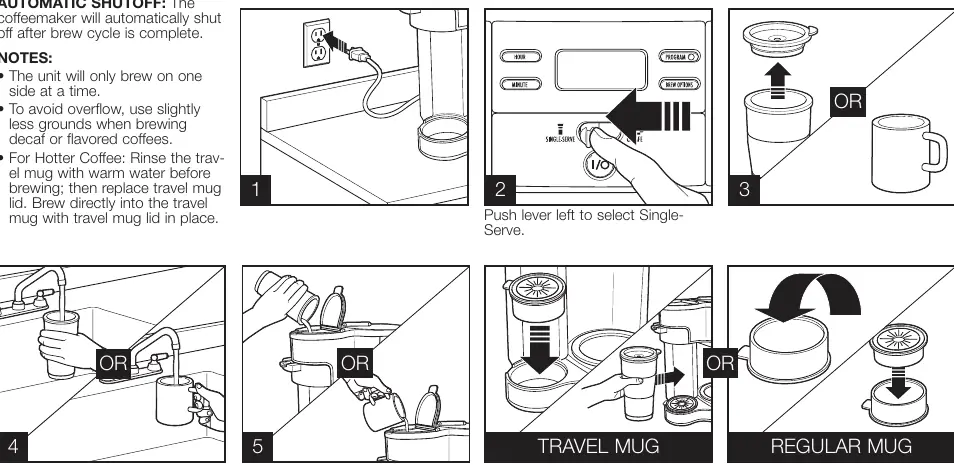
- Push the selector lever to the left to select Single-Serve.
- Fill the single-serve reservoir with the mug or cup you intend to use for brewing. Do not exceed 14 ounces (410 ml).
- Place the mug or cup under the filter basket.
- Add coffee grounds to the brew basket (maximum two level tablespoons). Do not fill above the MAX fill line.
- Press the I/O button to begin brewing. The unit will shut off automatically when the cycle is complete.
Using the Carafe side
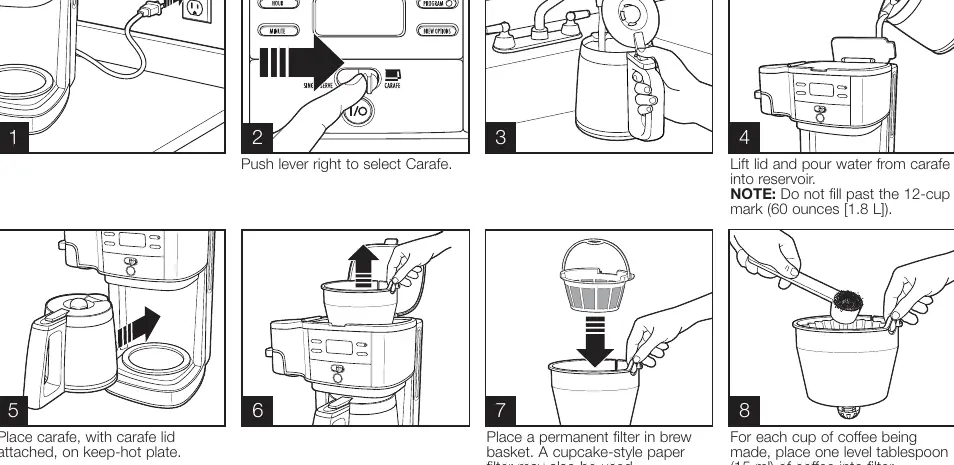
- Push the selector lever to the right to select Carafe.
- Lift the lid and pour water from the carafe into the reservoir. Do not fill past the 12-cup mark (1.8 L).
- Place the carafe with the lid attached on the keep-hot plate.
- Place the permanent filter in the brew basket and add one level tablespoon of coffee grounds per cup.
- For stronger coffee, press the BREW OPTIONS button until BOLD is displayed.
- Press the I/O button to start. The unit will shut off automatically after 2 hours.
Programming
You can program the coffee maker to start brewing automatically:
- Press the HOUR and MINUTE buttons to set the current clock time.
- Hold the PROGRAM button until the clock flashes.
- While holding the PROGRAM button, press HOUR and MINUTE to set the desired start time.
- Release the PROGRAM button and press it again to activate automatic brewing. A green LED will illuminate.
Care and cleaning
Clean the coffee maker at least once a month (or once a week in hard water areas):
- Single-Serve Side: Pour 1/2 cup (125 ml) of white vinegar and 1/2 cup (125 ml) of cold water into the reservoir. Press I (ON), then O (OFF) after 30 seconds. Wait 30 minutes, then press I (ON) again. Finish by running 2-3 cycles with clean water.
- Carafe Side: Pour 1 pint (500 ml) of white vinegar into the reservoir. Follow the same I/ON/OFF procedure as above. Finish by running 2-3 cycles with clean water.
Troubleshooting
If you encounter issues, check the following:
- Weak coffee: Use more ground coffee.
- Overflow: Use slightly less grounds, especially for decaf or flavored coffees. Ensure the filter is positioned correctly.
- Coffee tastes bad: The machine needs cleaning, or the coffee/water quality is poor.
- Unit won't turn on: Ensure it is plugged in, the reservoir is not empty, and the carafe is properly positioned.
Manufacturer information
Hamilton Beach
Practical help
Common problems
Weak coffee
Use more ground coffee.
Coffee overflows from brew basket or mug
Use slightly less grounds, especially for decaf or flavored coffees. Ensure the filter is not overfilled.
Coffee tastes bad
Clean the coffee maker. Ensure you are using fresh coffee and filtered or bottled water.
Unit will not turn on
Check if the unit is plugged in, the water reservoir is empty, or the carafe is not positioned on the keep-hot plate.
Before use
- Ensure the coffee maker is on a flat surface.
- Check that the carafe is empty and clean.
- Ensure the brew basket is properly seated.
- Check water reservoir levels before brewing.
- Set the clock to the correct time.
Specs in practice
- Single-Serve Reservoir
- Max capacity of 14 oz (410 ml).
- Carafe Reservoir
- Max capacity of 12 cups (1.8 L).
Images and diagrams
- The lever on the control panel selects between the Single-Serve and Carafe brewing sides.
- The I/O button is the main power switch to start and stop the brewing cycle.
Model compatibility
- The unit will only brew on one side at a time.
- Use only the carafe designed for this coffee maker.

Manual page author
David Miller
Documentation analyst
Organizes user manual content into clear summaries, with attention to model details, product context, and everyday usability.