Home Appliances / Coffee Equipment
User Manual for Hamilton Beach 2-in-1 Oven & Toaster
Comprehensive user guide for the Hamilton Beach 2-in-1 Oven & Toaster (Models 31156, 31158, 31465). Includes setup, operating instructions for toasting, baking, and broiling, cleaning tips, and troubleshooting.
Quick answers from the manual
Quick answer
- The Hamilton Beach 2-in-1 Oven & Toaster functions as both a toaster and a toaster oven. Use the mode selector to switch between TOAST and OVEN modes. p. 4
Key actions
- To toast: Plug in, set mode to TOAST, insert bread, set shade, press lever. p. 5
- To bake/broil: Plug in, set mode to OVEN, set temperature, preheat 5 mins. p. 6
First start
- Wash baking pan and oven rack. Plug in and heat at 450°F (232°C) for 10 minutes to eliminate initial odors. p. 4
Problems and fixes
Oven will not heat
Check outlet, ensure mode selector is set to OVEN, and temperature knob is set.
p. 8Maintenance and reset
- Unplug and allow to cool. Wash removable parts in hot, soapy water. Wipe interior and exterior with a damp cloth. p. 7
Technical specifications
| Parameter | Value | Meaning | Pages |
|---|---|---|---|
| Power | 1450 W | Power consumption | p. 28 |
Where to find it in the PDF
- Parts and Features p. 4
- How to Toast p. 5
- How to Bake or Broil p. 6
Table of contents
Manual images
Click an image to enlargeQuick Guide from the Manual
This appliance combines a toaster and a toaster oven. Always unplug the unit when not in use and never leave it unattended during operation. Before first use, wash the baking pan and oven rack, then heat the oven at 450°F (232°C) for 10 minutes to eliminate any manufacturing odors.
Parts and Features
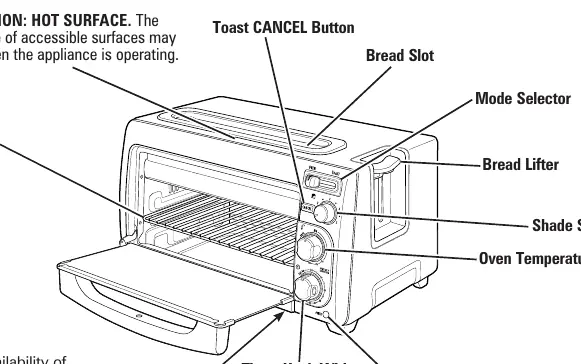
- Bread Slot: For toasting bread items.
- Mode Selector: Switches between TOAST and OVEN functions.
- Shade Selector: Adjusts the toasting level.
- Timer Knob: Includes a Stay-On feature for longer cooking.
- Baking Pan: Slides under the oven rack for broiling.
- Removable Crumb Tray: Slides out for easy cleaning.
How to Toast
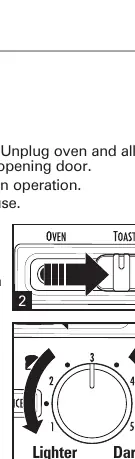
- Plug the appliance into an outlet.
- Slide the mode selector to TOAST.
- Insert bread slices into the bread slot.
- Rotate the shade selector to the desired shade and press down on the bread lifter.
- The bread will pop up automatically when the cycle is complete.
- Press the CANCEL button to stop toasting at any time.
How to Bake or Broil
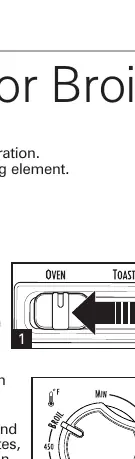
- Plug the appliance into an outlet.
- Slide the mode selector to OVEN.
- Turn the oven temperature knob to the desired temperature or BROIL.
- Preheat the oven for 5 minutes.
- Rotate the timer knob past 10 minutes, then back to the desired time, or use the Stay-On feature.
- When finished, turn the temperature knob to MIN and the timer knob to OFF.
Care and Cleaning
Always unplug the appliance and allow it to cool completely before cleaning.
- Removable Parts: Wash the oven rack, baking pan, and slide-out crumb tray in hot, soapy water. Rinse and dry.
- Interior: Wipe the oven walls, bottom, and glass door with a damp, soapy cloth. Repeat with a damp, clean cloth and dry.
- Exterior: Wipe the outside of the oven with a soft, damp cloth and dry.
- Warning: Do not use metal scouring pads, as pieces can break off and touch electrical parts, creating a risk of electric shock.
Troubleshooting
- Oven will not heat: Ensure the outlet is working, the unit is plugged in, the mode selector is set to OVEN, and the temperature knob is set.
- Food jammed in slot: Unplug the toaster and let it cool. Turn it upside down and shake. Do not use metal utensils.
- Smoke/Odor: Normal during the first use of heating appliances.
Manufacturer information
Hamilton Beach
Practical help
Common problems
Oven will not heat
Check that the outlet is working, the unit is plugged in, the mode selector is set to OVEN, and the temperature knob is set.
Food jammed in toaster slot
Unplug the toaster, let it cool, turn it upside down, and shake. Do not use metal utensils.
Smoke or odor during first use
This is normal for new heating appliances and will disappear after the initial heating period.
Before use
- Wash the baking pan and oven rack
- Plug in the toaster oven
- Set temperature to 450°F (232°C)
- Heat for 10 minutes to remove initial odors
Images and diagrams
- The mode selector is located on the top right of the control panel.
- The timer knob includes a Stay-On feature for extended cooking times.
- The baking pan slides under the oven rack for broiling.
Model compatibility
- Not for outdoor use.
- Do not operate with an external timer or separate remote-control system.
- Do not use oven cooking bags or plastic containers.

Manual page author
David Miller
Documentation analyst
Organizes user manual content into clear summaries, with attention to model details, product context, and everyday usability.