Home Appliances / Small Kitchen Appliances
User Manual for Hamilton Beach 14-Cup Coffee Maker
Quick guide for the Hamilton Beach 14-Cup Coffee Maker. Learn how to brew, program automatic start, adjust brew strength, clean the unit, and troubleshoot common issues.
Table of contents
Quick guide from the manual
This coffee maker features programmable automatic brewing, adjustable brew strength, and a customizable keep-warm function. Before first use, wash all removable parts in hot, soapy water and run one brew cycle with water only. The unit includes a 'CLEAN' notification after 30 cycles and a water filter replacement reminder after 60 cycles.
Parts and Features
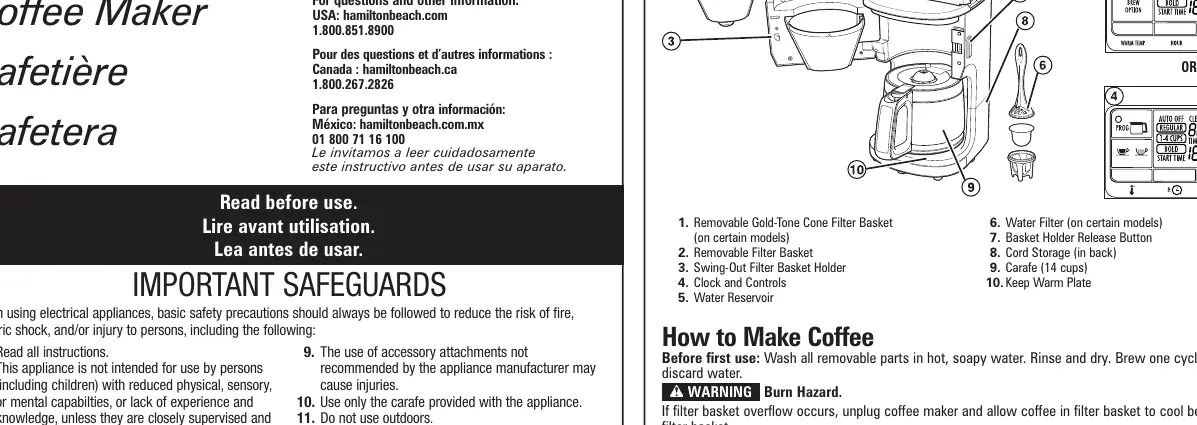
- Removable Gold-Tone Cone Filter Basket
- Swing-Out Filter Basket Holder
- Water Reservoir
- Clock and Controls
- Carafe (14 cups)
- Keep Warm Plate
How to Make Coffee
- Plug the unit into an outlet.
- Set the current time using the HOUR and MINUTE buttons.
- Lift the Water Reservoir lid and fill with the desired amount of water.
- Press the Basket Holder Release Button to open the Swing-Out Filter Basket. Add ground coffee (tip: 5g per cup).
- Close the filter basket holder.
- Select your brew option (Regular, Bold, or 1-4 Cups).
- Press the I/O (on/off) or BREW button to start brewing.
Programming Automatic Brew
- Press the PROG or PROGRAM button until '19:99' flashes.
- Use the HOUR and MINUTE buttons to set the desired start time.
- Press the PROG or PROGRAM button again to activate the automatic brew. A white LED will indicate that the program is active.
Brew Options and Keep Warm
Brew Options: The default setting is 'Regular'. For stronger coffee, hold the BREW OPTION button until 'BOLD' appears. For small amounts, hold the BREW OPTION button until '1-4 CUPS' appears.
Keep Warm: The unit defaults to the highest temperature and a 2-hour auto-off. You can adjust the temperature and the auto-off time (up to 4 hours) using the KEEP WARM and AUTO OFF buttons.
Care and Cleaning
Clean the coffee maker at least once a month (or weekly in hard water areas).
- Unplug the unit.
- Wipe the exterior with a damp cloth.
- Pour at least 2 cups (473 ml) of white vinegar into the Water Reservoir.
- Press the BREW OPTION button to select 'CLEAN'.
- Press the I/O or BREW button to start the cycle (takes about 35 minutes).
- Once finished, run 2-3 cycles with clean water only.
Troubleshooting
If the filter basket overflows, ensure you are not using too much coffee, the coffee grind is not too fine, or the carafe was not removed for more than 20 seconds during brewing. If the unit does not turn on, check if the reservoir is empty, the unit is unplugged, or if there was a power outage requiring a clock reset.
Manufacturer information
Hamilton Beach
Practical help
Common problems
Filter basket overflows or coffee brews slowly
Ensure coffee grind is not too fine, do not exceed recommended coffee amount, and ensure the carafe is placed securely on the Keep Warm plate.
Unit will not turn on
Check if the water reservoir is empty, the unit is unplugged, or if a power outage occurred requiring a clock reset.
CLEAN notification on display
The unit has reached 30 brew cycles. Perform the cleaning procedure using white vinegar.
Before use
- Wash all removable parts in hot, soapy water.
- Rinse and dry all parts thoroughly.
- Run one full brew cycle with water only and discard the water.
Images and diagrams
- Swing-Out Filter Basket: Pivots to the side for easy access to the filter basket.
- Keep Warm Plate: Keeps coffee at the desired temperature; adjustable auto-off timer.
Model compatibility
- Use only the provided carafe.
- Do not use the carafe on a stovetop or in a microwave.
- Do not use abrasive cleansers or steel wool on the carafe.

Manual page author
Michael Turner
Technical manual editor
Reviews PDF manuals for structure, safety notes, and practical product details so readers can find the right information quickly.