Software / Apps Services
Hikvision 03C5ACO Wireless Bridge User Guide
Quick start guide for the Hikvision 03C5ACO wireless bridge, covering device activation, login procedures, and typical application scenarios for outdoor video security.
Table of contents
Quick guide from the manual
This document provides essential instructions for activating and configuring the Hikvision Wireless Bridge. It is intended for use with professional guidance. Always ensure you are using the latest firmware and software versions available on the official Hikvision website (https://www.hikvision.com).
Overview
The wireless bridge is designed for long-distance wireless connections, making it ideal for outdoor video security systems and data transmission between sites within a local area network (LAN).
Typical Application
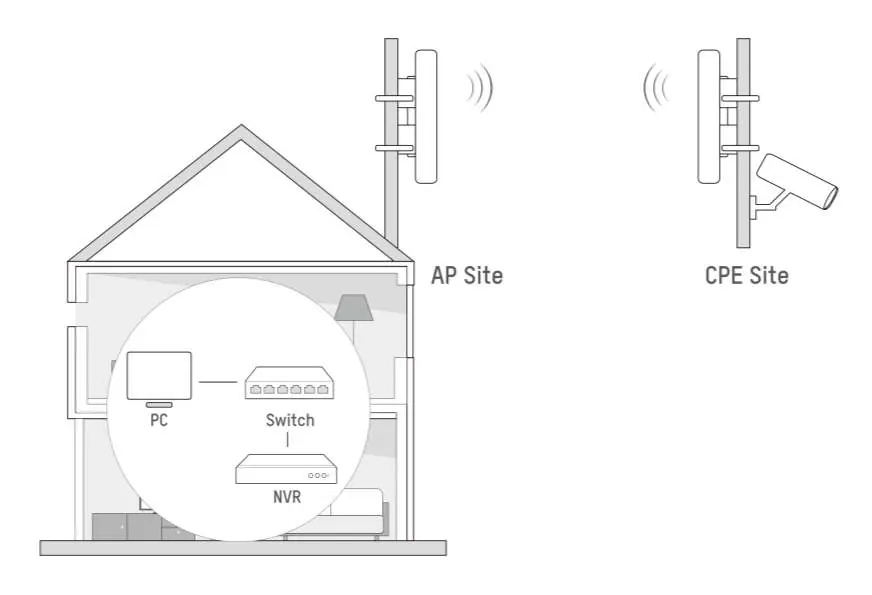
The system typically consists of an Access Point (AP) site and a Client Premises Equipment (CPE) site. The AP site connects to your local network infrastructure (PC, Switch, NVR), while the CPE site is positioned to receive the wireless signal for remote cameras or other network devices.
Activation and Login
To set up the device, follow these steps:
- Connect the device to your network.
- Open a web browser and access the device's interface.
- Activate the device by setting a secure password.
- Configure the required country and region code settings.
- Log in to the interface using the password you created.
Safety Instructions
- This is a Class A product; it may cause radio interference, requiring the user to take appropriate mitigation measures.
- Strictly comply with all national and regional electrical safety regulations during installation and operation.
- Ensure the power outlet is installed near the equipment and remains easily accessible.
- Do not place open flame sources, such as lighted candles, on the equipment.
Official resources from the manual
Manufacturer information
Hikvision
Practical help
Common problems
Radio interference
As a Class A device, it may cause interference. Take appropriate measures to mitigate this if it occurs.
Device not accessible
Ensure the device is properly powered and connected to the network. Use a web browser to access the activation/login interface.
Before use
- Ensure the device is installed in compliance with local electrical safety regulations.
- Verify that the power outlet is easily accessible and near the equipment.
- Confirm that the device is intended for outdoor use as per the application scenario.
- Have a secure password ready for device activation.
Specs in practice
- Frequency Range
- The specific radio frequency bands (5 GHz range) used for transmission and reception, varying by region (EU/US).
Images and diagrams
- The typical application diagram shows an AP site connected to a PC, Switch, and NVR, transmitting wirelessly to a CPE site.
Model compatibility
- The device is designed for long-distance wireless connections in LAN environments.
- Frequency and power settings must comply with local regional regulations (EU vs US specifications provided).

Manual page author
Emily Carter
User documentation editor
Prepares concise manual descriptions and highlights the most useful setup, operation, and maintenance information for readers.