Tools / Power Tools
Hilti TE 1000-AVR Powerful Jack Hammer Instruction Manual
Comprehensive operating instructions for the Hilti TE 1000-AVR electric breaker, covering safety, setup, operation, maintenance, and troubleshooting.
Table of contents
Manual images
Jump to the sectionProduct Overview
The Hilti TE 1000-AVR is a high-performance, electrically powered breaker designed for heavy-duty chiseling, demolition, and breaking of concrete, masonry, stone, and asphalt. It features an Active Vibration Reduction (AVR) system to significantly minimize operator fatigue during extended use.
Safety Instructions
Always prioritize safety when operating power tools. Ensure the work area is clean, well-lit, and free of explosive atmospheres. Wear appropriate personal protective equipment, including eye protection, a hard hat, hearing protection, and non-skid safety shoes. Always hold the tool with both hands using the provided grips. Before starting, inspect the area for concealed electrical cables, gas, or water pipes. If working outdoors, use only approved extension cords. Never modify the plug or use adapters with earthed tools.
Operation
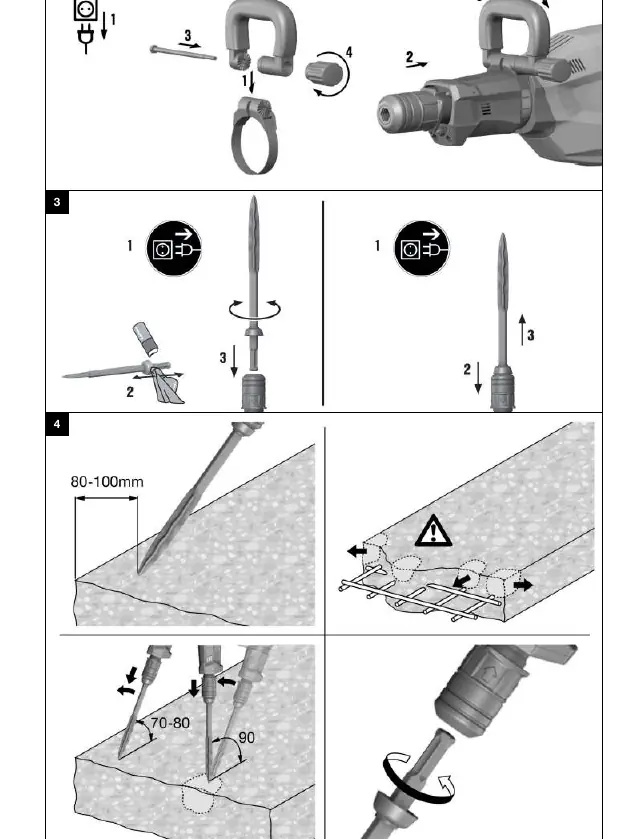
Before use, ensure the side handle is securely fitted. The tool features a detachable supply cord for easier transport and storage. To insert an accessory tool, apply a small amount of Hilti-recommended grease to the connection end and push it into the chuck until it clicks. To remove, pull the chuck back. The chisel can be adjusted to six different positions to ensure optimal working angles. Chiseling power can be reduced to approximately 70% by pressing the power level selector switch, which is useful for more delicate work.
Care and Maintenance
Regular maintenance is essential for tool longevity. Always unplug the tool before performing any cleaning or maintenance. Keep air vents clear of debris using a dry brush. Clean the casing with a slightly damp cloth; avoid silicone-based cleaning agents. Regularly inspect the dust shield on the chuck and clean or replace it if damaged. Repairs to electrical components must only be performed by trained electrical specialists using genuine Hilti spare parts.
Troubleshooting
If the tool fails to start, ensure it is properly connected to a power source and that the electronic initialization (which takes about 4 seconds) is complete. If the service indicator lights up red, it may indicate a fault or that maintenance is due. A blinking red light suggests overheating or an incorrect voltage supply. In such cases, allow the tool to cool down and check the power source. For persistent issues, contact Hilti Service.
Manufacturer information
Hilti Corporation
Practical help
Common problems
Tool does not start
Check power supply, ensure the detachable cord is fitted correctly, or wait for the 4-second initialization period.
Service indicator lights red
Servicing is due or a fault has occurred; contact Hilti Service.
Service indicator blinks red
Overheating protection activated or voltage too high; allow tool to cool and check power source.
No hammering action
Tool is too cold; run it under no load against the working surface until the mechanism engages.
Tool does not achieve full power
Power reduction mode is active; press the power level selector switch or check for inadequate extension cord gauge.
Before use
- Check that the side handle is fitted correctly and tightened.
- Ensure the supply cord is clean, dry, and undamaged.
- Verify the work area is free of concealed cables or pipes.
- Wear appropriate PPE (goggles, hard hat, gloves, ear protection).
- Ensure the accessory tool is properly greased and locked in the chuck.
- Check that the dust shield is in good condition.
- Confirm the power source voltage matches the tool's rating plate.
Specs in practice
- Single impact energy
- The force of each blow delivered by the tool, rated at 26 Joules.
- Protection class II
- Indicates the tool is double-insulated for electrical safety.
Images and diagrams
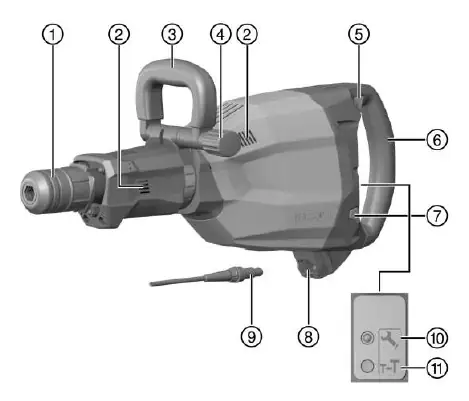
- 3: Side handle
- 5: On/off switch
Model compatibility
- Use only genuine Hilti spare parts and consumables.
- Use only Hilti-recommended grease for the accessory tool connection.
- When using a generator, its power output must be at least twice the tool's rated input power.

Manual page author
David Miller
Documentation analyst
Organizes user manual content into clear summaries, with attention to model details, product context, and everyday usability.