Documents / Warranty Safety
Honeywell Voyager 1602g Wireless Area-Imaging Pocket Scanner
The Honeywell Voyager 1602g is a compact, pocket-sized wireless area-imaging scanner designed for high-performance barcode reading, making it an ideal companion for mobile devices like tablets.
Table of contents
Product Overview
The Honeywell Voyager 1602g is a high-performance, pocket-sized wireless area-imaging scanner. Its compact design makes it perfect for mobile applications, particularly when paired with tablets. It supports both 1D and 2D barcode scanning (depending on the specific model) and offers flexible connectivity options.
Getting Started
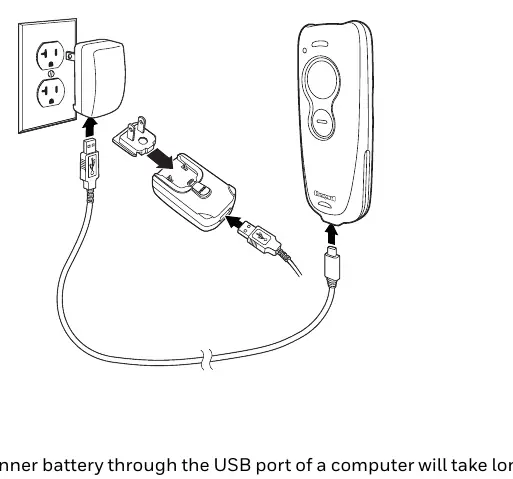
Before first use, the scanner's integrated lithium-ion battery must be fully charged. Charging can be performed via a power supply or by connecting the scanner to a computer using the provided USB cable. The LED indicator on the scanner provides status updates: flashing orange indicates charging, while solid green indicates a full charge.
Pairing and Operation
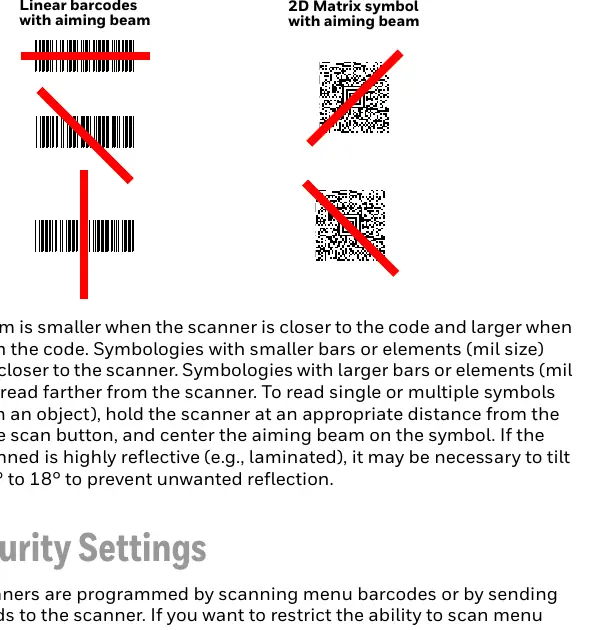
The scanner can be paired with various Bluetooth-enabled devices, including PCs, laptops, and tablets. For Apple devices requiring two-way communication, the Serial Port Protocol (SPP) is supported. The scanner features a large scan button for triggering the aiming beam and a smaller programmable button for additional functions like virtual keyboard toggling or battery status checks.
Programming and Configuration
The scanner is factory-programmed for common settings. Customization is achieved by scanning specific configuration barcodes found in this guide. Users can configure interface settings, keyboard layouts, and symbology preferences. Advanced users can utilize the EZConfig for Scanning tool for more complex configurations and firmware updates.
Maintenance and Troubleshooting
To ensure optimal performance, keep the scanner window clean using a soft cloth dampened with water or a mild detergent solution. Avoid using harsh solvents. If the scanner experiences issues, verify that the battery is charged and that the correct symbology is enabled. For persistent problems, the scanner can be reset to factory defaults by scanning the appropriate configuration barcode.
Safety and Disposal
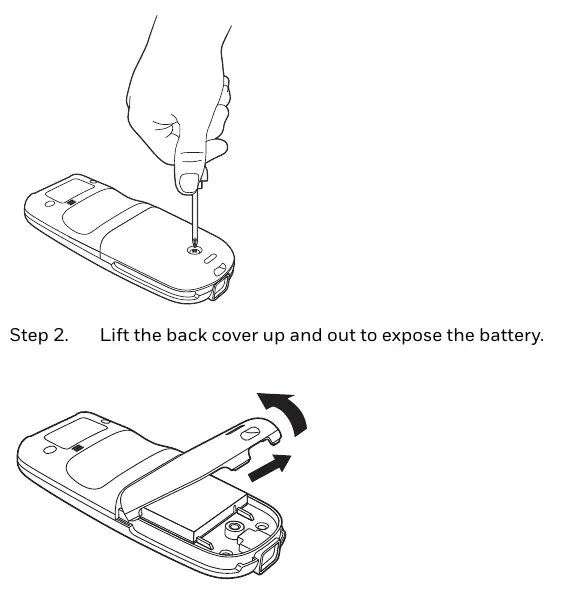
The device uses a rechargeable lithium-ion battery. Only use approved Honeywell battery packs. Incorrect replacement poses an explosion risk. Dispose of used batteries according to local regulations and recycling programs.
Related manuals
Related manuals from the same brand or category.
Documents / Warranty Safety
Honeywell Voyager 1250g Single-Line Laser Scanner Quick Start Guide
HoneywellComputers / Printers
Honeywell Voyager 1602g Wireless Area Imaging Pocket Scanner
HoneywellPower / Batteries Chargers
Honeywell GaN 140W Ultra Fast Wall Charger Owner’s Manual
HoneywellElectronics / Televisions
Honeywell Voyager 1400g Series Area-Imaging Scanner
HoneywellComputers / Printers
Honeywell Hyperion 1300g Handheld Linear Scanner User's Guide
HoneywellComputers / Printers
Honeywell Voyager 1250g Single Line Laser Scanner User Guide
HoneywellComputers / Printers
Honeywell Voyager 1250g Single-Line Laser Scanner User's Guide
Honeywell
Manual page author
Michael Turner
Technical manual editor
Reviews PDF manuals for structure, safety notes, and practical product details so readers can find the right information quickly.