Home Appliances / Cooktops Hobs
User Manual for Hotpoint HB 1560S NE Induction Hob
Quick guide and user manual for the Hotpoint HB 1560S NE induction hob. Learn about installation, control panel operation, safety features, cleaning, and troubleshooting.
Table of contents
Manual images
Click an image to enlargeQuick Guide
This manual provides essential information for the safe and efficient use of your Hotpoint induction hob. Always ensure the hob is installed by a qualified professional and that you use induction-compatible cookware. The hob features an automatic shut-off system, child lock, and power management functions.
Product Overview
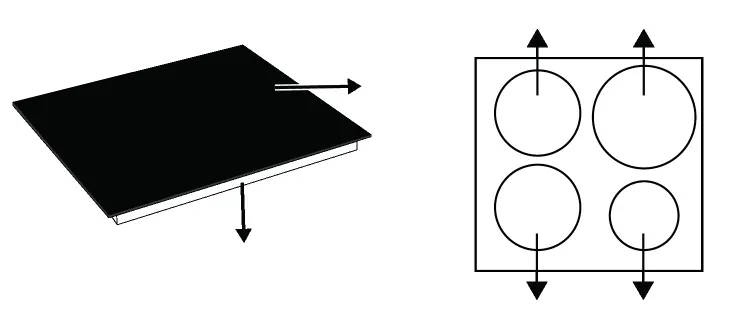
The hob features a glass cooking surface with four induction cooking zones. The control panel allows for precise temperature adjustment, timer settings, and various safety locks.
Safety Instructions
- Intended Use: Designed for domestic use only. Do not use for commercial purposes or as a room heater.
- Electrical Safety: Ensure the hob is connected to a grounded outlet protected by a fuse matching the current ratings.
- Cooking Safety: Never leave the hob unattended while heating oil. Do not use water to extinguish oil fires; use a fire blanket or damp cloth.
- Induction Safety: Keep magnetic objects (credit cards, tapes) away from the hob. Do not place metal objects (cutlery, lids) on the cooking zones.
Installation
Installation must be performed by an authorized service or qualified professional. Ensure there is no gas hose, plastic water pipe, or socket behind the installation area to prevent heat damage. Keep ventilation ducts clear.
Operation
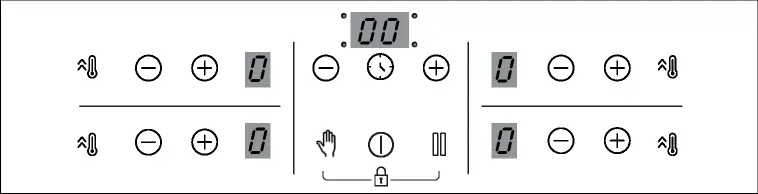
The hob is controlled via a touch-sensitive panel. Each operation is confirmed by an audible signal.
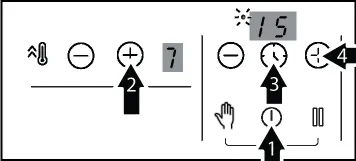
Switching On and Off
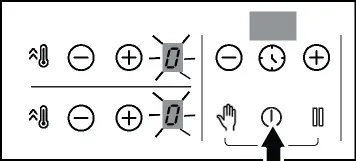
Touch the On/Off key to switch the hob on. To switch off, you can drop the temperature to 0, use the timer function, or touch the On/Off key.
Temperature Adjustment
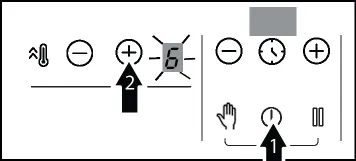
Switch on the hob and adjust the temperature level using the Increase/Decrease keys. The selected zone will operate at the set level.
Booster Function
Use the Booster key for rapid heating. This function is not recommended for long-term cooking.
Timer Function
The timer allows you to set a duration for cooking. The zone will switch off automatically when the time expires.
Safety Locks
- Cleaning Lock: Prevents operation of keys for 20 seconds to allow for cleaning.
- Child Lock: Prevents children from switching on the cooking zones.
- Key Lock: Prevents accidental changes to settings during operation.
Maintenance and Cleaning
Wait for the hob to cool before cleaning. Use dishwashing detergent, warm water, and a soft cloth or sponge. Do not use steam cleaners, abrasive detergents, or hard metal scrapers, as these can damage the glass surface.
Troubleshooting
If the hob does not work, check the fuse box and ensure the appliance is plugged in. If keys do not work, check if the key lock is enabled. For error codes (e.g., E1-E11, E22, E46), refer to the troubleshooting section in the manual for specific solutions, such as turning the hob off and on again or cleaning the control panel.
Practical help
Common problems
The product does not work.
Check the fuses in the fuse box and ensure the appliance is plugged into a grounded outlet.
Keys on the control panel do not work.
Check if the key lock is enabled and disable it if necessary.
The pot does not heat up.
Ensure the pot is induction-compatible and correctly centered on the cooking zone.
The hob suddenly turns off.
Check if the cooking time has expired, if the hob has overheated, or if an object is covering the control panel.
Before use
- Remove all packaging materials.
- Wipe the surfaces with a wet cloth or sponge and dry with a cloth.
- Ensure the hob is connected to a grounded outlet.
- Verify that your cookware is induction-compatible (ferromagnetic base).
- Ensure the control panel is clean and dry.
Specs in practice
- Total power consumption
- Maximum 7.2 kW.
- Induction zones
- Cooking zones that generate heat directly in the cookware.
Images and diagrams
- The control panel includes keys for On/Off, Timer, Booster, Cleaning Lock, Stop, and Increase/Decrease temperature.
- The hob surface has four distinct induction cooking zones.
Model compatibility
- Use ferromagnetic, flat-bottomed cookware.
- Avoid aluminum, copper, brass, glass, pottery, ceramic, and porcelain cookware.
- Cookware base diameter must match the induction zone size.

Manual page author
David Miller
Documentation analyst
Organizes user manual content into clear summaries, with attention to model details, product context, and everyday usability.