Electronics / Monitors
HUAWEI MatePad T 10s User Manual
Quick start guide for the Huawei MatePad T 10s, covering basic operations, setup, safety information, and regulatory compliance.
Table of contents
Getting Started
The HUAWEI MatePad T 10s is a tablet device. To power on, press and hold the power button until the screen turns on. To power off or restart, press and hold the power button and select the corresponding option on the screen. A forced restart can be performed by holding the power button for 10 or more seconds.
Device Setup
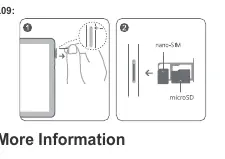
Use the included eject pin to open the card slot. Ensure the nano-SIM and microSD cards are correctly aligned and the tray is level when inserting it into the device. Do not use cut or modified SIM or microSD cards, as they may not be recognized and could damage the card tray.
Safety Information
To ensure safe operation, observe the following:
- Avoid listening at high volume levels for long periods to prevent hearing damage.
- Use only approved power adapters and batteries to avoid fire or explosion hazards.
- Ideal operating temperatures are 0 °C to 35 °C; storage temperatures are -20 °C to +45 °C.
- Keep the device at least 15 cm away from pacemakers to prevent potential interference.
- Do not use the device in potentially explosive environments, such as gas stations or chemical plants.
- The device contains a built-in battery; do not attempt to replace it yourself. Contact an authorized Huawei service center for assistance.
Disposal and Recycling
The crossed-out wheeled-bin symbol indicates that the product, battery, and accessories must be taken to separate waste collection points at the end of their lifespan. This ensures proper recycling and conservation of valuable materials.
Support
For device information, frequently asked questions, and contact details, visit https://consumer.huawei.com/en or https://consumer.huawei.com/en/support.
Official resources from the manual
Manufacturer information
Huawei Technologies Co., Ltd.
Practical help
Common problems
Device not recognizing SIM or microSD card
Ensure the card is correctly aligned and the tray is level. Do not use cut or modified cards.
Device unresponsive
Press and hold the power button for 10 or more seconds to force a restart.
Battery replacement
Do not attempt to replace the built-in battery yourself. Contact an authorized Huawei service center.
Before use
- Use the included eject pin to open the card slot.
- Ensure the nano-SIM and microSD cards are correctly aligned.
- Keep the eject pin out of reach of children.
- Check that the card tray is level before insertion.
Specs in practice
- Operating Temperature
- 0 °C to 35 °C for optimal performance.
- Storage Temperature
- -20 °C to +45 °C for safe storage.
Images and diagrams
- 1: Power button
- 2: Volume button
- 4: USB Type-C port
- 5: Headset jack
Model compatibility
- 5150-5350 MHz frequency range is restricted to indoor use in EU member states and the UK.
- Do not use cut or modified SIM or microSD cards.

Manual page author
David Miller
Documentation analyst
Organizes user manual content into clear summaries, with attention to model details, product context, and everyday usability.