Electronics / Monitors
User Guide for Huawei 12TH Laptop
Quick start guide for the Huawei 12TH laptop, covering initial setup, charging, safety precautions, and regulatory information.
Table of contents
Quick guide from the manual
This document provides essential instructions for setting up and safely operating your Huawei 12TH laptop. It includes procedures for initial power-on, charging, and important safety guidelines to ensure proper device maintenance.
Powering on and charging
When using your computer for the first time, simply plug it into a power supply, and it will turn on automatically. For subsequent power-ons, press and hold the power button until the keyboard lights up.
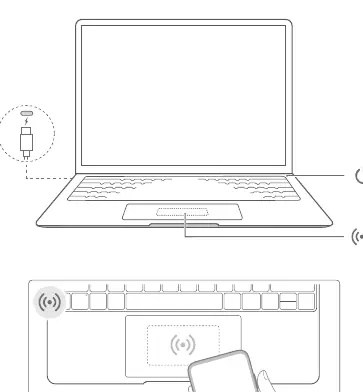
The laptop features a built-in rechargeable battery. Use the provided adapter and charging cable to charge the device. The indicator light will blink white during the charging process.
Force shutdown: Press and hold the power button for more than 10 seconds. Note that this action will result in the loss of any unsaved data.
Safety Information
- Avoid listening at high volumes for long periods to prevent hearing damage.
- Consult your doctor if you use medical devices to ensure the laptop does not interfere with their operation.
- Keep the device away from dusty, damp, or dirty environments and strong magnetic fields.
- Operating temperature range: 0°C to 35°C; Storage temperature range: -10°C to +45°C.
- Use only approved power adapters that meet IEC/EN 62368-1 standards.
- Avoid placing the device on soft surfaces like blankets or sofas, as this may block air vents and cause overheating.
- Do not attempt to replace the battery yourself; contact Huawei or an authorized service provider for battery maintenance.
Disposal and recycling
The device and its accessories should be disposed of at designated waste collection points at the end of their lifespan to ensure proper recycling and environmental protection. Contact local authorities or visit the official Huawei support website for more information.
Regulatory Information
The device complies with international RF exposure standards. The highest reported body SAR value is 0.56 W/kg. The device is also compliant with EU directives, including RED 2014/53/EU, RoHS 2011/65/EU, and ErP 2009/125/EC. Note that the 5150 to 5350 MHz frequency range is restricted to indoor use in many countries.
Manufacturer information
Huawei Technologies Co., Ltd.
Practical help
Common problems
Device does not turn on
Ensure it is connected to a power supply for the first time. For subsequent use, hold the power button until the keyboard lights up.
Device overheating
Avoid placing the laptop on soft surfaces like blankets or pillows, which can block air vents.
System unresponsive
Perform a force shutdown by pressing and holding the power button for more than 10 seconds.
Before use
- Ensure the power adapter is connected to an easily accessible socket.
- Verify the environment is free from dust, moisture, and magnetic fields.
- Check that the power adapter meets IEC/EN 62368-1 requirements.
- Ensure the device is placed on a hard, flat surface for proper ventilation.
Specs in practice
- Operating Temperature
- 0°C to 35°C for safe operation.
- Storage Temperature
- -10°C to +45°C for safe storage.
- Thunderbolt 4 Port
- Provides up to 5V DC/3A power to other devices.
Images and diagrams
- The diagram shows the power button location and the charging port.
- It illustrates the correct way to connect the power cable.
- It indicates the area for wireless connectivity or NFC features.
Model compatibility
- The 5150-5350 MHz frequency band is restricted to indoor use in most EU countries and the UK.
- The device is preinstalled with a third-party operating system or none at all.

Manual page author
Michael Turner
Technical manual editor
Reviews PDF manuals for structure, safety notes, and practical product details so readers can find the right information quickly.