Lighting / Fixtures
User Manual for Husky Extra Deep 42 in. 10-Drawer Mobile Work Bench
Quick guide for the Husky Extra Deep 42 in. 10-Drawer Mobile Work Bench (H42MWC10R-TL). Includes assembly instructions, safety warnings, drawer operation, and maintenance tips.
Table of contents
Manual images
Click an image to enlargeQuick guide from the manual
This document provides essential assembly, safety, and maintenance instructions for the Husky Extra Deep 42 in. 10-Drawer Mobile Work Bench. Always assemble the unit close to its final intended location as it is heavy. Ensure the unit is placed on a level surface to prevent tipping and instability.
Safety Information
- Moving the unit: Always push the unit, never pull it. Lock the drawers before moving. Use the brakes on the casters when the unit is stationary.
- Loading: Load the unit starting with the bottom drawers to maintain stability. Do not overload the top of the unit.
- Prohibitions: Do not stand on the unit, do not tow with power equipment, and do not mount to vehicles or trailers. Do not use the side handle as a leverage point for vertical lifting.
- Electrical Safety: Ensure the power cord is unplugged before servicing or cleaning. Use only a three-wire extension cord with all three prongs intact, connected to a 125 Volt GFCI protected outlet.
Assembly
Two people are recommended for assembly. The holes in the cabinet are tapped and do not require nuts.
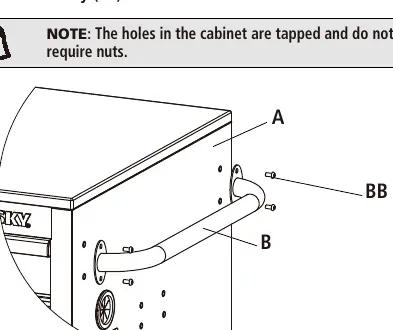
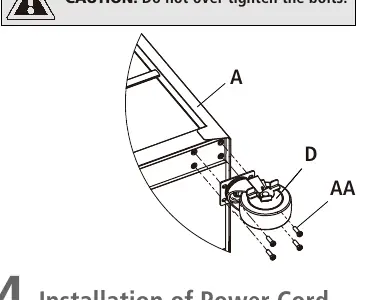
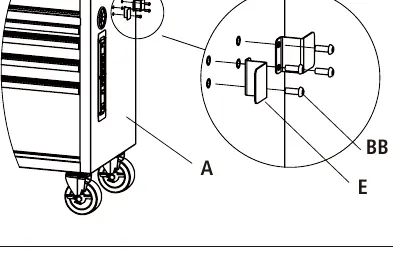
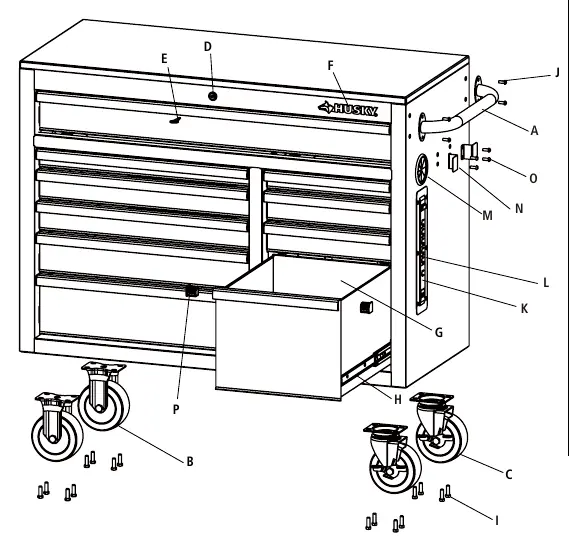
- Attaching the handle: Position the cabinet handle over the holes on the cabinet and secure with the provided bolts using the hex key.
- Attaching the casters: Lock the drawers and lay the cabinet on its top using packaging material to protect the finish. Attach the swivel casters and fixed casters using the provided bolts and hex key or a 12 mm wrench/socket. Return the cabinet to an upright position.
- Attaching the storage hook: Position the storage hook over the holes on the cabinet and secure with bolts.
- Power Cord: Untie the power cord located inside the drawer and pull the plug through the grommet.
Operation
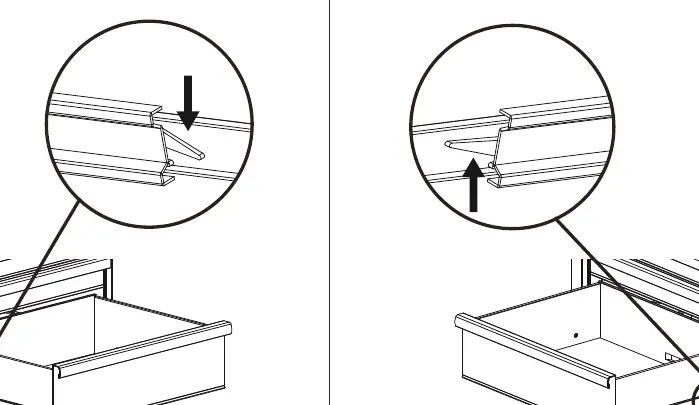
- Removing drawers: Fully extend the empty drawer. Push up on one release lever while pulling down on the other release lever, then pull the drawer outward until it releases from the slide.
- Re-inserting drawers: Extend the drawer slides. Insert the brackets on each side of the drawer into the slots in the slides, ensuring they are properly positioned. Close the drawer completely to set the slides.
- Rubber Grommet: When passing cords into the box, enter from the rear. Pull back 2-3 inches to ensure the weather-resistant star bursts face outward.
Maintenance
- Casters: Grease the casters annually using high-quality bearing grease.
- Drawer Slides: Lubricate the slides semi-annually with high-quality bearing grease.
- Cleaning: Periodically clean drawer fronts and surfaces with a mild detergent and water. Auto wax can be used to preserve the finish.
Manufacturer information
Husky
Practical help
Common problems
Unit is unstable or tips over
Ensure the unit is on a level surface and always load the bottom drawers first.
Drawer does not open or close smoothly
Check if the drawer slides are properly inserted and aligned. Lubricate slides semi-annually.
Handle feels loose
Check that the bolts attaching the handle to the cabinet are tightened securely with the provided hex key.
Before use
- Ensure the unit is on a level surface.
- Lock all drawers before moving the unit.
- Verify all bolts are tightened securely.
- Ensure the power cord is unplugged before any cleaning or maintenance.
- Check that the extension cord is rated for outdoor use if applicable.
Specs in practice
- Maximum weight per drawer
- 100 lbs. Do not exceed this limit to prevent damage.
- Casters support
- 1200 lbs. Total weight capacity of the unit.
Images and diagrams
- Assembly diagrams illustrate the correct placement of the handle, casters, and storage hook.
- Drawer removal diagram shows the release levers on the slides that must be manipulated to remove or insert drawers.
Model compatibility
- Use only a three-wire extension cord with all three prongs intact.
- Connect to a 125 Volt GFCI protected outlet.

Manual page author
Emily Carter
User documentation editor
Prepares concise manual descriptions and highlights the most useful setup, operation, and maintenance information for readers.