Power / Power Banks
iHome NANO MAG+ 10000mAh Power Bank
Quick guide for the iHome NANO MAG+ 10000mAh Power Bank. Learn how to charge your devices via USB-C or magnetic wireless pad, recharge the power bank, and understand LED indicators.
Table of contents
Quick guide from the manual
To turn the power bank on, press and hold the power button for 3 seconds. The LED indicator will light up. You can charge your devices using either the USB-C port or the magnetic wireless charging pad. Ensure the power bank is charged before use.
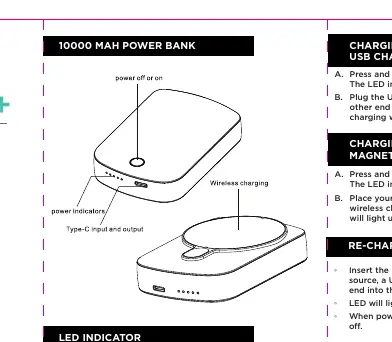
Charging your devices
Using the USB charging port:
- Press and hold the power button for 3 seconds to turn the unit on.
- Plug the USB-C cable into the charging port on the power bank and the other end into your device.
- Charging will begin automatically.
Using the magnetic charging pad:
- Press and hold the power button for 3 seconds to turn the unit on.
- Place your MagSafe compatible device on the magnetic wireless charging pad.
- The LED indicator will light up and charging will begin automatically.
Recharging the power bank
- Insert the included USB-C to USB-C cable into a power source (USB charger sold separately).
- Plug the USB-C end into the power bank's charging port.
- The LED will light up to indicate charging is in progress.
- When the power bank is fully charged, all 4 LEDs will turn off.
LED indicator
The 4-level battery charge indicator shows the remaining power:
- 1 LED: 0-25% battery life
- 2 LEDs: 25-50% battery life
- 3 LEDs: 50-75% battery life
- 4 LEDs: 75-100% battery life
Safety and maintenance
- If the device is not used for a long time, charge it at least every 3 months.
- It is normal for the device to produce slight heat during charging, provided it stays below 55°C (131°F).
- Keep the device dry and do not clean with chemical agents.
- Do not crush, disassemble, impale, or put the device into water.
- Children must use the device under adult supervision.
- Do not use the device to charge incompatible devices with incorrect current or voltage.
Technical specifications
- Type-C input: 5V/2.1A
- Type-C output: 5V/2.4A
- Wireless output: 5W
- Total output: 12W Max
Practical help
Common problems
Device not charging
Ensure the power bank is turned on by pressing and holding the power button for 3 seconds.
Power bank not charging
Verify the USB-C cable is connected to a working power source.
Device feels hot during charging
Slight heat is normal as long as it is below 55°C (131°F).
Before use
- Charge the power bank fully before first use.
- Ensure your device is MagSafe compatible for magnetic wireless charging.
- Use a compatible USB-C cable for wired charging.
- Check that the power bank is turned on (hold button for 3 seconds).
Specs in practice
- Type-C Input (5V/2.1A)
- The power required to recharge the power bank itself.
- Type-C Output (5V/2.4A)
- The power delivered to your device when using a wired connection.
- Wireless Output (5W)
- The power delivered to your device when using the magnetic charging pad.
Model compatibility
- Compatible with iPhone 12 and newer models.
- Compatible with other wireless charging devices.

Manual page author
Emily Carter
User documentation editor
Prepares concise manual descriptions and highlights the most useful setup, operation, and maintenance information for readers.