Power / Batteries & Chargers
User Manual for iHome 2IHPP2194 Magnetic Wireless Power Bank
Quick guide for the iHome 2IHPP2194 5000mAh Magnetic Wireless Power Bank. Learn how to charge your devices, check battery levels, and use wireless charging safely.
Quick answers from the manual
Quick answer
- The iHome 2IHPP2194 is a 5000mAh magnetic wireless power bank. It supports wired charging via USB-C and wireless charging by placing the device on the charging area. p. 1
Key actions
- Charge the power bank using the USB-C port. p. 1
- Charge devices wirelessly by placing them on the center of the charging area. p. 1
First start
- Charge the power bank fully before first use. p. 1
Problems and fixes
Charging not starting
Check cable connection or device alignment on the wireless charging area.
p. 1Technical specifications
| Parameter | Value | Meaning | Pages |
|---|---|---|---|
| Capacity | 5000mAh | Battery storage capacity | p. 1 |
| Input/Output | 5V/2A | Charging speed | p. 1 |
Where to find it in the PDF
- User Manual p. 1
Table of contents
Manual images
Click an image to enlargeQuick Guide
The iHome 2IHPP2194 is a 5000mAh magnetic wireless power bank designed for portable charging. Before first use, ensure the power bank is fully charged. Use the provided USB-C cable for wired charging or place your device on the wireless charging area for wireless power delivery.
Product Overview
The device features a USB-C input/output port, a wireless charging area, and LED indicators to show the remaining battery level. It is compatible with devices supporting wireless charging standards.
Operating Instructions
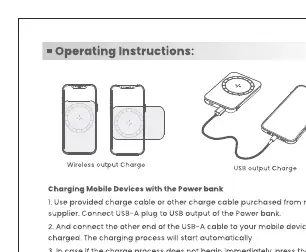
Charging Devices
- Wired Charging: Connect your device to the USB-C port using a compatible cable. Charging will start automatically.
- Wireless Charging: Place your device on the center of the wireless charging area. Press the ON/OFF button to start the charging process.
Charging the Power Bank
Connect the power bank to a power source using the provided USB-C cable. The LED indicators will show the charging status.
Battery Level Indicators
You can check the battery level by pressing the ON/OFF button. The LED indicators display the current charge:
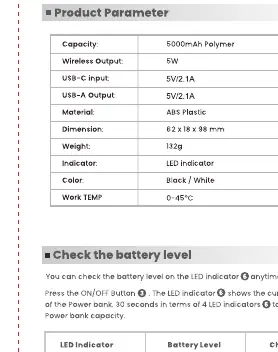
- 4 LEDs: 75%-100%
- 3 LEDs: 50%-75%
- 2 LEDs: 25%-50%
- 1 LED: 0%-25%
Safety Warnings
- Do not attempt to open or disassemble the product.
- Keep away from naked flames, extreme heat, and direct sunlight.
- Do not stand on or apply pressure to the power bank.
- Keep out of reach of children.
- If the device is in high-temperature environments, do not exceed 45°C.
- Stop using the device if it shows signs of damage or leakage.
Technical Specifications
- Capacity: 5000mAh
- Input/Output: 5V/2A
- Material: ABS Plastic
- Weight: 132g
- Operating Temperature: 0-45°C
Practical help
Common problems
Charging does not start
Ensure the cable is securely connected for wired charging, or verify the device is properly aligned on the center of the wireless charging area.
Power bank gets hot
Slight heating during charging is normal. If it becomes excessively hot, stop use immediately.
Before use
- Charge the power bank fully before first use.
- Use the provided USB-C cable for optimal performance.
- Ensure your device is compatible with wireless charging.
- Check the LED indicators to verify the battery level.
Images and diagrams
- USB-C Port: Used for both charging the power bank and charging devices via cable.
- Wireless Charging Area: The designated spot to place your device for wireless power.
- LED Indicators: Displays the remaining battery capacity.
Model compatibility
- Compatible with devices supporting wireless charging standards.
- Requires a 5V/2A charger for optimal input charging.

Manual page author
David Miller
Documentation analyst
Organizes user manual content into clear summaries, with attention to model details, product context, and everyday usability.