Power / USB Chargers
User Manual for IKEA SJÖSS 20W USB Charger
A comprehensive user guide for the IKEA SJÖSS 20W USB Charger. This manual covers setup, safety precautions, technical specifications, and care instructions to ensure optimal performance.
Quick answers from the manual
Quick answer
- The IKEA SJÖSS 20W is a USB-C charger that supports fast charging via Power Delivery (PD 3.0) and Quick Charge (QC 3.0). It is designed for indoor use with phones, tablets, and small IT devices. p. 4
Key actions
- Plug the charger into a wall outlet and connect your device using a USB-C cable. p. 5
First start
- Connect the charger to an accessible wall socket and attach your device via a USB-C cable. p. 5
Problems and fixes
Slow charging speed
Use a high-quality, appropriate length USB-C cable.
p. 7Maintenance and reset
- Unplug from the power source and wipe with a dry cloth. p. 7
Technical specifications
| Parameter | Value | Meaning | Pages |
|---|---|---|---|
| Input | 100-240 Vac, 50/60Hz, Max. 0.5A | Power input requirements | p. 8 |
| Output | 5V/3A, 9V/2.22A, 12V/1.67A, 15V/1.33A | Charging output capabilities | p. 8 |
Where to find it in the PDF
- English Instructions p. 4, 5, 6, 7
- Technical Data p. 8
Table of contents
Manual images
Click an image to enlargeQuick guide from the manual
The IKEA SJÖSS 20W is a compact USB-C charger designed for powering phones, tablets, and other small IT devices. It supports fast charging via Power Delivery (PD 3.0) and Quick Charge (QC 3.0) standards. Please note that the USB-C cable is not included and must be purchased separately.
Product description
The SJÖSS 20W charger is designed for indoor and household use. It features built-in safety mechanisms to protect against short-circuiting, overheating, and overloading. The device can be personalized using the included colorful stickers.
Instructions for use
- Connect the USB-C charger to an easily accessible wall socket.
- Insert one end of a compatible USB-C cable into the charger.
- Connect the other end of the cable to the device you wish to charge or power.
Note: The charging speed is determined by the connected device.
Safety warnings

- Indoor use only: This product is intended for indoor and household use only.
- Damage: Discard the product immediately if it is damaged.
- Liquids: Never submerge the charger in water or other liquids.
- Cables: Never use a damaged or faulty USB cable, as this can harm the charger or your device.
- Supervision: This product is for adult use only and is not a toy.
Care instructions
To clean the product, unplug it from the power source and wipe it with a dry cloth. Always unplug the charger from the power source when it is not in use.
Good to know
- The length and quality of the USB cable significantly influence charging speed and performance.
- It is normal for devices to get warm during the charging process; they will cool down once fully charged.
- Operating temperature: 5°C to 35°C (41°F to 95°F).
Technical data
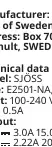
- Model: SJÖSS
- Type: E2501-NA, E2501-EU
- Input: 100-240 Vac, 50/60Hz, Max. 0.5A
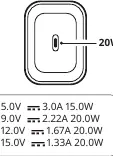
- Output: 5.0V/3.0A (15.0W), 9.0V/2.22A (20.0W), 12.0V/1.67A (20.0W), 15.0V/1.33A (20.0W)
Manufacturer information
IKEA
Practical help
Common problems
Device is charging slowly or not performing as expected.
Check the quality and length of your USB-C cable. Poor quality or excessively long cables can negatively impact charging speed.
Device feels warm during charging.
It is normal for devices to get warm during charging. They will gradually cool down once fully charged.
Before use
- Ensure you have a compatible USB-C cable (sold separately).
- Verify the wall socket is easily accessible.
- Check that the charger is not damaged.
- Ensure the environment is suitable for indoor use (5°C to 35°C).
Specs in practice
- PD 3.0 / QC 3.0
- Fast charging protocols supported by the charger for compatible devices.
Images and diagrams
- The charger features a single USB-C port.
- The output power varies depending on the voltage negotiated with the connected device.
Model compatibility
- Compatible with phones, tablets, and other small IT devices.
- Requires a USB-C cable (not included).

Manual page author
Emily Carter
User documentation editor
Prepares concise manual descriptions and highlights the most useful setup, operation, and maintenance information for readers.