Power / USB Chargers
User Manual for Goobay 79150/79151 USB-C PD GaN Fast Charger Nano
Quick guide for the Goobay 79150 and 79151 USB-C PD GaN Fast Charger Nano. Includes safety instructions, connection steps, technical specifications, and maintenance tips.
Quick answers from the manual
Quick answer
- The Goobay 79150/79151 is a 20W USB-C PD GaN charger. To use it, connect your mobile device to the charger using a USB-C cable and plug the charger into a wall outlet. It automatically adjusts the output voltage for your device. p. 3
Key actions
- Connect device p. 3
- Disconnect after use p. 3
First start
- Plug into wall outlet p. 3
Maintenance and reset
- Cleaning p. 3
Technical specifications
| Parameter | Value | Meaning | Pages |
|---|---|---|---|
| Input | 110-240 V, 50/60 Hz, 0.5 A | Power input requirements | p. 1 |
| Output | 5V/3A, 9V/2.22A, 12V/1.67A, PPS1/PPS2 | Charging output modes | p. 1 |
Where to find it in the PDF
- Technical Data p. 1
- Safety and Operation p. 3
Table of contents
Manual images
Click an image to enlargeQuick guide from the manual
The Goobay 79150/79151 is a compact USB-C PD (Power Delivery) charger designed for mobile devices. It supports the USB-PD 3.0 standard. The device does not have a power switch and should be connected to an easily accessible wall outlet to allow for quick disconnection in emergencies.
Description and function
This product is a USB charger for charging and powering mobile devices via a USB-C PD connector. It automatically regulates the output voltage based on the connected device.
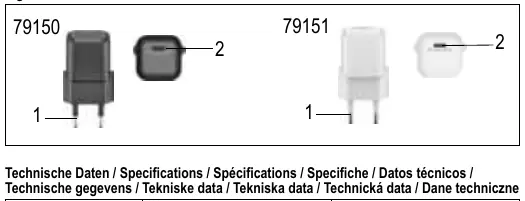
Safety instructions
- Indoor use only: The product is designed for dry interior rooms.
- No power switch: Always connect to an easily accessible outlet.
- Emergency disconnection: In case of emergency, during thunderstorms, or after use, pull the plug directly by the housing.
- Do not open: Never open the housing or modify the product.
- Condition: Only use the product and accessories if they are in perfect condition.
- Not a toy: Keep away from children.
- Avoid extremes: Protect from heat, cold, moisture, direct sunlight, microwaves, vibrations, and mechanical pressure.
- Do not cover: Ensure the product is not covered during use.
Connection and operation
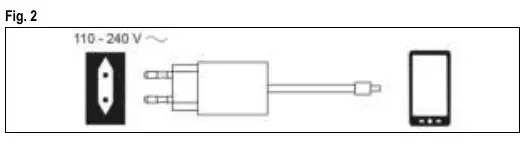
- Connect your mobile device to the charger using a compatible USB charging cable (not included).
- Plug the charger into a power socket.
- Disconnect all plug connections after use.
Maintenance and care
The product is maintenance-free.
- Cleaning: Use only a dry and soft cloth. Do not use detergents or chemicals.
- Storage: Store in a cool, dry, and dust-protected environment when not in use. Keep out of reach of children.
Technical specifications
The charger supports multiple output voltages to ensure fast charging for compatible devices:
- Input: 110-240 V, 50/60 Hz, 0.5 A
- Output (USB-C PD): 5.0 V / 3.0 A (15.0 W), 9.0 V / 2.22 A (20.0 W), 12.0 V / 1.67 A (20.0 W)
- PPS Output: PPS1 (3.3-5.9 V / 3.0 A), PPS2 (3.3-11.0 V / 2.0 A)
- Efficiency: 80.2% average active efficiency
- No-load power consumption: 0.03 W
Manufacturer information
Goobay
Practical help
Common problems
Device not charging
Ensure the USB cable is securely connected to both the device and the charger, and that the charger is fully inserted into the wall outlet.
Charger feels warm
It is normal for the charger to become warm during operation. Ensure it is not covered and has adequate ventilation.
Before use
- Check the package for completeness and integrity.
- Verify that your mobile device is compatible with USB-PD 3.0.
- Ensure the wall outlet is easily accessible for emergency disconnection.
- Use only a dry, soft cloth for cleaning if necessary.
Specs in practice
- Protection class II
- The device is double-insulated and does not require a safety earth connection.
Images and diagrams
- Fig 1: Illustrates the physical components, including the Euro plug and the USB-C PD socket.
- Fig 2: Shows the connection sequence: connecting the device to the charger and the charger to the wall outlet.
Model compatibility
- Supports USB-PD 3.0 standard.
- For indoor use only.
- USB charging cables are not included.

Manual page author
David Miller
Documentation analyst
Organizes user manual content into clear summaries, with attention to model details, product context, and everyday usability.