Power / Batteries & Chargers
User Manual for Traxxas 20W USB-C Charger TRA2949
Quick guide for the Traxxas 20W USB-C charger (TRA2949). Learn how to charge, format, and store your NiMH batteries safely, understand LED indicators, and troubleshoot common charging errors.
Quick answers from the manual
Quick answer
- The Traxxas 20W USB-C charger is designed for 6.0-8.4V NiMH batteries. It requires an external USB-C power source and features LED indicators to show charging progress and error codes. p. 1
Key actions
- Connect the USB-C power source first, then connect the battery. p. 4
First start
- Connect USB-C cable to power source (Red LED on). Connect battery to charger. p. 4
Problems and fixes
LED flashes red
Refer to the error code table on page 6. Most errors require disconnecting the battery and power source.
p. 6Error codes
| Code | Meaning | Action | Pages |
|---|---|---|---|
| 1 flash red | Power supply error | Check power source compatibility | p. 6 |
| 3 flashes red | Charging timeout | Check if battery is hot; let cool | p. 6 |
Maintenance and reset
- Format new batteries or those stored for >3 months by cycling (charge/discharge). p. 2
Technical specifications
| Parameter | Value | Meaning | Pages |
|---|---|---|---|
| Charging Current | 2A | Fixed charging rate | p. 1 |
| Battery Compatibility | 6.0-8.4V NiMH | Supported battery voltage | p. 1 |
Where to find it in the PDF
- Charging Instructions p. 4
- LED Indicators p. 5
- Troubleshooting p. 6
Table of contents
Manual images
Click an image to enlargeQuick guide from the manual
The Traxxas 20W USB-C charger (TRA2949) is designed for charging 6.0-8.4V NiMH batteries. It requires an external USB-C power source (such as a power bank or AC adapter) to operate. Key safety requirements include charging on a heat-resistant surface, monitoring battery temperature, and never leaving the charger unattended.
Device Overview
This charger is a dedicated NiMH battery charger with a 2A charging current. It utilizes Delta-Peak detection to optimize the charging process. It is compatible with 5 to 7-cell Traxxas iD NiMH batteries with capacities ranging from 1200 to 5000 mAh.
Battery Formatting
New batteries or those unused for more than 3 months require formatting (cycling) to reduce internal resistance and improve performance.
- Charge: Charge the battery at a reduced rate (e.g., 0.3C).
- Discharge: Discharge the battery at a maximum rate of 2C. If you do not have a discharger, you can drive the model slowly for about 30 minutes (to approx. 30% capacity). Monitor temperature; if it exceeds 60°C, stop and let it cool.
- Complete: The battery is now formatted and ready for normal use.
Charging Instructions
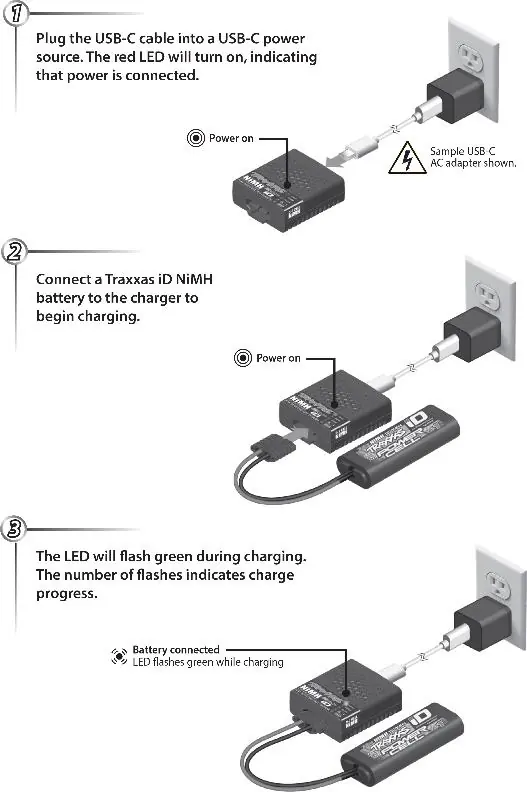
- Connect the USB-C cable to a compatible USB-C power source. The red LED will turn on, indicating power is connected.
- Connect the Traxxas iD NiMH battery to the charger.
- The LED will flash green during charging. The number of flashes indicates the charge progress.
Safety Warnings
- Temperature Limits: During charging, the battery temperature must not exceed 45°C. If it does, disconnect immediately. During discharging, do not exceed 60°C.
- Environment: Never charge on carpet, car seats, or near flammable materials.
- Supervision: Do not leave the battery unattended while charging.
- Storage: For long-term storage (over 6 months), charge the battery to 50% capacity and store in a clean environment between 0 and 30°C.
LED Indicators
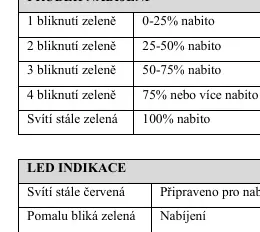
- Solid Red: Ready for charging.
- Slow Flashing Green: Charging in progress.
- Solid Green: Battery fully charged.
- Flashing Red: Charging error.
Troubleshooting
If the LED flashes red, a problem has been detected. Common issues include:
- 1 Flash: Power supply error. Check compatibility.
- 3 Flashes: Charging timeout. Battery may be too hot; let it cool.
- 4 Flashes: Charger internal temperature too high. Let it cool down.
- 5 Flashes: Power supply error (insufficient power).
- 6 Flashes: Battery connected before power source. Disconnect and reconnect.
- 7 Flashes: Battery voltage too high/incompatible.
Practical help
Common problems
LED flashes red 1 time
Power supply error. Disconnect battery and power source, then check power source compatibility.
LED flashes red 3 times
Charging timeout. If the battery is hot, stop using the charger. If not hot, reconnect and continue.
LED flashes red 4 times
Charger internal temperature too high. Disconnect and allow the charger to cool down.
LED flashes red 5 times
Power supply error. The power source is not powerful enough for charging.
Before use
- Ensure you have a USB-C power source (e.g., power bank or AC adapter).
- Verify the battery is a 6.0-8.4V NiMH type.
- Place the charger on a heat-resistant surface.
- Ensure the area is free of flammable materials.
- Format new batteries or those stored for >3 months.
Specs in practice
- Charging Current
- Fixed at 2A for fast charging.
- Max Charging Temp
- 45°C. Stop charging immediately if this temperature is exceeded.
- Max Discharging Temp
- 60°C. Exceeding this may permanently damage the battery.
Images and diagrams
- The charger connects via USB-C to a power source. The battery connects to the charger's output port. LED status indicates progress.
Model compatibility
- Compatible with 5 to 7-cell Traxxas iD NiMH batteries (1200–5000 mAh).
- Requires external USB-C power source (not included).

Manual page author
Michael Turner
Technical manual editor
Reviews PDF manuals for structure, safety notes, and practical product details so readers can find the right information quickly.