Power / Batteries & Chargers
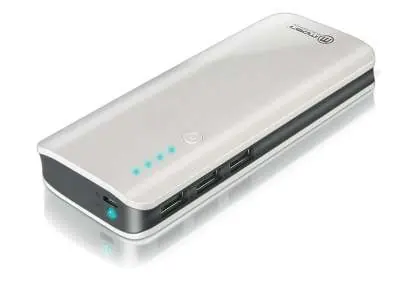
Imperii Electronics 13000mAh Portable Charger
Quick guide for the Imperii Electronics 13000mAh portable charger. Learn how to charge the power bank, use it to charge your devices, and understand the LED indicators and safety features.
Table of contents
Manual images
Click an image to enlargeQuick guide from the manual
To check the battery level, press the power button. If the pilot light is blue, there is sufficient charge to use the device. If the light does not turn on, the battery level is low and requires recharging.
Charging the portable charger
You can recharge the power bank using one of the following methods:
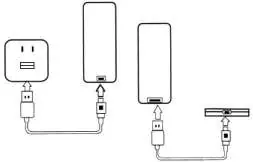
- Method 1: Connect to Computer: Disconnect all devices from the charger. Use the provided cable to connect the power bank's DC-IN port to a computer USB port. The battery indicator will blink while charging and turn off when complete.
- Method 2: USB Adapter: Disconnect all devices. Use the provided cable to connect the power bank's DC-IN port to a DC-5V USB power adapter plugged into a wall outlet. The indicator will blink while charging and turn off when complete.
Charging other devices
The portable charger is suitable for devices that support a DC-5V input current. Simply connect your device to the charger using the appropriate cable that fits your device's input port.
Maintenance
- Keep the charger and accessories in a dry place, protected from moisture, rain, and corrosive liquids.
- Do not place the device near heat sources, as high temperatures can damage electronic components and the battery.
- Do not drop or knock the charger to avoid damaging the internal electrical circuit.
- Do not attempt to repair or disassemble the charger yourself.
Safety features
- Protection System: The charger includes an intelligent system for load/discharge protection, short circuit protection, and overload protection.
- Input Voltage: An internal chip controls the input voltage. Safe charging is guaranteed as long as the input voltage is between DC 4.5V and 20V.
- LED Indicators: The LEDs inform you about the different states of the charger, including the battery level and charging status of the power bank and connected devices.
Manufacturer information
Imperii Electronics
Practical help
Common problems
LED indicators do not light up when charging a device.
The power bank battery is low and needs to be recharged.
Device not charging.
Ensure the connection is secure and the device is compatible with DC-5V input.
Before use
- Charge the power bank fully before the first use.
- Ensure the charging cable is compatible with your device.
- Check that the power bank has sufficient charge (blue light) before use.
- Verify that the device you want to charge supports DC-5V input.
Specs in practice
- Input Voltage
- 4.5V - 20V range for safe charging.
- LED Indicators
- Used to inform about different states of the charger, including battery level and charging status.
Images and diagrams
- The diagram illustrates two charging methods: connecting the power bank to a power source (wall adapter or computer) and connecting a mobile device to the power bank.
Model compatibility
- Compatible with devices supporting DC-5V input current (phones, tablets, GPS, etc.).

Manual page author
David Miller
Documentation analyst
Organizes user manual content into clear summaries, with attention to model details, product context, and everyday usability.