Electronics / Paper Shredders
User Guide for Insignia 10-Sheet Cross Cut Shredder NS-S10CCBK
Quick setup and operation guide for the Insignia 10-Sheet Cross Cut Shredder (NS-S10CCBK). Includes assembly instructions, usage tips, troubleshooting, and technical specifications.
Table of contents
Manual images
Click an image to enlargeQuick guide from the manual
This guide covers the setup and operation of the Insignia 10-Sheet Cross Cut Shredder. The device is designed to shred up to 10 sheets of paper, credit cards, or discs. Key operational limits include a duty cycle of 3 minutes of operation followed by 30 minutes of cooling. Do not use extension cords and ensure the shredder head is properly seated on the wastebasket for the device to function.
Setting up your shredder
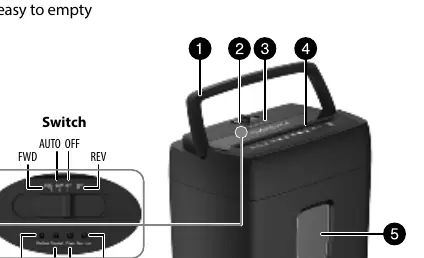
- Place the wastebasket upright on a level surface.
- Attach the shredder head to the basket, ensuring it fits properly.
- Place the wastebasket securely in the shredder. Do not use plastic bags to line the wastebasket.
- Connect the power cord to a standard 120V AC outlet. Do not use an extension cord.
Using your shredder
To operate the shredder, slide the power switch to AUTO. Insert paper (up to 10 pages), one credit card, or one disc into the shredding slot. The shredder will start automatically.
Switch positions:
- FWD: Runs the cutters forward continuously. Use this to clear the slot or ensure remaining paper is shredded.
- AUTO: Automatically shreds items when inserted.
- OFF: Turns off the shredder.
- REV: Reverses the paper to clear a jam or remove unshredded material.
If the shredder jams, slide the switch to REV to return the paper, then slide it back to AUTO. When the wastebasket is 2/3 full, turn the unit off, unplug it, and empty the basket.
LED indicators
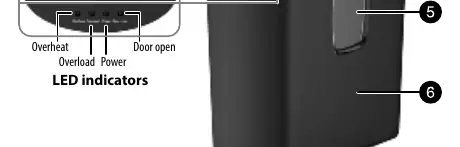
- Overheat: Lights up when the unit has overheated. Stop shredding and allow at least 30 minutes for the unit to cool down.
- Overload: Lights up when trying to shred more than 10 sheets or if paper is folded. The cutter will stop automatically.
- Power: Indicates the shredder is in use.
- Door open: Lights up when the shredder head is not correctly positioned on the wastebasket.
Troubleshooting
If the shredder is not working, ensure the power cord is plugged in, the head is positioned correctly, and the unit has not overheated. If the cutter does not stop, switch to OFF, unplug the unit, and clear any paper from the slot. If the unit is too noisy, ensure it is on a flat, level surface.
Specifications
- Shred capacity: 10 sheets (75 g/m2 A4 paper), 1 disc, or 1 credit card.
- Duty cycle: 3 minutes ON / 30 minutes OFF.
- Shred size: 0.2 x 1.4 inches (4 x 35 mm).
- Input: AC 120 V, 60 Hz, 4.5 A.
Safety information
Do not operate the device with a damaged power cord. Keep the unit in the OFF position when not in use for prolonged periods. Always disconnect the power before moving, transporting, cleaning, or emptying the wastebasket. This product is for indoor use only and is not intended for use by children.
Practical help
Common problems
Shredder not working
Check power connection, ensure shredder head is correctly positioned, check if Overheat indicator is on (requires 30 min cool down), or try folding paper if it is too thin/crumpled.
Shredder is jammed
Slide switch to REV to reverse paper, remove it, then slide switch to AUTO to resume.
Cutter won't stop
Slide switch to OFF, unplug from power, and clear any paper stuck in the head.
Overheat indicator is lit
The unit has overheated. Stop using and let it cool for at least 30 minutes.
Overload indicator is lit
Too much paper inserted. Slide switch to REV, remove paper, and try again with fewer sheets.
Before use
- Place wastebasket on a level surface.
- Ensure shredder head is correctly fitted onto the basket.
- Do not use plastic bags to line the wastebasket.
- Connect to a standard 120V AC outlet.
- Do not use an extension cord.
Specs in practice
- Shred capacity
- Maximum 10 sheets of 75g/m2 paper, or 1 credit card/disc at a time.
Images and diagrams
- Switch positions: FWD (forward), AUTO (automatic), OFF, REV (reverse).
- LED indicators: Overheat, Overload, Power, Door open.
Model compatibility
- Do not shred envelopes, adhesive material, newsprint, transparencies, laminated documents, continuous forms, cardboard, or hard plastic materials (except credit cards).
- Small staples and small paper clips are acceptable.

Manual page author
Michael Turner
Technical manual editor
Reviews PDF manuals for structure, safety notes, and practical product details so readers can find the right information quickly.