Electronics / Paper Shredders
User Manual for Tracer Edgy 10L Paper Shredder
Quick guide for the Tracer Edgy 10L paper shredder. Includes setup, operation, safety warnings, and troubleshooting steps to resolve common issues like paper jams.
Table of contents
Quick guide from the manual
The Tracer Edgy 10L is a personal paper shredder designed for indoor use. To ensure longevity and performance, follow the recommended operating cycle: 2 minutes of continuous operation followed by 1 hour of rest. Always keep loose clothing, jewelry, hair, and other small items away from the feed opening to prevent injury.
Components
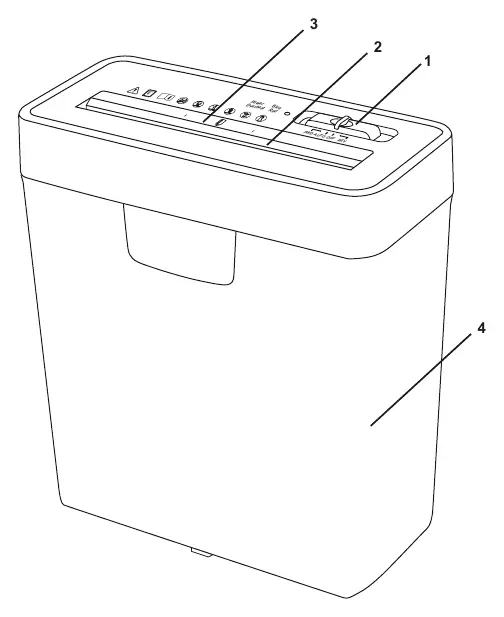
- 1: 3-Position slide switch (AUTO, OFF, REV)
- 2: Paper entry
- 3: Credit card entry
- 4: Wastebasket
Installation
- Place the shredder on a flat, stable surface.
- Connect the power plug to a suitable electrical outlet, ensuring the local voltage matches the device requirements.
Operation
- AUTO: Set the switch to AUTO to enter standby mode. Insert paper vertically into the entry; the shredder will start automatically and return to standby when finished.
- REV: Use this position to reverse the motor and clear paper jams or to withdraw paper immediately.
- OFF: Turn the switch to OFF when the device is not in use for extended periods.
Maintenance
- Empty the wastebasket frequently to prevent paper buildup.
- Always turn off and unplug the device before moving, cleaning, or emptying the wastebasket.
- Do not spray flammable gases or oils on the shredder as this may cause a fire.
Troubleshooting
- Shredder keeps running: The wastebasket may be too full, preventing new shreds from falling. Empty the bin and press down the contents.
- Paper jam: Set the switch to REV to reverse the motor and clear the jam.
- Shredder doesn't start: Ensure the paper is not too thin, soft, or crinkled, as this may fail to trigger the automatic sensor. Try folding the paper and re-inserting it.
Specifications
- Cutting Style: Strip cut
- Entry Width: 220 mm
- Shred Capacity: 6 sheets (A4 paper)
- Power: 190W
- Operating Cycle: 2 min on / 40 min off
Practical help
Common problems
Shredder continues to run after finishing
The wastebasket is too full. Empty the bin and press down the contents to clear the area below the shredder head.
Paper jam
Set the slide switch to 'REV' to reverse the motor and withdraw the paper.
Shredder does not start when paper is inserted
The paper might be too thin, soft, or crinkled to trigger the sensor. Fold the paper and try again, or ensure it is positioned to touch the automatic sensor.
Before use
- Place the machine on a flat table.
- Ensure the power voltage matches the device requirements.
- Remove all paper clips and staples from paper before shredding.
- Do not shred credit cards, CDs/DVDs, and paper at the same time.
- Keep children and pets away from the device.
Specs in practice
- Shred Capacity
- Maximum of 6 sheets of A4 paper at once.
- Operating Cycle
- 2 minutes of continuous use followed by 1 hour of rest to prevent overheating.
Images and diagrams
- 1: 3-Position slide switch (AUTO, OFF, REV)
- 2: Paper entry
- 3: Credit card entry
- 4: Wastebasket
Model compatibility
- Not intended for use by children.
- Do not use with damaged power cords.
- For indoor use only.

Manual page author
Michael Turner
Technical manual editor
Reviews PDF manuals for structure, safety notes, and practical product details so readers can find the right information quickly.