Computers / Laptops
HP Pro Shredder 18CC User Manual
Quick start guide for the HP Pro Shredder 18CC. Learn how to set up, operate, oil, and maintain your shredder, including troubleshooting and safety instructions.
Table of contents
Quick guide from the manual
This guide provides essential information for operating your HP Pro Shredder 18CC. Always keep the full operating manual nearby for future reference. The shredder is designed for private indoor use to shred paper, credit cards, paper clips, and staples.
Safety Information
- Warning: Risk of injury from the insertion mechanism. Keep fingers, hair, scarves, ties, and jewelry away from the insertion slot.
- Warning: Risk of electric shock. Do not operate with a damaged power cable.
- Warning: Risk of suffocation from small parts or packaging materials. Keep out of reach of children.
- Caution: Risk of tripping over the power cable.
- Important: Avoid environmental influences like smoke, dust, vibration, chemicals, moisture, heat, or direct sunlight.
Positioning and Starting Up
The shredder only operates when the waste bin is correctly fitted. Ensure the device is placed on a stable, level surface near an easily accessible power socket, maintaining at least 10 cm distance from walls for proper cooling.
- Slide the waste bin into the device until it latches audibly.
- Connect the power cable to the device and then to a power socket.
- Press the On/Off button to switch the device on. The status indicator will light up blue.
Operating the Shredder
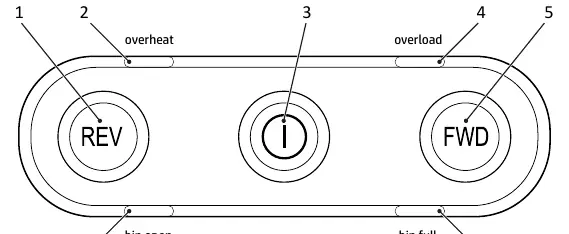
The shredder features an automatic shredding mechanism. Simply feed the material into the center of the insertion slot. If the sensors do not detect the material, you can press and hold the FWD button for manual operation. To switch off, press the On/Off button.
Maintenance and Cleaning
To extend the life of your shredder, oil the cutting mechanism regularly using special oil or oiled sheets. Empty the waste bin when the "Bin full" status LED flashes red. Clean the housing surface with a soft, dry, lint-free cloth; do not use aerosols, solvents, or cleaning agents.
Troubleshooting
- Overheating: The shredder switches off automatically. Wait for the cool-down phase (see Technical Data) until the status indicator turns blue.
- Overload: If too much material is inserted, the status indicator flashes red and the shredder runs in reverse for 5 seconds. Pull the material out to clear the blockage.
- Sleep Mode: If not used for 30 minutes, the device enters sleep mode. Feed material or press FWD/REV to wake it up.
Technical Data
The HP Pro Shredder 18CC features a P-4 security level (DIN 66399-2) and a cutting capacity of 18 sheets. It operates at 220-240 V~, 50 Hz, 2.5 A, 550 W.
Manufacturer information
HP Inc.
Practical help
Common problems
Shredder stops due to overheating
Wait for the cool-down phase defined in the Technical Data section until the status indicator turns blue.
Material jam (Overload)
Pull the material out of the shredder. The device will automatically run in reverse for 5 seconds to clear the blockage.
Bin full indicator flashes
Switch off the device, remove the waste bin, and empty it.
Before use
- Check package contents for shredder, bin, manual, power cable, and oiled sheet.
- Place on a stable, level, horizontal surface.
- Ensure at least 10 cm distance from walls.
- Slide the waste bin into the device until it latches.
- Connect the power cable to the device and a power socket.
- Press the On/Off button to start.
Specs in practice
- Security Level (P-4)
- Recommended for sensitive and confidential data (particle area ≤ 160 mm²).
- Max. cutting capacity
- Up to 18 sheets of paper or 1 credit card at a time.
- Continuous operation
- 30 minutes of use before requiring a 50-minute cool-down phase.
Images and diagrams
- 1: Operating buttons / Status indicator
- 2: Insertion slot
- 3: Cutting mechanism
- 4: Status indicator, front
- 6: Viewing window / Grip
Model compatibility
- Suitable for shredding paper, credit cards, paper clips, and staples.
- Only for private indoor use.

Manual page author
David Miller
Documentation analyst
Organizes user manual content into clear summaries, with attention to model details, product context, and everyday usability.