Electronics / Paper Shredders
User Manual for Fellowes Powershred 12C Cross-Cut Shredder
Quick guide for the Fellowes Powershred 12C Cross-Cut Shredder. Learn about shredding capacity, safety lock features, maintenance, and technical specifications.
Table of contents
Manual images
Click an image to enlargeQuick guide from the manual
The Fellowes Powershred 12C is a personal cross-cut shredder designed for home office or deskside use. This guide provides essential information on operating the device, safety features, and maintenance requirements to ensure optimal performance.
Product Overview
The shredder features a pull-out bin design and a dedicated Safety Lock mechanism. It is capable of shredding paper, staples, paper clips, and credit cards.
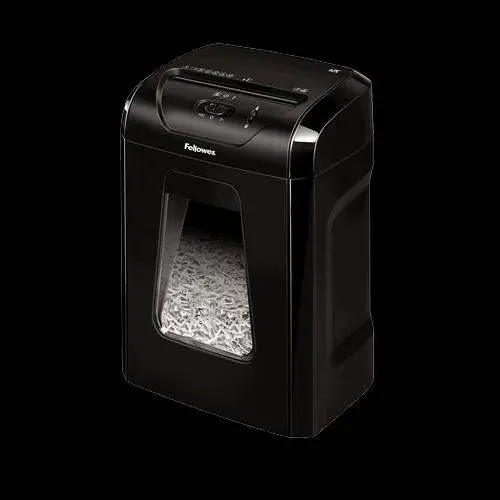
Safety Lock
The Safety Lock is a critical feature that manually disables the shredder. Use this feature to prevent accidental activation, especially when the device is not in use or during maintenance.
Operation and Capacity
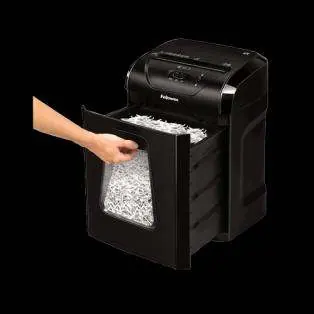
- Sheet Capacity: Shreds up to 12 sheets of paper (70gsm) per pass.
- Duty Cycle: The shredder can operate non-stop for 20 minutes. After this period, it requires a 30-minute cool-down period.
- Bin Capacity: The 19-litre pull-out bin holds approximately 250 sheets of shredded paper.
Maintenance
To maintain the shredder's performance, ensure the bin is emptied regularly. The manufacturer recommends using specific oil (355ml or 120ml bottles) and oil sheets to keep the cutters in good condition.
Technical Specifications
- Cut Type: Cross-cut (4x40mm particles).
- Security Level: P-4 (approximately 390 particles per A4 sheet).
- Throat Width: 224mm.
- Dimensions: 470 x 341 x 246 mm.
- Weight: 6.6 kg.
Manufacturer information
Fellowes
Practical help
Common problems
Shredder stops working during use
The unit has likely reached its duty cycle limit. Allow the shredder to cool down for 30 minutes before resuming operation.
Shredder will not start
Ensure the pull-out bin is fully inserted and the Safety Lock is not engaged.
Before use
- Ensure the shredder is placed on a stable surface.
- Verify that the pull-out bin is fully pushed into the unit.
- Check that the Safety Lock is in the unlocked position.
- Ensure the power cord is securely connected to a power outlet.
Specs in practice
- P-4 Security Level
- Indicates a cross-cut size of 4x40mm, resulting in approximately 390 particles per A4 sheet.
- 20 min on / 30 off
- The duty cycle; the machine must rest for 30 minutes after 20 minutes of continuous shredding.
Images and diagrams
- The product features a pull-out bin that can be accessed from the front.
- The top control panel includes the Safety Lock mechanism.

Manual page author
Emily Carter
User documentation editor
Prepares concise manual descriptions and highlights the most useful setup, operation, and maintenance information for readers.