Electronics / Headphones Earbuds
JBL Quantum 100N Wired Gaming Headset User Guide
Comprehensive user guide for the JBL Quantum 100N wired gaming headset, covering setup, controls, technical specifications, and microphone usage.
Table of contents
Manual images
Jump to the sectionProduct Overview
The JBL Quantum 100N is a high-quality wired gaming headset designed for immersive audio experiences across various platforms. The headset features a lightweight, ergonomic design with flat-fold ear cups for easy storage and comfort during extended gaming sessions. It comes equipped with a detachable boom microphone, ensuring clear communication with teammates.

What is in the Box
Inside the package, you will find the JBL Quantum 100N headset, a detachable boom microphone, a windshield foam cover for the microphone to reduce background noise, and essential documentation including a quick start guide, warranty card, and safety warnings.
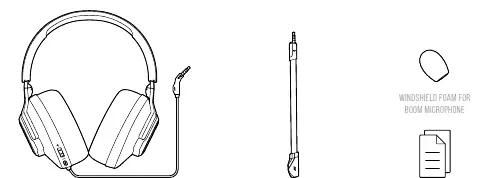
Headset Controls
The headset is designed for intuitive control during gameplay. On the ear cup, you will find a volume control wheel for quick adjustments. Additionally, there is a dedicated button for microphone mute and unmute functionality, allowing you to control your voice transmission instantly. The 2.5mm jack for the boom microphone is located on the bottom of the ear cup, providing a secure connection.
Setup and Compatibility
The JBL Quantum 100N is highly versatile and compatible with a wide range of devices. It connects via a standard 3.5mm audio jack, making it suitable for use with PC, Mac, and various gaming consoles including PlayStation 4 and 5, Xbox One, Series S, and Series X. It is also compatible with Nintendo Switch, Nintendo Switch Lite, mobile devices, and VR systems.
Technical Specifications
The headset features 40mm dynamic drivers that deliver a frequency response of 20 Hz to 20 kHz, ensuring rich sound quality. The microphone is a directional, detachable boom type with a frequency response of 100 Hz to 10 kHz and a sensitivity of -42 dBV at 1 kHz/Pa. The headset has an impedance of 32 ohms and a sensitivity of 96 dB at 1 kHz/1 mW. The total weight of the unit is 220 grams, and it includes a 1.2-meter cable.
Maintenance and Safety
To ensure the longevity of your headset, keep it clean and store it properly when not in use. The detachable microphone and windshield foam can be removed for cleaning or replacement if necessary. Please be mindful of volume levels; prolonged exposure to high volumes can cause hearing damage. Always follow local regulations for the disposal of electronic equipment.
Manufacturer information
JBL
Practical help
Common problems
No sound from headset
Ensure the 3.5mm cable is fully inserted into the device's audio jack and check that the volume control on the headset is turned up.
Microphone not working
Check if the microphone is properly connected to the 2.5mm jack on the headset and ensure the mute button is not engaged.
Before use
- Unpack all items from the box.
- Attach the boom microphone to the headset.
- Place the windshield foam on the boom microphone.
- Check the volume level before putting on the headset.
- Connect the 3.5mm cable to your gaming device.
Specs in practice
- Frequency response
- The range of audio frequencies (20Hz-20kHz) the headset can reproduce.
- Microphone pickup pattern
- Directional, meaning it focuses on capturing sound from the front while reducing background noise.
Images and diagrams
- 01: Volume control wheel for adjusting audio levels.
- 02: Mute/Unmute button for the microphone.
- 03: 2.5mm port for connecting the detachable boom microphone.
- 04: Flat-fold ear cup mechanism for storage.
Model compatibility
- Compatible with PC, Mac, and VR.
- Works with PlayStation 4/5 and Xbox One/Series S/X.
- Supports Nintendo Switch and Nintendo Switch Lite.
- Compatible with mobile devices via 3.5mm jack.

Manual page author
David Miller
Documentation analyst
Organizes user manual content into clear summaries, with attention to model details, product context, and everyday usability.