Electronics / Headphones Earbuds
JBL Tour One M3 Smart Tx Wireless Noise Cancelling Headphones User Guide
Comprehensive user guide for the JBL Tour One M3 Smart Tx headphones, covering setup, controls, app integration, charging, and technical specifications.
Table of contents
Manual images
Jump to the sectionProduct Overview
The JBL Tour One M3 Smart Tx is a premium over-ear wireless headphone system featuring True Adaptive Noise Cancelling 2.0 and an innovative Smart Tx Audio Transmitter. This system allows for seamless connectivity to various audio sources, including in-flight entertainment, PCs, and mobile devices, providing a high-fidelity listening experience with Hi-Res Audio support.
Setup and Connection
To power on and enter pairing mode, slide the power switch to the bottom and hold for 2 seconds. The headphones support Google Fast Pair for Android devices and Microsoft Swift Pair for Windows 10 v1803+. For multi-point connections, you can pair up to two devices simultaneously. The included Smart Tx transmitter provides a touch-screen interface for controlling audio without needing a smartphone app.
Controls and App
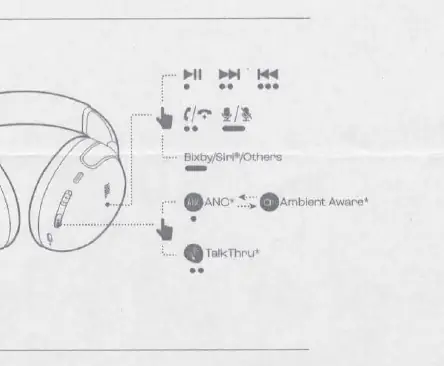
The headphones feature intuitive touch and button controls. Use the JBL Headphones app to unlock advanced features, customize EQ settings, and personalize your listening experience. Key features include Smart Talk, which automatically pauses music when you speak, and VoiceAware for managing your voice levels during calls. The app also allows for customization of gestures and sound settings.
Wired Listening and SilentNow
For wired connections, use the provided USB-C to 3.5mm cable. The headphones support ANC, Ambient Aware, and TalkThru modes even in wired listening mode. The SilentNow feature allows you to activate noise cancellation without Bluetooth connectivity, perfect for quiet environments or sleeping.
Charging and Maintenance
The headphones offer up to 70 hours of total music playback. A quick 5-minute charge provides an additional 5 hours of playtime. To protect battery lifespan, it is recommended to fully charge the device at least once every 3 months. Always use the original cables for optimal performance and charging speed.
Safety and Troubleshooting
If you encounter issues, a factory reset can be performed by holding the button for 5 seconds, or a restart by holding for 10 seconds. Ensure the device is kept away from extreme heat and moisture. Do not attempt to disassemble the battery. For detailed safety information and warranty terms, please refer to the official documentation provided with your product.
Manufacturer information
JBL
Practical help
Common problems
Headphones not pairing
Slide the power switch to the bottom and hold for 2 seconds to re-enter pairing mode.
Device unresponsive
Perform a restart by holding the power button for 10 seconds.
Need to reset to factory settings
Hold the button for 5 seconds to initiate a factory reset.
Before use
- Charge the headphones fully before first use.
- Download the JBL Headphones app for full feature access.
- Ensure Bluetooth is enabled on your source device.
- Check that the correct cable is used for wired connections.
Specs in practice
- Bluetooth version
- 5.3 for stable, low-power wireless connectivity.
- Battery life
- Up to 70 hours total playback (ANC off).
Images and diagrams
- Power switch: Slide to bottom and hold for 2 seconds to pair.
- Touch controls: Tap/press patterns for playback and call management.
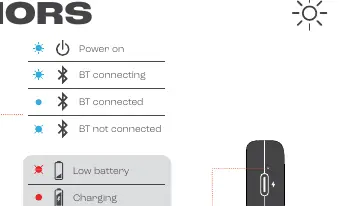
- LED indicators: Shows power, connection, and battery status.
- Charging port: Supports both charging and audio transmission.
Model compatibility
- Compatible with Android 6+ for Fast Pair.
- Compatible with Windows 10 v1803+ for Swift Pair.
- Smart Tx transmitter works with any standard audio source.
- Supports Auracast for sharing audio with other enabled devices.

Manual page author
Emily Carter
User documentation editor
Prepares concise manual descriptions and highlights the most useful setup, operation, and maintenance information for readers.